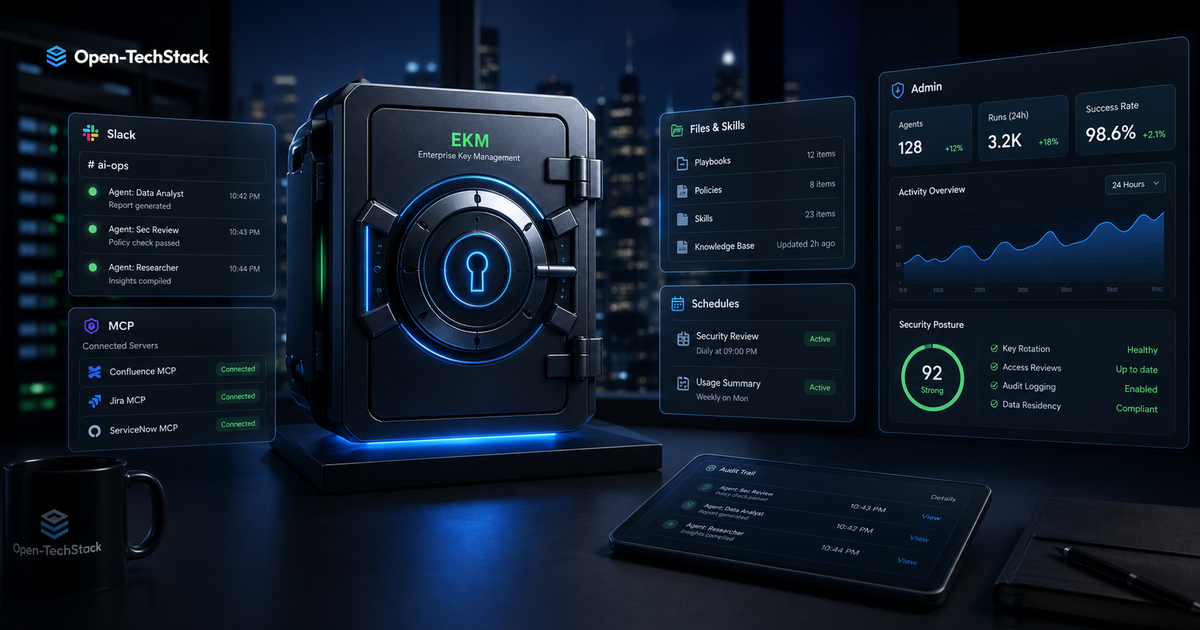
OpenAI just moved ChatGPT workspace agents closer to serious enterprise deployment.
On May 7, 2026, OpenAI’s Enterprise and Edu release notes said ChatGPT workspace agents are now available to eligible ChatGPT Enterprise workspaces with Enterprise Key Management (EKM). The release notes describe agents that can be built from templates or from scratch, previewed before publishing, shared inside a workspace, run on a schedule, connected to supported apps and tools, used in Slack channels, extended with files, skills, and custom MCP servers, and reviewed through version history and analytics.
This is independent Open-TechStack analysis, not official OpenAI documentation, legal advice, or a sponsored post.
That is useful.
It also turns workspace agents into something that needs a rollout policy, not just an enablement toggle.
If an agent can run on a schedule, use Slack, read files, connect to apps, and call MCP tools, the security question is no longer “Can ChatGPT answer employee questions?” The better question is: which enterprise workflows are allowed to become repeatable agents, and what evidence proves they stayed inside policy?
TL;DR
ChatGPT workspace agents with EKM matter because they put agent creation inside the enterprise control plane instead of leaving it as an informal prompt habit.
The practical rollout rule:
- Start with agents off unless there is a named business owner.
- Enable building and publishing separately.
- Treat Slack usage, custom MCP servers, schedules, files, and connected apps as higher-risk capabilities.
- Require a review checklist before any agent is shared broadly.
- Use the global admin console to track agent activity, connected apps, memory files, schedules, and analytics.
- Start with read-only or advisory workflows before letting agents update systems, send messages, or trigger recurring work.
OpenAI says workspace agents remain off by default, and admins can enable agent building, publishing, and Slack usage through admin controls. That default is the right signal: enterprise agents should be rolled out like controlled automation, not like a chat feature.
Who this is for
This playbook is for IT admins, security teams, platform owners, and department leaders evaluating ChatGPT workspace agents in Enterprise environments.
It is especially relevant if your organization already uses:
- ChatGPT Enterprise with EKM
- Slack as a collaboration surface
- Microsoft Entra, Intune, SSO, or managed mobile access
- internal knowledge files or shared workspace memory
- MCP servers for internal tools, cloud systems, repos, or databases
- scheduled workflows for reporting, triage, or operational updates
The goal is not to block useful agents. The goal is to make sure useful agents do not quietly become unmanaged automation.
What actually changed
OpenAI’s May 7 release note says eligible Enterprise workspaces with EKM can now create and use workspace agents. The same note says these agents can connect supported tools and apps, add skills, files, and custom MCP servers, schedule recurring runs, use agents in connected Slack channels, and view version history and analytics.
That combination is the important part.
Individually, each capability sounds ordinary:
| Capability | Why it matters |
|---|---|
| Templates or scratch-built agents | Teams can standardize repeated workflows instead of rewriting prompts. |
| Preview before publishing | Builders can test behavior before sharing. |
| Workspace sharing | Agents become reusable organizational assets. |
| Schedules | Agents can run without a person actively prompting them. |
| Slack usage | Agents move into a live collaboration channel. |
| Files and skills | Agents gain persistent domain context. |
| Custom MCP servers | Agents can reach internal tools and systems. |
| Version history and analytics | Admins get some evidence trail for governance. |
Together, they create a new internal software surface.
A workspace agent is not just a saved prompt. It is a repeatable workflow object with permissions, context, integrations, scheduling, and distribution. That puts it closer to an internal app, bot, or automation job than a normal chat thread.
The governance model to copy
The safest mental model is:
Agent = workflow + context + tools + audience + schedule + owner.
If any part of that sentence is missing, the agent should not be published broadly.
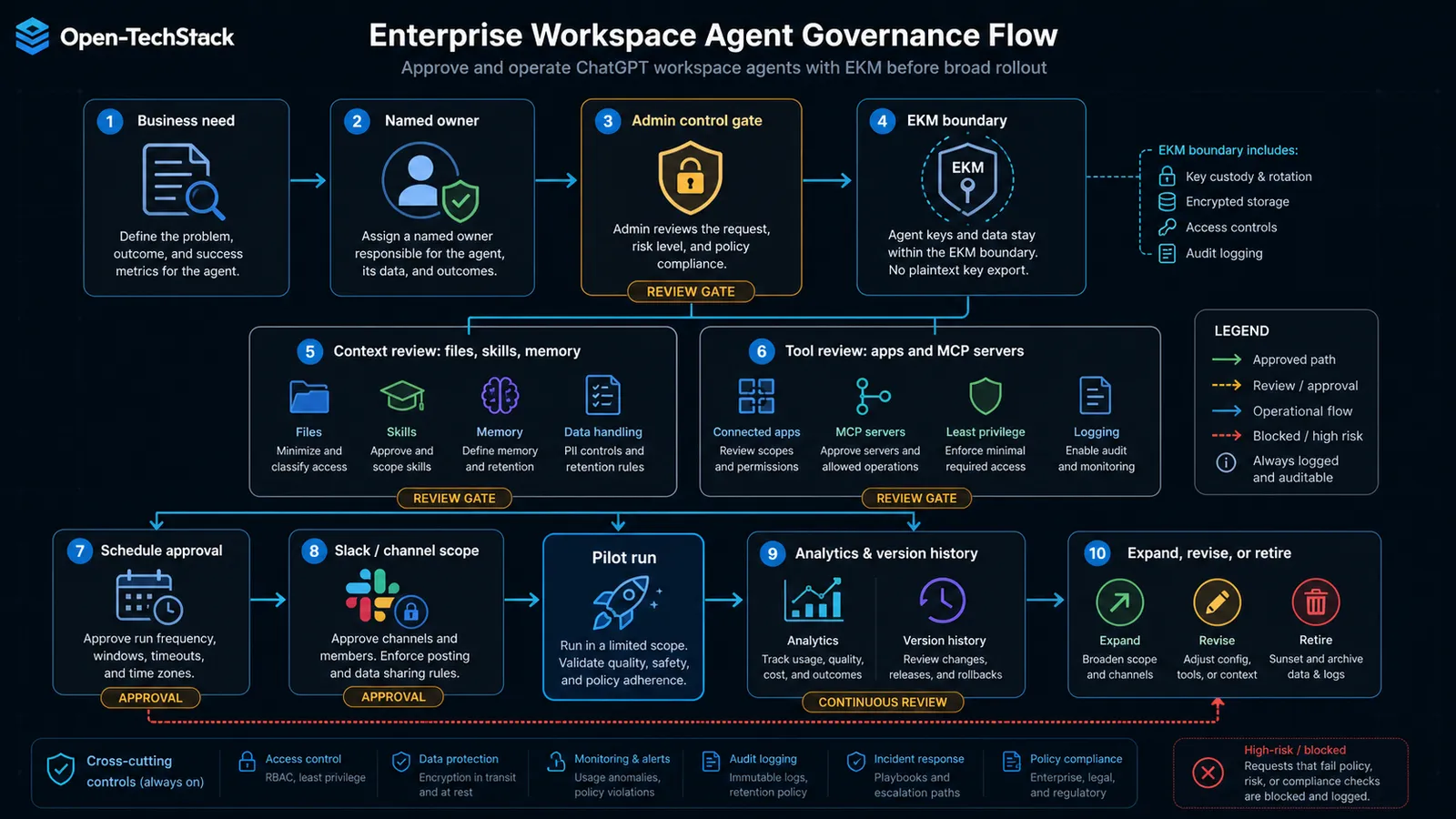
Use this as the minimum review shape:
| Review area | Question to answer before publishing |
|---|---|
| Workflow | What repeatable task does this agent perform? |
| Owner | Who is accountable for behavior, updates, and retirement? |
| Context | Which files, skills, memories, or knowledge sources can it use? |
| Tools | Which apps, connectors, and MCP servers can it reach? |
| Audience | Who can run it, see it, or invoke it from Slack? |
| Schedule | Can it run automatically, and who approves that schedule? |
| Output | Can it post, send, update, export, or only draft? |
| Evidence | Where do admins review usage, version history, and analytics? |
This is boring on purpose. The biggest enterprise agent failures rarely come from one dramatic model error. They come from unclear ownership, unclear permissions, and workflows that spread faster than anyone can audit.
Capability risk matrix
Not every workspace agent capability carries the same risk.
Use a tiered rollout instead of one all-or-nothing launch:
| Capability | Default risk | Recommended first policy |
|---|---|---|
| Agent building | Medium | Allow only trained builders or pilot groups first. |
| Agent publishing | High | Require owner, purpose, audience, and tool review. |
| Slack usage | High | Limit to named channels and read-only or draft-first behavior. |
| Files and skills | Medium | Use approved knowledge sets and avoid sensitive one-off uploads. |
| Custom MCP servers | High | Start read-only, scoped, logged, and separately approved. |
| Schedules | High | Require owner approval, run frequency limits, and monitoring. |
| Connected apps | High | Map every app to a business purpose and least-privilege access. |
| Version history | Control | Review changes before broad reuse. |
| Analytics | Control | Use adoption and run data to find risky or unused agents. |
The riskiest capabilities are the ones that let agents act outside a single user’s immediate chat window: Slack, schedules, app connectors, and custom MCP servers.
That does not make them bad. It means they need better gates.
Starter policy for Enterprise teams
Use this as a first version of an internal policy:
Workspace agent publishing policy

1. Every published agent must have a named business owner and technical owner.
2. Agents must state their purpose, audience, data sources, connected apps, and allowed outputs.
3. Agent building and agent publishing are separate permissions.
4. Slack-enabled agents require channel-level approval and must not post final decisions without human review unless explicitly approved.
5. Scheduled agents require documented run frequency, owner review, and monitoring.
6. Custom MCP servers must be approved by security or platform engineering before use.
7. MCP tools should start read-only unless there is a documented reason for write access.
8. Sensitive workflows involving finance, HR, legal, customer data, credentials, production systems, or regulated data require a separate risk review.
9. Agent version history and analytics must be reviewed during pilot rollout.
10. Unused, ownerless, or policy-violating agents should be disabled or archived.
This is not meant to be legal text. It is the operational skeleton teams need before agents start spreading across departments.
How to roll it out in 30 days
Week 1: Inventory and admin setup
Start in the admin layer before teams start building.
OpenAI’s Global Admin Console documentation says admins can review identity and access, analytics, agents, and governance from one place. The Agents area lets admins review agent details such as Agent ID, recent activity, connected apps, memory files, schedules, and agent analytics.
Use that before enabling broad access.
Week 1 checklist:
- Confirm which workspaces are eligible.
- Decide which admins can enable building, publishing, and Slack usage.
- Define pilot workspaces and departments.
- Confirm SSO, domain mapping, and role ownership.
- Decide whether Slack usage is in scope for the pilot.
- Decide whether custom MCP servers are blocked, allowed by exception, or allowed only from an approved list.
Week 2: Pick low-risk pilot agents
Choose workflows where the agent drafts, summarizes, or routes work without making final decisions.
Good first agents:
| Agent idea | Why it is safer |
|---|---|
| Weekly project summary | Uses known workspace context and produces a reviewable draft. |
| Policy Q&A assistant | Answers from approved files without changing systems. |
| Support triage draft | Suggests categories and next steps, but a human decides. |
| Meeting follow-up checklist | Turns notes into tasks without sending external messages. |
| Internal documentation finder | Helps employees find approved docs. |
Avoid first:
| Agent idea | Why to wait |
|---|---|
| Expense approval agent | Financial action and policy interpretation risk. |
| HR response agent | Sensitive employee data and legal exposure. |
| Production operations agent | Possible infrastructure impact. |
| Customer email sending agent | External communication risk. |
| Broad database query agent | Data exposure and access control risk. |
Week 3: Add Slack, schedules, or MCP one at a time
Do not turn on every capability for the same pilot agent.
If the agent works well in ChatGPT, add one new surface:
- Slack access for one named channel
- a schedule with low frequency
- one approved file set
- one read-only MCP server
- one connected app with limited scope
Then observe behavior for a week.
The point is to isolate risk. If an agent starts producing bad summaries after adding a new file source, you can see the cause. If you add Slack, schedules, files, and MCP on the same day, you lose that visibility.
Week 4: Review evidence before expanding
Before broad rollout, review:
- agent run volume
- active users
- failed or abandoned runs
- Slack channel usage
- connected apps
- memory files
- schedules
- version changes
- user feedback
- incidents, near misses, or confusing outputs
Then make a clear decision:
- expand as-is
- expand with tighter controls
- keep in pilot
- disable and redesign
This is where analytics matter. Adoption alone is not success. A widely used agent that posts confusing outputs into Slack is a governance problem, not a win.
What not to do
Do not let every team publish agents immediately. Builder enthusiasm is not an access control model.
Do not treat EKM as the whole security story. Enterprise Key Management is valuable, but it does not decide which agent can connect to Slack, which MCP tools are safe, or whether a scheduled run should exist.
Do not let custom MCP servers become shadow integrations. If an MCP server can reach internal tools, databases, repos, cloud accounts, or ticketing systems, it needs ownership, scopes, logging, and review.
Do not let Slack become the default place for final actions. Slack is excellent for visibility and collaboration, but channel conversations move fast. Use Slack for draft, review, and notification first. Be careful with agents that post decisions, customer messages, or operational commands.
Do not forget mobile access. OpenAI also documents ChatGPT for Intune as a separate iOS and iPadOS app for Enterprise organizations using Microsoft Intune and Entra, with app protection and Conditional Access policies. If employees will use workspace agents from managed mobile devices, validate policy behavior before broad rollout.
Admin checklist
Copy this before enabling workspace agents broadly:
- Agent building is limited to approved pilot users.
- Agent publishing requires owner, purpose, audience, context, tools, and schedule review.
- Slack usage is limited to approved workspaces and channels.
- Custom MCP servers are blocked by default or approved through a separate process.
- Write-capable tools require explicit approval.
- Scheduled agents have owners, frequencies, and monitoring expectations.
- Sensitive departments have stricter rules for HR, finance, legal, customer data, and regulated data.
- Admins know where to review Agent ID, recent activity, connected apps, memory files, schedules, version history, and analytics.
- Unused or ownerless agents have a retirement process.
- Mobile access has been tested if ChatGPT for Intune or managed devices are part of the rollout.
FAQ
Are ChatGPT workspace agents available for Enterprise EKM workspaces?
OpenAI’s May 7, 2026 release notes say workspace agents are now available to eligible ChatGPT Enterprise workspaces with EKM. Eligibility still matters, so admins should verify availability in their own workspace and account setup.
Should admins enable workspace agents for everyone?
No. Start with a pilot. OpenAI says workspace agents are off by default and can be enabled through admin controls. That default supports a staged rollout.
Are custom MCP servers safe to use with workspace agents?
They can be safe if they are scoped, logged, owned, and reviewed. Treat custom MCP servers like internal integrations. Start read-only and expand only when the business case and controls are clear.
Is Slack usage a high-risk capability?
Yes. Slack moves agent outputs into a shared collaboration surface. Limit Slack-enabled agents to approved channels and use draft-first behavior until the agent has proven reliable.
Does EKM remove the need for agent governance?
No. EKM helps with enterprise key control, but governance still has to cover agent ownership, publishing, schedules, Slack usage, connected apps, files, skills, custom MCP servers, analytics, and retirement.
Related posts
- Cloud MCP Servers Compared: AWS vs Azure vs Cloudflare vs GitHub vs Google
- AI Agent Observability Stack: Traces, Evals, Approval Logs, and Cost Controls
- AI Agent Browser Security Checklist: Let Agents Use Your Site Without Letting Bots Abuse It
- Why MCP Is Becoming the Default Standard for AI Tools in 2026
Sources
