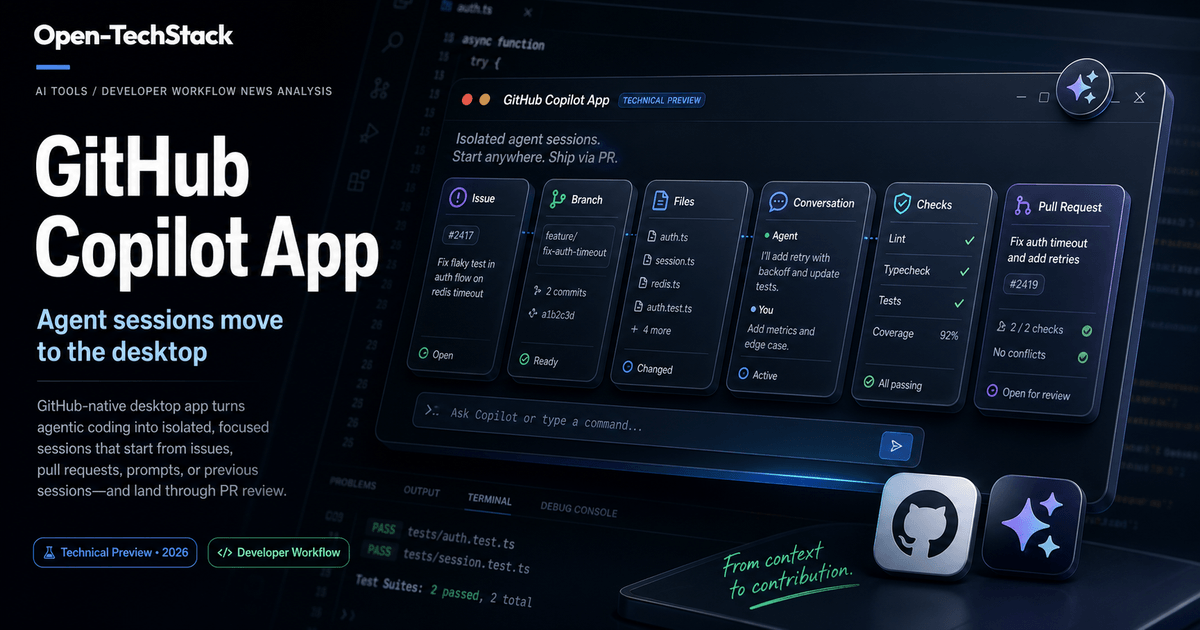
GitHub’s newest Copilot surface is not another chat box inside an editor.
On May 14, 2026, GitHub announced that the GitHub Copilot app is available in technical preview. The important part is the shape of the workflow: a GitHub-native desktop app where agentic coding starts from GitHub context, runs inside focused sessions, stays isolated from other work, and ends through pull request review.
That sounds subtle. It is not.
Most AI coding tools still force developers to choose between two imperfect modes:
- keep the assistant close to the IDE, where context is local but task management is fragmented
- send work to a cloud agent, where delegation is easier but the workflow can feel detached from daily review habits
The Copilot app points at a third pattern: desktop-based agent sessions that remain anchored to GitHub artifacts. Issues, pull requests, review comments, checks, branches, files, and task state become the operating surface.
If GitHub executes this well, the product could make agentic coding feel less like “ask a model to write code” and more like “open a work session, steer it, validate it, and decide whether it is ready for review.”
TL;DR
The GitHub Copilot app technical preview matters because it packages agentic coding as a session workflow instead of a single prompt.
The useful takeaways:
- The app starts from GitHub context. GitHub says sessions can begin from an issue, pull request, prompt, or previous session.
- Each session is isolated. The technical preview is organized around focused sessions with their own branch, files, conversation, and task state.
- The desktop app becomes a control surface. Developers can pause, resume, steer, validate, and move work toward a pull request from one place.
- The real value is workflow discipline. The feature is less interesting as a code-generation story and more interesting as a way to make AI coding work reviewable.
- Teams should still roll it out carefully. Technical preview means the product is early, and agent-generated changes still need branch policy, checks, code review, and human judgment.
This is an ai-tools post rather than a broad industry-news post because the practical question is not “did GitHub announce something?” It is how should developers evaluate this new tool surface?
What GitHub announced
GitHub describes the Copilot app technical preview as a GitHub-native desktop experience for agentic development. In GitHub’s framing, the app is designed to let developers start from the work already in front of them, keep the agent’s work isolated, steer progress, and land the change through pull request review.
The announcement highlights three product ideas:
| Product idea | What it means in practice |
|---|---|
| Start from GitHub context | Begin from an issue, pull request, prompt, or previous session instead of rebuilding context manually. |
| Work in focused sessions | Keep each task in its own branch, file set, conversation, and task state. |
| Steer, validate, and ship | Guide the agent, run checks, and move the result through pull request review. |
That framing matters because GitHub is not positioning the app as a replacement for editors. It is positioning it as a place where GitHub work becomes agent work.
The difference is practical. An issue already contains intent. A pull request already contains code, comments, and checks. A previous session already contains history. If the agent can start from those artifacts, the developer spends less time restating the obvious and more time narrowing the task.
Why a desktop app matters
It is fair to ask why this needs to be a desktop app at all.
Developers already have GitHub.com, VS Code, JetBrains IDEs, terminals, GitHub Mobile, Copilot Chat, Copilot coding agent, and command-line tools. Adding another surface can become noise if it does not solve a distinct workflow problem.
The case for a desktop app is that agentic work is not exactly the same as editing code.
When a human developer works on a task, they switch between:
- reading the issue
- checking related pull requests
- opening files
- asking questions
- running tests
- reviewing diffs
- pushing a branch
- responding to review
An agent session has the same shape, but with an extra layer: the developer is also steering a worker. That creates a new interface problem. The user needs to see what the agent is doing, interrupt it, refine instructions, compare state across sessions, and keep several delegated tasks from bleeding into each other.
That is what makes the desktop-app approach interesting. The app can become a dedicated cockpit for agent sessions rather than another panel squeezed into an IDE sidebar.
The workflow GitHub is aiming for
The technical preview is best understood as a session loop.
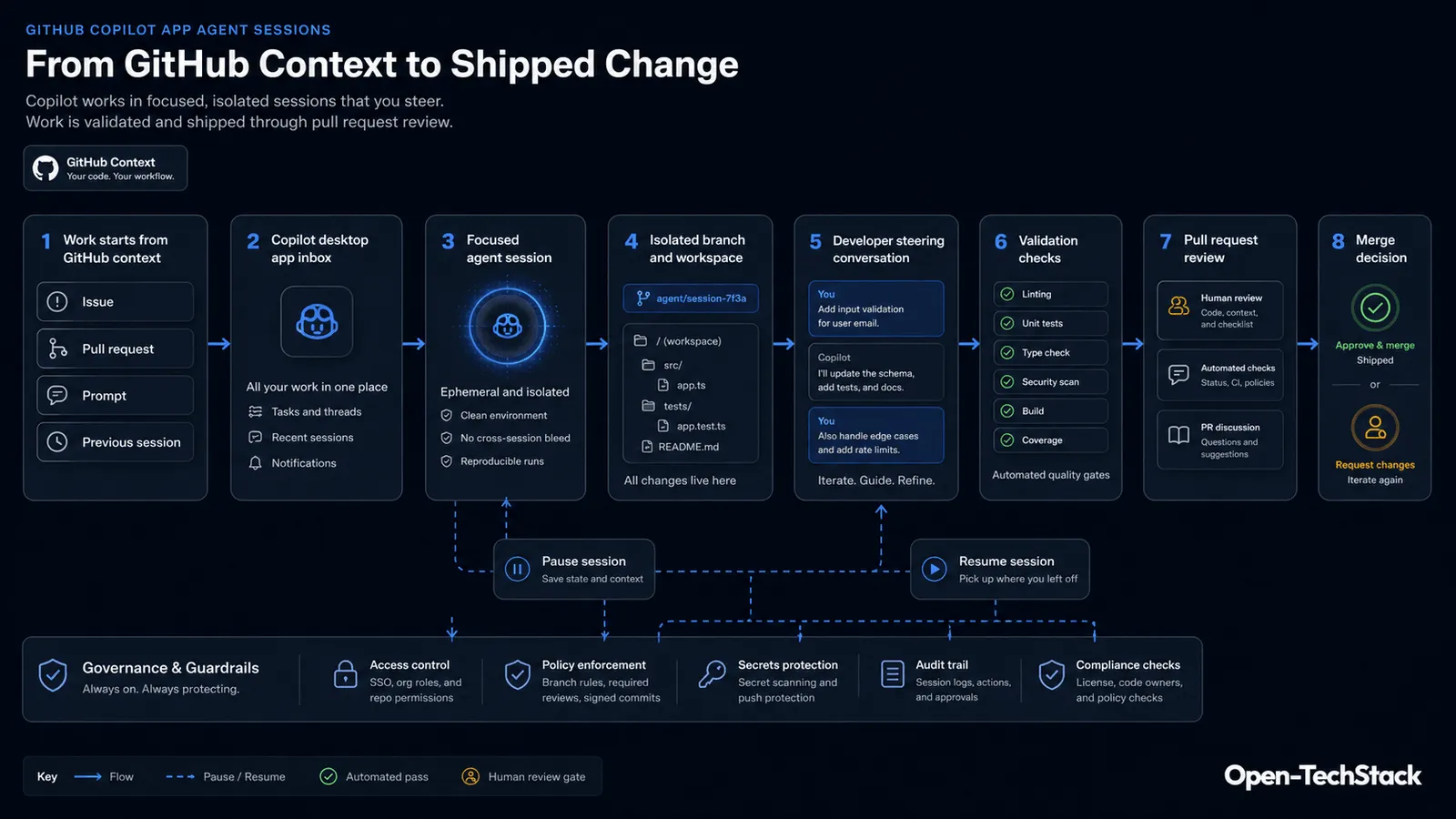
In the healthy version of this workflow, the developer does not simply ask Copilot to “fix the bug” and hope for a usable diff. The process is more structured:
- Start from real context, such as an issue or pull request.
- Open a focused session for that task.
- Let the agent inspect the repo and propose or make changes.
- Steer the session with follow-up instructions.
- Validate the change with tests, checks, and review signals.
- Create or update a pull request.
- Approve, request changes, or continue iterating.
The most important detail is separation. If each session has its own branch, files, conversation, and task state, then multiple pieces of delegated work can remain understandable. That is essential for teams because agent work becomes risky when everything turns into one long conversational thread with unclear scope.
What this changes for developers
The Copilot app technical preview changes the mental model from assistant response to managed work session.
That has several practical effects.
First, it makes agent work easier to pause and resume. A developer should be able to stop watching an agent, come back later, and understand where the task stands. That is different from a disposable chat prompt.
Second, it makes context more durable. Starting from GitHub artifacts means the session can inherit issue details, pull request state, review comments, and checks. The app still needs to summarize and prioritize that context well, but the raw material is already connected.
Third, it creates a more natural path to pull request review. A serious coding agent should not bypass the team process. It should produce work that fits into the team process. Branches, checks, comments, and PR review are where GitHub already has muscle memory.
Fourth, it makes concurrent agent work more realistic. If you can keep separate tasks in separate sessions, then delegated coding becomes less chaotic. A developer might have one session investigating flaky tests, another updating docs, and another preparing a refactor plan without mixing context.
That does not mean every task should be delegated. It means the product is moving toward the infrastructure needed for delegation to be less messy.
Good first use cases
The Copilot app is still in technical preview, so teams should start with constrained tasks where review quality is high and failure is manageable.
Good candidates:
| Use case | Why it fits |
|---|---|
| Bug reproduction notes | The agent can collect context and propose a narrow fix while the human checks the reasoning. |
| Small test fixes | Test files usually expose expected behavior and give quick validation feedback. |
| Documentation updates | Changes are easy to review and useful for learning the session workflow. |
| Issue triage drafts | The app starts from GitHub context, so summarizing or preparing next steps is a natural fit. |
| Low-risk dependency cleanup | The task has clear constraints and can be validated through checks. |
Poor first candidates:
| Use case | Why to wait |
|---|---|
| Authentication rewrites | Mistakes can become security bugs. |
| Payment or billing logic | Small errors can have business impact. |
| Large migrations | Too many files and decisions for an early workflow test. |
| Production incident fixes | Speed pressure can weaken review discipline. |
| Secret, policy, or permission changes | Requires strong governance and audit controls first. |
The best first rollout is not the flashiest demo. It is the task category where the team can quickly tell whether the agent helped or created review debt.
What teams should measure
The obvious metric is speed, but speed alone is weak.
Teams evaluating the Copilot app should track whether sessions reduce total work or merely move work into review.
Measure:
- time to first useful diff
- number of follow-up instructions needed
- test and check pass rate
- review comments per agent-authored PR
- percentage of sessions that become merged PRs
- percentage of sessions abandoned before PR
- types of tasks where the app consistently helps
- types of tasks where humans spend more time cleaning up than coding
The last two are the most important. AI coding tools do not need to win every task. They need a clear operating envelope where they are reliably useful.
If the app helps with issue-to-PR maintenance work but struggles with architectural changes, that is still valuable. The team just needs to document the boundary.
Rollout checklist
For a team, the safest way to test the Copilot app is to treat it like a new contributor workflow.
Use this starter checklist:
- Choose one repository with strong tests and active review habits.
- Limit the first tasks to docs, tests, small bug fixes, or issue triage.
- Require pull request review for every agent-produced change.
- Keep branch protection, required checks, and code-owner rules active.
- Ask developers to record whether each session saved time or created cleanup work.
- Do not allow the app to become an emergency fix path until the team has evidence.
- Review session outcomes weekly and update the task categories that are allowed.
- Compare the app against existing Copilot surfaces rather than assuming every task belongs in the desktop app.
This keeps the trial grounded. The goal is not to prove that agentic coding is exciting. The goal is to find where this specific interface improves real delivery.
How it compares with existing Copilot surfaces
The Copilot app does not erase the need for other Copilot workflows. It gives teams another place to put work.
| Surface | Best fit |
|---|---|
| IDE Copilot Chat | In-the-moment coding help while a developer is actively editing. |
| Copilot coding agent | Delegated repo work that can run in the background and produce branches or PRs. |
| Copilot CLI | Terminal-centered workflows, repo operations, and command-line delegation. |
| GitHub Mobile | Lightweight review and async management away from the desk. |
| Copilot app | Focused desktop sessions that start from GitHub context and coordinate multiple delegated tasks. |
The interesting overlap is between the Copilot app and cloud agent workflows. The app can become the control surface that makes cloud-agent work easier to steer, pause, resume, and review.
For related context, read GitHub Copilot Cloud Agent April 2026 Update: What Changed and Why It Matters and GitHub Copilot CLI /fleet: What It Is, How It Works, and When It Actually Helps.
What not to assume yet
Technical preview is not general maturity.
Developers should avoid three assumptions.
First, do not assume the app will immediately replace IDE workflows. Some tasks are still better handled while actively editing code with local tools, terminals, and debugger context.
Second, do not assume session isolation replaces review. Isolation keeps tasks organized. It does not guarantee correctness, security, or maintainability.
Third, do not assume every GitHub issue is ready for an agent. Poorly written issues create poor agent tasks. The better the acceptance criteria, reproduction steps, and constraints, the better the session can be.
This is where teams can raise their own quality bar. If a task is too vague for a junior engineer, it is probably too vague for an agent session.
SEO FAQ
What is the GitHub Copilot app?
The GitHub Copilot app is a GitHub-native desktop experience, currently in technical preview, for running agentic development sessions that start from GitHub context and move toward pull request review.
Is the GitHub Copilot app the same as Copilot Chat?
No. Copilot Chat is usually a conversational assistant inside an existing surface such as an IDE or GitHub. The Copilot app is positioned as a desktop workflow for focused agent sessions with their own task state.
What are agent sessions in the Copilot app?
Agent sessions are focused workspaces for delegated tasks. GitHub’s announcement describes sessions with their own branch, files, conversation, and task state, so separate tasks can stay separated.
Should teams use the Copilot app for production code?
Teams can evaluate it, but they should keep normal engineering controls in place: branch protection, tests, required checks, code review, and clear task boundaries.
Bottom line
The GitHub Copilot app technical preview is worth watching because it treats agentic coding as workflow infrastructure, not just model output.
The strongest idea is not that Copilot can write code from a desktop app. The stronger idea is that agent work needs a dedicated control surface: context in, isolated session, human steering, validation, pull request review, and a clear merge decision.
If your team is already experimenting with coding agents, the practical next step is simple: pick one low-risk repository, define three approved task types, and measure whether focused sessions reduce review debt.
That is how this becomes useful instead of just impressive.
Sources
