
AI agents are becoming real website visitors.
That changes the security problem.
For years, most site owners treated automated traffic as a crawler issue: let search engines in, block obvious scrapers, and watch server load. Browser-capable agents are different. They can load dynamic pages, follow links, submit forms, trigger login flows, and act for a real user.
That means the old question, “Should I allow this bot?” is too blunt.
The better question is:
Which agent traffic should reach which parts of my site, under what identity, rate limit, and review policy?
This guide is a checklist for answering that question without creating an open door for fake bots, form spam, credential abuse, or prompt-injection attacks.
If you want the broader agent context first, read AI Agents Are Everywhere, but Which Ones Are Genuinely Useful?. For hosted browser runtimes, pair this with Cloudflare Browser Run: What Changed on April 15, 2026 and Why It Matters for AI Agents.
Who this is for
This checklist is for site owners, SaaS builders, publishers, security teams, and developers who expect AI agents to read pages, operate browsers, or interact with forms on their site.
If your site has public content, login pages, lead forms, checkout, support workflows, or account exports, agent traffic should not be treated as one generic bot bucket.
TL;DR
- Treat AI-agent traffic as a separate class from search crawlers, generic scrapers, and human users.
- Do not trust user-agent strings by themselves.
- Prefer verified agent signals from your CDN/WAF or cryptographic request signatures.
- Allow public reading paths more easily than login, checkout, account, admin, or form-submission paths.
- Preserve signed-request headers through proxies if your verification depends on them.
- Rate-limit agent traffic by path sensitivity, not only by global request count.
- Log agent identity, route, action type, verification result, and abuse signals.
- Use human approval or hard blocks for sensitive actions such as purchases, permission changes, data export, and account recovery.
The goal is to separate useful, accountable agent access from traffic that only looks like an agent because it copied a header.
What changed in 2026
More agent systems now use real browser sessions, hosted browser runtimes, and structured web tools. Cloudflare’s Browser Run documentation, for example, describes headless browser sessions that can be controlled through Playwright, Puppeteer, CDP, Stagehand, and MCP clients. That is not the same operating model as a plain crawler fetching static HTML.
Major platforms are also exposing verification paths for agent traffic. OpenAI’s ChatGPT Agent allowlisting documentation says ChatGPT Agent signs outbound HTTP requests using the HTTP Message Signatures standard, RFC 9421. Cloudflare now has a signed-agent concept for end-user-controlled bots verified through cryptographic signatures. MCP elicitation is formalizing how systems should ask humans for input or sensitive actions instead of letting tools act silently.
Put those pieces together and the trend is clear:
The web is moving from “bots crawl pages” to “agents operate through browsers.”
That does not mean every website needs to welcome every agent. It means site operators need more precise rules.
The core risk
The risk is not that an agent reads your homepage. The risk is that your security layer cannot distinguish these cases:
- A verified user-directed agent reading public content.
- A legitimate crawler used for search or indexing.
- A browser automation tool operated by a real user.
- A scraper pretending to be a known agent.
- An abusive workflow using an agent to submit forms, test credentials, or trigger side effects.
Those cases should not get the same treatment.
Public documentation can usually tolerate more automated reading. Login, checkout, contact forms, password resets, exports, comments, and admin routes need a stricter policy.
This is also where prompt injection enters the picture. If an AI agent reads untrusted page content and then acts in another system, the page becomes part of the agent’s instruction environment. A malicious page can try to convince the agent to ignore constraints, leak data, or perform an unintended action.
AI-agent browser security needs both traffic controls and workflow controls.
The checklist
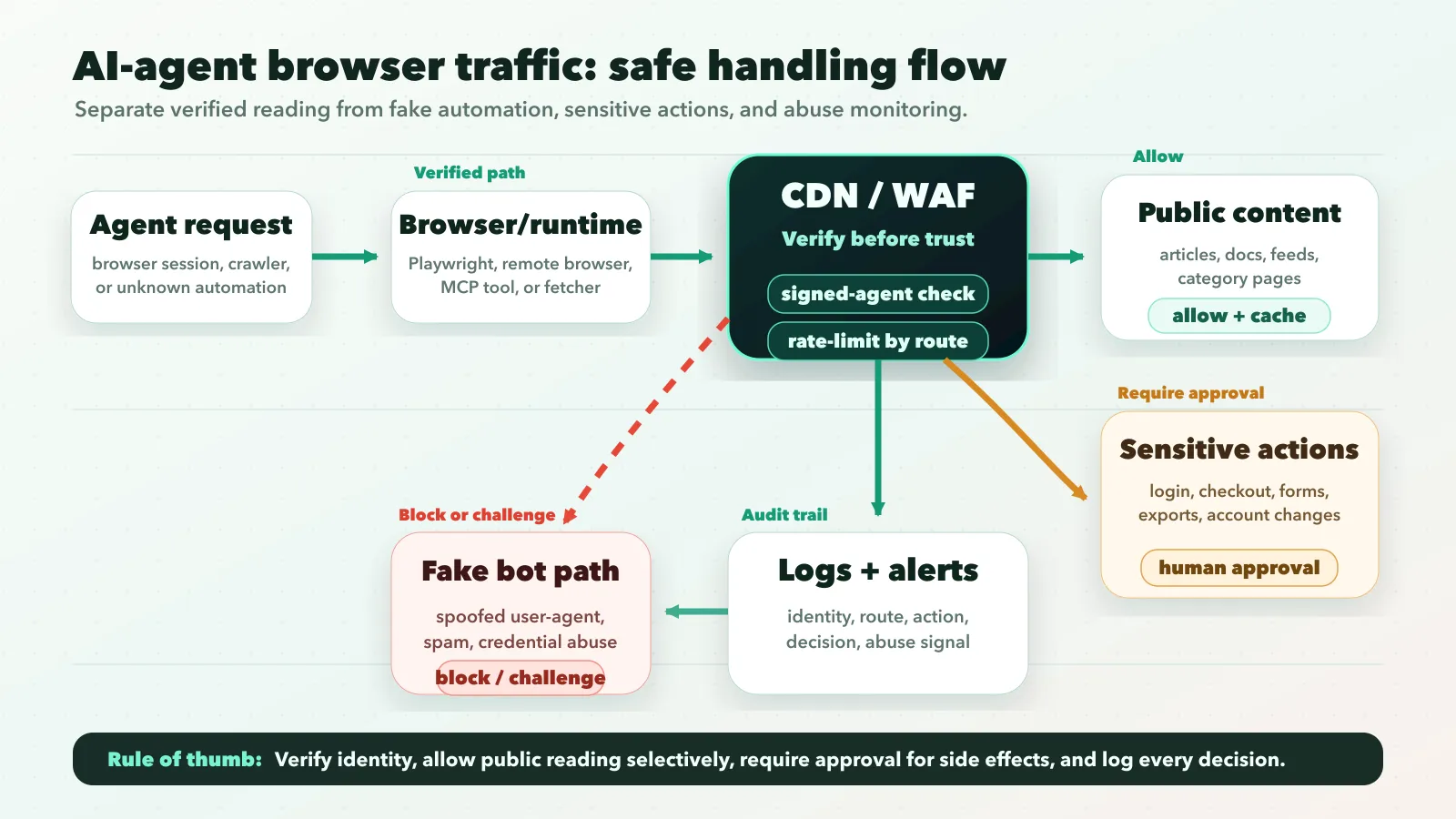
1. Separate crawlers, agents, and browser automation
Start with taxonomy.
Search crawlers, user-triggered fetchers, signed agents, and generic browser automation are not the same thing. OpenAI’s crawler documentation separates systems such as GPTBot, OAI-SearchBot, and ChatGPT-User. Some automated requests are for indexing; others may be initiated by a user action.
Use robots.txt and crawler controls for indexing behavior. Use CDN/WAF verification, route policy, and application-level authorization for interactive agents. A robots.txt rule is not enough to control what a logged-in or user-directed agent can attempt.
2. Verify identity before allowlisting
The weakest pattern is this:
if User-Agent contains "KnownAgent":
  allow
That is not security. It is string matching.
Prefer one of these verification paths:
- CDN/WAF verified bot or signed-agent directory.
- Cryptographic request signatures.
- Published IP ranges only when the provider explicitly documents them for that traffic class.
- Application-level authentication for user-owned actions.
OpenAI’s ChatGPT Agent allowlisting docs give one concrete model: requests include Signature, Signature-Input, and Signature-Agent headers. If you are not relying on a CDN that verifies this for you, the edge service needs to retrieve the public key and validate the signature.
The broader lesson is vendor-neutral: allowlist verification, not branding.
Starter WAF policy
Use a policy like this as the first draft, then adapt it to your CDN, WAF, and app stack:
IF verified_agent = true AND path_type = public_content
THEN allow with normal cache rules and route-level rate limits

IF verified_agent = false AND automation_signal = high
THEN challenge, throttle, or block

IF path_type IN login, password_reset, checkout, billing, account_export
THEN require human confirmation or block automation

IF request_submits_form = true
THEN apply anti-spam scoring, session checks, and stricter rate limits

ALWAYS log agent identity, verification result, route group, action, and decision
This is not meant to be pasted blindly into production. It is the mental model: verify first, route by sensitivity, protect side effects, and keep an audit trail.
3. Preserve security headers through proxies
If your verification depends on signed headers, your proxy chain has to preserve them.
That includes:
- CDN edge rules
- reverse proxies
- load balancers
- serverless adapters
- application middleware
OpenAI’s troubleshooting guidance calls out preserving Signature, Signature-Input, and Signature-Agent through intermediate proxies. The same principle applies to any signed-agent approach: if verification material disappears before inspection, your rule will fail open or fail closed.
Fail closed for sensitive routes.
4. Set different policies by route type
A single global allow/block rule is too rough.
Use route sensitivity:
| Route type | Recommended default | Why |
|---|---|---|
| Public articles, docs, landing pages | Allow verified agents, rate-limit unknown automation | Low side-effect risk, useful for user-directed research |
| Search, category, and feed pages | Allow with crawl budget controls | Helpful but easy to over-fetch |
| Contact forms and comments | Challenge, throttle, or require stronger checks | High spam and abuse exposure |
| Login and account recovery | Strict rate limits and anomaly detection | Credential stuffing risk |
| Checkout, billing, admin, exports | Block or require explicit user approval | High-impact actions need intent and auditability |
This is the most important practical move. Agent traffic should get permissions based on what the request is trying to do.
5. Rate-limit by action, not just by IP
Many bot rules still think in IP addresses and global request counts. That is not enough for agent traffic.
A verified agent reading ten public articles is different from the same identity submitting ten password reset requests. Track limits by:
- agent identity or verification class
- user account, when authenticated
- path group
- action type
- session
- failure rate
Be more forgiving for public reading and much stricter for actions that mutate state, send messages, create records, or touch money.
6. Add human approval for sensitive steps
For sensitive actions, the right pattern is often not “allow” or “block.” It is “let the agent prepare, then require a human to confirm.”
MCP elicitation points in that direction. The current MCP spec describes form mode for structured user input and URL mode for sensitive interactions that should not pass through the MCP client. It also says form mode must not be used for secrets such as passwords, API keys, tokens, or payment credentials.
Even if your site does not use MCP, the pattern still holds:
- agent can read product details
- agent can fill a draft form
- human must confirm submit
- secrets and payment credentials stay in a trusted first-party flow
That is safer for checkout, account changes, permission escalation, and data export.
7. Defend the page content itself
If an AI agent reads your page, your page may influence the agent.
That makes content integrity part of security.
For public pages, avoid hidden instructions designed to manipulate agents. For user-generated content, comments, reviews, support messages, and rich text fields, assume prompt-injection attempts can hide inside normal-looking text.
Useful controls include:
- separating trusted UI instructions from untrusted page content
- stripping or labeling hidden text in agent-facing extracts
- testing common prompt-injection patterns before exposing content to agent workflows
For implementation context, see Secure Prompt Injection Testing with Promptfoo: Team Playbook.
Decision matrix
Use this matrix when deciding what to do with AI-agent browser traffic:
| Situation | Recommendation |
|---|---|
| Public content and verified agent identity | Allow with normal caching and reasonable rate limits |
| Public content and unknown automation | Throttle, challenge, or block depending on abuse history |
| Logged-in user requests an agent action | Require normal user authentication and audit the session |
| Agent submits forms or messages | Add anti-spam checks, throttles, and abuse scoring |
| Agent attempts checkout or billing changes | Require explicit human confirmation in the first-party flow |
| Agent touches admin, permissions, or data export | Block by default unless there is a verified enterprise workflow |
| Agent reads user-generated content | Treat content as untrusted input and test prompt-injection paths |
Avoid moral categories like “AI good” or “AI bad.” Treat agent access as a permissions design problem.
Common mistakes
- Trusting user-agent strings alone. They help with logging, but they are not proof.
- Mixing crawler rules with interactive-agent rules. Robots.txt is useful, but it is not authorization for interactive actions.
- Opening every route to verified agents. Verification proves identity, not safety.
- Ignoring forms. Contact forms, newsletters, login forms, reset flows, and checkout screens need explicit policies.
- Forgetting observability. If you cannot answer “which agent did what, when, on whose behalf, and with what verification result,” your policy is not production-ready.
Logging checklist
At minimum, log timestamp, route group, method, verification source, claimed user agent, signed-agent result, account or session ID, action type, rate-limit result, challenge/allow/block decision, and downstream success or failure.
Keep the logs boring and searchable so abuse reports, false positives, and partner debugging do not become guesswork.
Copy this AI-agent traffic checklist
Use this as a working policy checklist before allowing agent traffic at scale:
- Classify automated traffic into crawlers, user-triggered fetchers, signed agents, and unknown browser automation.
- Verify identity before allowlisting any high-trust path.
- Preserve signature headers through every proxy and middleware layer.
- Allow verified agents on public content with route-level rate limits.
- Challenge or throttle unknown automation on search, category, feed, and high-volume pages.
- Protect contact forms, comments, newsletters, login, reset flows, checkout, billing, and account exports separately.
- Require human confirmation for purchases, permission changes, data export, account recovery, and payment flows.
- Treat user-generated content as untrusted input for agent workflows.
- Log verification result, route group, action type, rate-limit result, and final allow/challenge/block decision.
- Review logs weekly until the policy is stable.
FAQ
Should I block AI agents from my website?
Not automatically. Public content can often allow verified agent access with rate limits. Sensitive routes such as login, checkout, billing, admin, account recovery, and data export should require stronger controls or human confirmation.
Can AI agents bypass robots.txt?
Robots.txt is a crawler instruction, not an authorization system. It helps communicate indexing preferences, but it should not be the only control for browser-capable agents, logged-in sessions, forms, or side-effect-heavy actions.
How do I verify AI-agent traffic?
Prefer CDN/WAF verified bot features, signed-agent verification, cryptographic request signatures, documented provider-specific verification methods, or normal application authentication for user-owned actions. Do not rely on user-agent strings alone.
Should AI agents be allowed to submit forms?
Only with guardrails. Contact forms, comments, newsletters, and support forms need anti-spam scoring, throttles, session checks, and abuse logging. Checkout, account changes, payment flows, and exports should require explicit human confirmation.
Bottom line
AI-agent browser traffic is not automatically good or bad.
It is a new class of website access that needs better boundaries than old crawler rules can provide. Start by separating public content, forms, login, checkout, admin, and account routes. Then write one policy for each route group.
The best policy is selective:
- allow public reading when identity is verified
- throttle or block suspicious automation
- require human confirmation for sensitive actions
- log enough to investigate what happened
That gives site owners a practical middle path: do not open the whole site to agents, but do not block every useful AI-assisted workflow either.
Related posts
- Cloudflare Browser Run: What Changed on April 15, 2026 and Why It Matters for AI Agents
- MCP Elicitation: The Missing Human-in-the-Loop Primitive for Agents
- AI Agents Are Everywhere, but Which Ones Are Genuinely Useful?
- Secure Prompt Injection Testing with Promptfoo: Team Playbook
- How to Use OpenAI Agents SDK with MCP and Approvals (2026)
Sources
