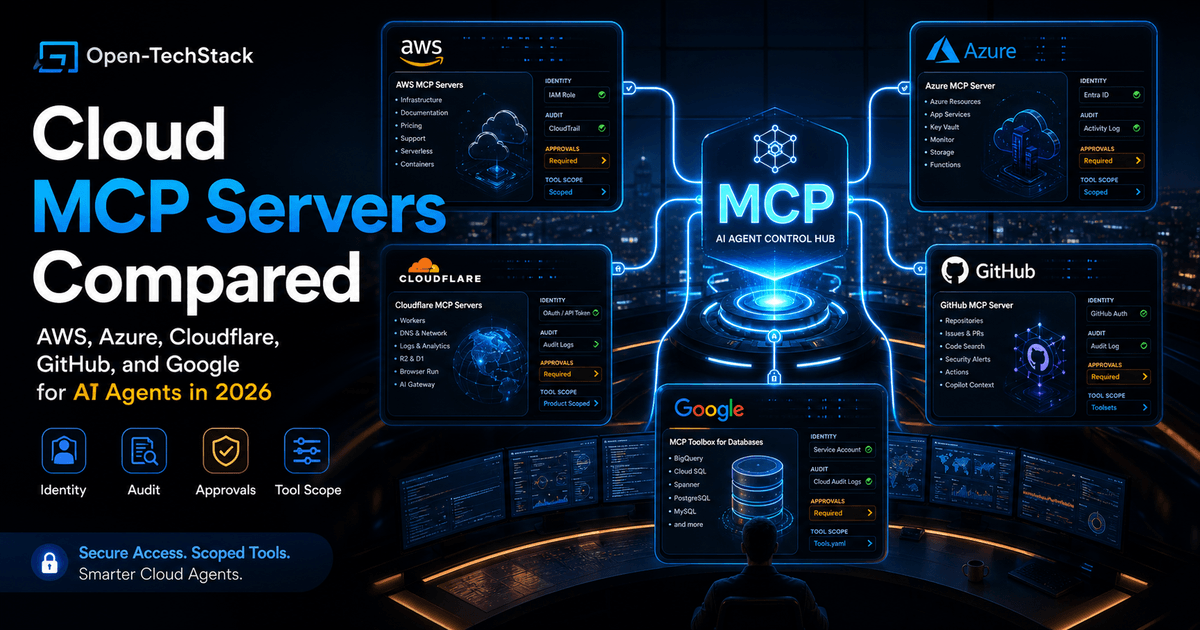
Cloud MCP servers are turning AI agents from smart chat windows into operators that can inspect repos, query databases, read cloud configuration, and sometimes change infrastructure.
That is useful.
It is also exactly where teams need to slow down.
The decision is no longer “should we use MCP?” The better question is: which MCP surface should this agent touch first, and what should it never be allowed to do without review?
This comparison looks at five practical options for teams building cloud-connected AI workflows in 2026:
- AWS MCP Servers for AWS docs, infrastructure, containers, serverless, support, pricing, and service-specific workflows
- Azure MCP Server for Azure resource operations through Microsoft identity and Azure tooling
- Cloudflare MCP servers for Cloudflare API, Workers, logs, observability, DNS, Browser Run, AI Gateway, and product-specific workflows
- GitHub MCP Server for repository, code, issue, security, and Copilot workflows
- Google MCP Toolbox for Databases for database-backed agent tools across Google Cloud and other database systems
This is not a brand ranking. It is a deployment choice.
If you want the broader protocol story first, read Why MCP Is Becoming the Default Standard for AI Tools in 2026. If you want the AWS-specific launch analysis, pair this with AWS MCP Server Is GA: Why Cloud Agent Access Needs a Real Control Plane.
TL;DR
| If your agent needs to… | Start with… | Why |
|---|---|---|
| inspect and operate AWS infrastructure | AWS MCP Servers | AWS has a broad server catalog plus AWS-native identity, documentation, infrastructure, container, serverless, support, and pricing angles. |
| work inside Azure apps and operations | Azure MCP Server | It is designed around Azure resources, Entra ID authentication, Azure CLI, Azure Developer CLI, and Azure service tools. |
| manage edge apps, Workers, DNS, logs, and Cloudflare platform state | Cloudflare MCP servers | Cloudflare offers managed remote servers, OAuth authorization, product-specific endpoints, and a token-efficient API server pattern. |
| operate on repositories, issues, pull requests, code security, and Copilot workflows | GitHub MCP Server | GitHub provides and maintains the server, supports toolsets, and integrates with Copilot surfaces. |
| expose databases to agents with controlled tools | Google MCP Toolbox for Databases | Toolbox is strongest when you want structured database access, custom tool definitions, connection handling, authentication, and observability. |
The safest default is read-only first, then add write access by route, toolset, account, and approval policy.
Why cloud MCP is different from local MCP
Local MCP often starts with harmless-sounding tools: read files, search docs, inspect a local repo, query a development database.
Cloud MCP changes the blast radius.
An agent connected to cloud systems may be able to:
- list production resources
- read logs containing sensitive data
- query billing or usage signals
- inspect database schemas
- trigger builds or deploys
- update DNS or access rules
- open issues or create pull requests
- run diagnostic scripts
- call service APIs through a cloud account
That does not mean cloud MCP is bad. It means cloud MCP should be treated like production access, not like a browser plugin.
The useful pattern is:
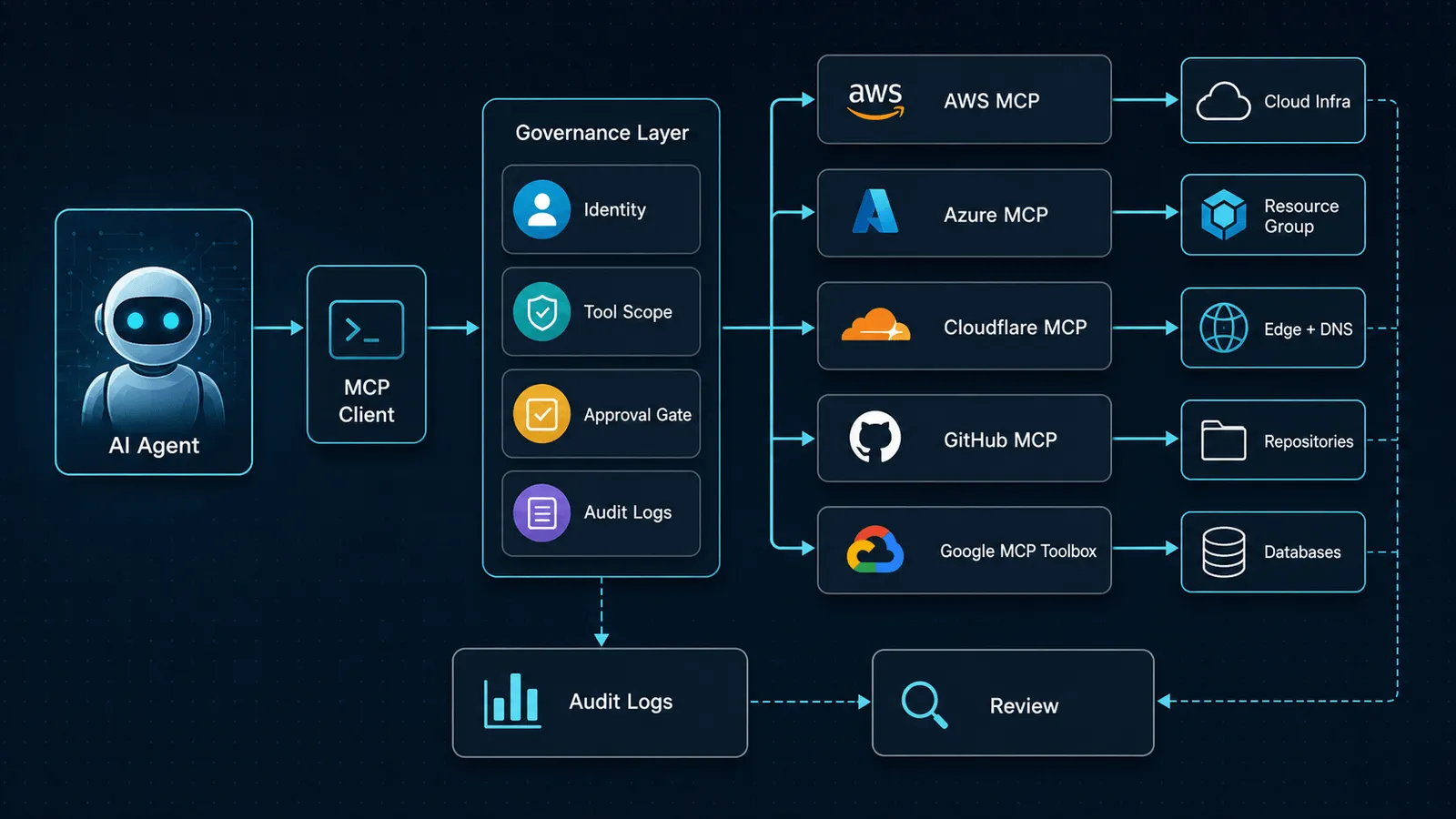
The agent should not connect directly to everything. It should pass through identity, scope, approval, logging, and monitoring.
The core comparison
| Platform | Strongest fit | Access model to care about | Main risk |
|---|---|---|---|
| AWS MCP Servers | AWS operations, infrastructure as code, docs, support, pricing, containers, serverless | IAM, CloudTrail, account boundaries, server-specific permissions | Too much AWS account capability exposed too quickly |
| Azure MCP Server | Azure resource work from IDEs, Copilot, custom apps, and Microsoft agent workflows | Entra ID, Azure Identity, Azure CLI, Azure Developer CLI, service tool access | Treating natural-language convenience as permission design |
| Cloudflare MCP servers | Cloudflare platform operations, Workers, DNS, logs, analytics, Browser Run, AI Gateway | OAuth, API tokens, product-specific remote MCP endpoints | Broad API reach if tokens and scopes are not curated |
| GitHub MCP Server | repo work, issues, PRs, code scanning, Copilot agent context | GitHub auth, organization policy, toolsets, Copilot surfaces | Agents taking repo actions with broad toolsets enabled |
| Google MCP Toolbox for Databases | database access for build-time exploration and run-time agent tools | tools.yaml, defined sources, custom tools, auth, connection and query controls | Letting agents run generic SQL where purpose-built tools would be safer |
The important difference is not “who has MCP.” They all do. The important difference is which control plane the MCP server naturally belongs to.
AWS MCP Servers: broad cloud operations with AWS-native guardrails
AWS now has one of the broadest MCP server catalogs because it is not just one connector. The official AWS Labs MCP repository lists servers for AWS documentation, infrastructure as code, EKS, ECS, Finch, Serverless, Lambda tools, support, pricing, SageMaker, Bedrock knowledge bases, and more.
That breadth is powerful, but it should shape how you deploy it.
AWS is a good fit when the agent’s job is to:
- inspect AWS docs and service guidance
- reason about infrastructure as code
- work with CDK, CloudFormation, or deployment troubleshooting
- explore container and serverless applications
- retrieve pricing or support context
- help engineers understand AWS resource state
The key is restraint. Do not start by exposing every AWS server. Start with the smallest server set that maps to the actual workflow.
For example:
| Workflow | Better first server choice |
|---|---|
| ”Help me understand this CloudFormation error” | AWS IaC MCP Server plus documentation |
| ”Estimate service cost before a change” | AWS Pricing MCP Server |
| ”Debug this Lambda-based app” | AWS Serverless MCP Server or Lambda tool server |
| ”Search official AWS docs during coding” | AWS Documentation or Knowledge MCP Server |
The practical security rule is simple: cloud MCP should inherit the same IAM discipline you would apply to a human engineer or automation role.
Azure MCP Server: strong fit for Microsoft-centered developer workflows
Microsoft describes Azure MCP Server as a way for AI agents and clients to interact with Azure resources using natural language commands. The docs emphasize MCP compatibility, Entra ID authentication through Azure Identity, Azure CLI and Azure Developer CLI integration, and a broad set of Azure tools.
That makes Azure MCP most compelling when your team already lives in:
- Visual Studio Code or Visual Studio
- GitHub Copilot agent mode
- Azure Developer CLI workflows
- Azure Monitor, Azure AI Search, Cosmos DB, Key Vault, RBAC, Redis, or App Configuration
- Microsoft identity and permission boundaries
The advantage is not that an agent can say “list my storage accounts.” The advantage is that the tool lives close to the authentication and operational systems Azure teams already use.
The mistake is assuming natural-language commands make cloud operations inherently safer. They do not. They make operations easier to request.
Before giving an agent write access, define:
- which Azure subscription it can touch
- which resource groups are in scope
- whether it is allowed to read secrets, keys, or connection strings
- whether it can run diagnostics only or make changes
- where approval is required
- where logs are reviewed
For teams already standardized on Microsoft developer tooling, Azure MCP is a natural fit. For mixed-cloud teams, it should be one controlled connector, not the default tool for every cloud action.
Cloudflare MCP servers: remote, product-specific, and unusually token-conscious
Cloudflare’s MCP story is different because it leans into managed remote servers and product-specific endpoints.
Cloudflare says its API MCP server exposes the entire Cloudflare API through two tools: search() and execute(). Instead of loading thousands of native tool definitions into context, the server uses Code Mode so the model writes JavaScript against a typed representation of the API. Cloudflare’s docs say this reduces the token footprint to roughly 1,000 tokens, compared with hundreds of thousands or more for large native tool schemas.
That matters because tool overload is one of the quiet failure modes of agent systems. If the model sees too many tools, it can choose poorly. If every API endpoint arrives as a giant schema, context gets expensive and noisy.
Cloudflare is a strong fit when the agent needs to work with:
- Workers and platform configuration
- DNS analytics and performance
- R2, D1, and edge application primitives
- logs, Logpush, audit logs, and observability
- Browser Run for fetching pages, markdown, or screenshots
- AI Gateway logs and prompts
- Cloudflare Radar or network intelligence
The risk is obvious: a token-efficient wrapper around a broad API is still a broad API.
Use Cloudflare MCP with:
- OAuth for user-scoped interactive access
- API tokens with narrow permissions for automation
- separate servers for high-risk product areas
- read-only mode where possible
- approval for DNS, firewall, Worker deploy, access, and account-level changes
Cloudflare’s product-specific MCP servers are the safer starting point for most teams. The all-API server is useful, but it deserves a tighter review.
GitHub MCP Server: repository operations need toolset discipline
GitHub’s MCP server is provided and maintained by GitHub, and the GitHub docs position MCP as a way to extend Copilot with external systems across IDEs, Copilot CLI, and cloud agent workflows.
For developers, this may be the most immediately useful MCP server because the work is already inside GitHub:
- search repository context
- inspect issues and pull requests
- create or update issues
- help with code scanning and security workflows
- connect Copilot agent sessions to repo tools
- support remote or local usage depending on the host app
The most important control is GitHub’s toolset model. GitHub says toolsets let teams enable or disable groups of functionality so the assistant sees only the capabilities it needs. That is not just a UX feature. It is a security and accuracy feature.
The default mistake is enabling too much because “it is our repo anyway.”
For a healthy rollout, split GitHub MCP into levels:
| Level | Agent can do |
|---|---|
| Research | read issues, search code, inspect PR context |
| Draft | propose issue text, draft comments, prepare branch changes |
| Action | open PRs, update issues, request reviews |
| Sensitive | touch security alerts, secrets, organization settings, releases |
Most teams should start with research and draft workflows. Action workflows should require clearer tool approval, branch policy, and review.
Google MCP Toolbox for Databases: database access is its own category
Google’s MCP Toolbox for Databases is not a general “control my entire cloud” server. That is a strength.
The project describes itself as an open-source MCP server that connects AI agents, IDEs, and applications to enterprise databases. It serves two jobs:
- a ready-to-use build-time MCP server for database exploration from tools such as Gemini CLI, Claude Code, Codex, and other MCP clients
- a custom tools framework for building production agent tools with defined sources, tools, toolsets, prompts, authentication, connection handling, and observability
That makes Toolbox interesting for teams that do not want to hand an agent raw database access.
The article-worthy part is the tools.yaml model. Instead of “agent, here is the database,” you define:
- which sources exist
- which tool can query which source
- what parameters the tool accepts
- which SQL statement or operation is allowed
- which tools belong in a toolset
That is the right shape for database agents.
In many production cases, a narrow tool like search_open_invoices_by_customer_id is better than a generic execute_sql tool. It is easier to test, easier to log, easier to explain, and less likely to leak data.
Use Google MCP Toolbox when:
- the agent needs database context, not broad cloud control
- you want a declarative tool layer around SQL
- you need support for multiple database engines
- you want to separate build-time exploration from run-time production tools
- you care about connection pooling, authentication, and OpenTelemetry signals
Avoid it when the real need is cloud resource management. Database tools and infrastructure tools have different risk profiles.
Decision matrix: which one should you pick first?
| Situation | Best first move |
|---|---|
| Your team runs mostly AWS and wants agent-assisted cloud debugging | AWS MCP Servers, starting with docs, IaC, pricing, or the specific service server |
| Your developers live in Microsoft tooling and Azure resources | Azure MCP Server with Entra ID and scoped resource access |
| Your app is on Cloudflare Workers, R2, D1, DNS, or Zero Trust | Cloudflare product-specific MCP server before the full API server |
| Your agent needs repo, PR, issue, and security context | GitHub MCP Server with limited toolsets |
| Your agent needs database answers or database-aware code | Google MCP Toolbox with purpose-built tools and toolsets |
| You are unsure | Start read-only, pick one workflow, and measure whether the agent actually saves time |
The wrong move is connecting all five because they exist.
An agent with five broad cloud MCP surfaces is not “more capable” in a useful sense. It is harder to predict, harder to audit, and easier to misconfigure.
A safer rollout plan
Use this rollout path for any cloud MCP server:
- Pick one workflow. Example: “summarize failed GitHub Actions and link related AWS docs.”
- Start read-only. Give the agent visibility before action.
- Use one MCP server first. Add the second only when the workflow proves it needs it.
- Limit toolsets or API scopes. The fewer tools the agent sees, the better.
- Log every call. Capture user, server, tool, input category, output category, latency, status, and approval state.
- Add approvals for writes. DNS changes, deploys, database writes, repository updates, billing actions, and security changes should pause.
- Review failures weekly. Look for wrong tool selection, missing permissions, noisy outputs, and prompt injection exposure.
- Promote only what works. Keep experiments separate from production agent access.
This is where yesterday’s observability topic connects: cloud MCP without traces is a future incident report waiting to happen. For the observability layer, see AI Agent Observability Stack: Traces, Evals, Approval Logs, and Cost Controls.
Common mistakes
Mistake 1: Treating MCP as a single permission
“MCP access” is not one thing. A docs server, a repo server, a DNS server, and a database server expose very different risks.
Name the server, toolset, account, and allowed actions explicitly.
Mistake 2: Starting with write access
Read-only agents already provide useful value: summarizing resources, finding errors, explaining logs, drafting fixes, and preparing commands for a human to review.
Write access should be earned by repeated success on narrow workflows.
Mistake 3: Mixing database access with infrastructure access
Database MCP and cloud API MCP should usually be separated. A support agent that needs customer lookup does not automatically need IAM, DNS, or repository tools.
Mistake 4: Ignoring token and tool load
More tools can make an agent worse. Tool descriptions consume context, and broad tool surfaces make selection harder. Cloudflare’s Code Mode approach is one answer to that problem, but the broader lesson applies everywhere: curate the tool surface.
Mistake 5: No incident replay
If an agent changed something, your team should be able to answer:
- who initiated it
- which server was used
- which tool was called
- what inputs were provided
- what result came back
- whether a human approved it
- what downstream system changed
If you cannot reconstruct that, the rollout is not ready.
Recommendation
For most teams, the best first cloud MCP deployment is not the broadest one.
Use this default:
- GitHub MCP for developer workflow context
- one cloud-specific MCP server for the primary production platform
- Google MCP Toolbox only when the agent needs database-shaped tools
- Cloudflare product-specific servers before the full API server
- AWS or Azure MCP only within the identity and audit model your cloud team already trusts
The durable architecture is not one giant agent with every key. It is a small set of scoped agents, each with a narrow MCP surface, approval rules, and logs.
That may sound less exciting than “connect everything.”
It is also how this becomes useful enough to keep.
FAQ
Are cloud MCP servers safe for production?
They can be, but only if you treat them like production access. Use scoped identity, least privilege, audit logs, approval gates, and read-only defaults. The server being official does not remove your responsibility to design access.
Should we use remote MCP or local MCP?
Use remote MCP when the provider already offers a managed endpoint with auth, logging, and clear permissions. Use local MCP when the workflow is development-only, private to a machine, or easier to sandbox locally.
Is Cloudflare’s all-API MCP server too broad?
It can be too broad if you give it a wide token. Its token-efficient design is useful, but permission scope still matters. For production, product-specific servers and narrow API tokens are easier to reason about.
Is Google MCP Toolbox only for Google Cloud?
No. The current repository describes support for Google Cloud databases such as BigQuery, AlloyDB, Cloud SQL, Spanner, and Firestore, plus other databases including PostgreSQL, MySQL, SQL Server, Oracle, MongoDB, Redis, Elasticsearch, Snowflake, Trino, Neo4j, and more.
What should a small team do first?
Pick one workflow where the agent saves real time without taking risky actions. A good first version might read docs, summarize logs, inspect repo context, or draft a fix. Add write access later.
Related posts
- AWS MCP Server Is GA: Why Cloud Agent Access Needs a Real Control Plane
- Why MCP Is Becoming the Default Standard for AI Tools in 2026
- AI Agent Observability Stack: Traces, Evals, Approval Logs, and Cost Controls
- How to Use OpenAI Agents SDK with MCP and Approvals
Sources
