TL;DR
Restarting your iPhone is usually the first step in troubleshooting a glitchy app, but for the victims of DarkSword, it’s the only way to delete the evidence of a total device compromise.
A sophisticated new zero-click spyware exploit chain, dubbed DarkSword, has been observed targeting millions of iPhones running iOS versions 18.4 through 18.7. Discovered by the Google Threat Intelligence Group (GTIG) in collaboration with Lookout and iVerify, the malware is notable not just for its technical complexity, but for its “hit-and-run” tactical shift that makes traditional digital forensics almost impossible.
The Zero-Click Nightmare
Unlike traditional phishing attacks that require a user to click a suspicious link or download a malicious attachment, DarkSword is a zero-click exploit. A victim’s device can be fully compromised simply by visiting a compromised “watering-hole” website.
The exploit chain, written entirely in JavaScript, leverages six different vulnerabilities to achieve kernel-level privileges. This allows the attacker to bypass Apple’s most stringent security layers, including the sandbox and Pointer Authentication Codes (PAC).
The Technical Chain of Command
The useful defensive detail is not exploit reproduction. It is the pattern: a browser-exposed entry point, a sandbox escape, and privilege escalation chained into a short-lived collection operation. Public writeups describe the chain at a high level and name affected components, but defenders should avoid trying to recreate the chain on personal devices.
Reported affected areas include:
- Remote Code Execution (RCE): The entry point often involves a JavaScriptCore JIT optimization bug (CVE-2025-31277) for older 18.x versions or a garbage collection bug (CVE-2025-43529) for iOS 18.6-18.7.
- Sandbox Escape: The exploit then pivots to the GPU process via an out-of-bounds write in ANGLE (CVE-2025-14174). From there, it moves into the
mediaplaybackddaemon. - Privilege Escalation: Finally, a copy-on-write bug in the XNU kernel (CVE-2025-43510) and a kernel memory corruption flaw (CVE-2025-43520) provide the “keys to the kingdom”—arbitrary memory read/write primitives and full kernel control.
GHOSTBLADE and the Data Heist
Once the exploit chain completes, DarkSword deploys one of three malware families: GHOSTBLADE, GHOSTKNIFE, or GHOSTSABER.
These payloads are designed for total information exfiltration. Within minutes of infection, the spyware can strip a device of:
- Passwords and Keychain data
- WhatsApp and Telegram messages (including encrypted chats)
- Photos, contacts, and call history
- Apple Health data and cryptocurrency wallets
- Browser cookies and Wi-Fi passwords
The “Hit-and-Run” Tactic
The most alarming aspect of DarkSword is its ephemeral nature. Most spyware, like Pegasus, aims for long-term persistence to monitor a target over months. DarkSword takes the opposite approach.
It is designed to get in, take everything, and get out. After exfiltrating the targeted data, the spyware cleans up its own files on the filesystem and exits. Because it resides primarily in memory, a simple restart of the device wipes almost all traces of the infection. While this sounds like a “fix,” it actually serves the attacker by destroying the forensic trail that security researchers use to track state-sponsored actors.
This shift in strategy highlights why AI Coding Agents Need Guardrails, Not More Autonomy; as exploit kits become more automated—with evidence suggesting some of DarkSword’s server-side code was LLM-generated—the speed of attack is beginning to outpace the speed of human defense.
Who is Behind DarkSword?
Evidence points toward multiple commercial surveillance vendors and state-sponsored groups. One Russian-aligned APT group, known as UNC6353, has been linked to the infrastructure. Targets have been identified in Saudi Arabia, Turkey, Malaysia, and Ukraine, suggesting the tool is being used for both domestic surveillance and international espionage.
The presence of AI-generated code in the exploit kit is a chilling reminder of how the barrier to entry for high-end cyber warfare is dropping. When AI Hallucinates, it’s usually a nuisance; when it’s used to optimize a kernel exploit, it’s a global security crisis.
How to Protect Your iPhone
If you are running any version of iOS between 18.4 and 18.7, you are at risk.
- Update Immediately: Apple has addressed these vulnerabilities in iOS 26.3 (and 18.7.6 for older devices). Go to Settings > General > Software Update and install the latest version now.
- Enable Lockdown Mode: If you are a high-risk individual (journalist, activist, or government official), enable Lockdown Mode. It significantly reduces the attack surface for zero-click exploits.
- Periodic Restarts: While a restart won’t prevent the initial theft, it will clear the active malware from your memory if you’ve already been targeted.
- Verify Your Version: Check if you are among the estimated 25% of users still running vulnerable 18.x versions.
DarkSword represents a new era of mobile threats—faster, more automated, and harder to detect. The “Sword” is out of the scabbard; make sure your software is updated before it finds a target.
The practical lesson is that mobile security is now an operational habit, not a one-time setting. High-risk users should treat update cadence, Lockdown Mode, and device restarts as part of their normal workflow, especially when they travel, handle sensitive communications, or depend on the phone for account recovery.
If you are responsible for a team, make sure the device policy includes emergency update windows and a clear escalation path when a zero-click advisory lands. The window for response is often shorter than the window for forensic certainty.
Speed matters here.
Defensive boundary
This article is for defensive awareness and response planning. It does not provide exploit steps, payloads, targeting instructions, or instructions to reproduce a zero-click chain.
For high-risk users, the safe response is boring:
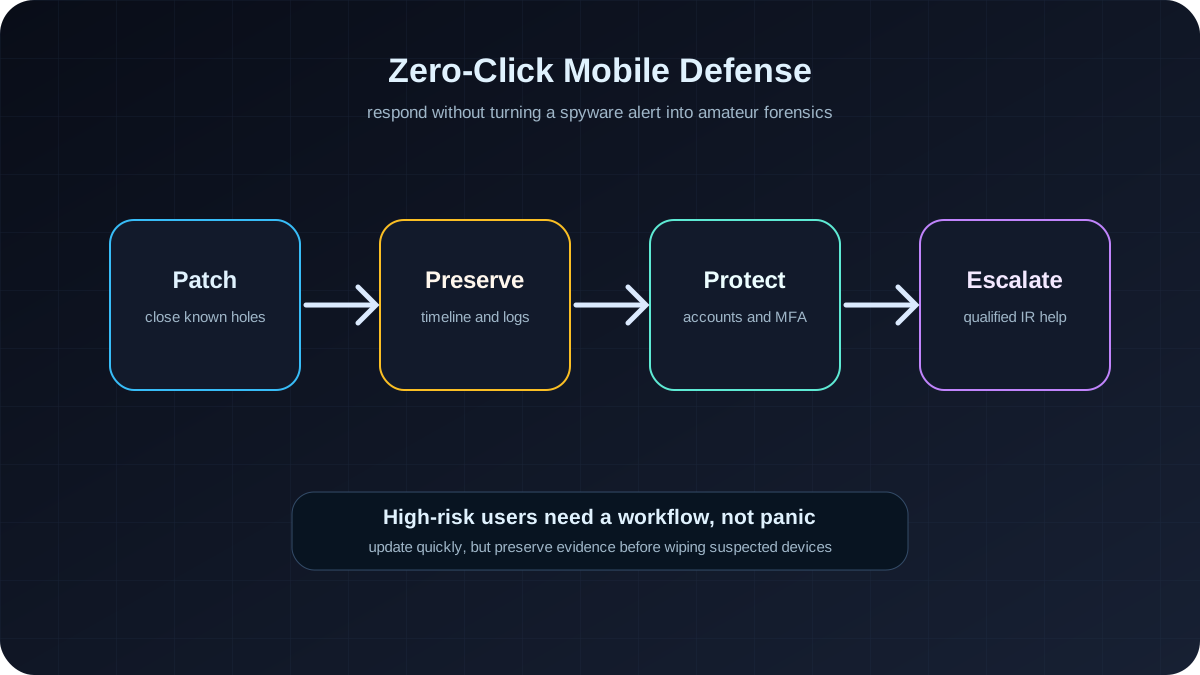
- update iOS quickly
- enable Lockdown Mode when risk justifies the tradeoff
- preserve timelines and logs before wiping a suspected device
- rotate account sessions if compromise is plausible
- get qualified mobile incident-response help for sensitive cases
The dangerous response is improvisation. Repeated restarts, random security apps, and casual resets can destroy useful evidence without proving that the device was safe.
Team response checklist
For individuals, the answer is simple: update immediately and enable the strongest protections your risk profile justifies. For organizations, the response needs more structure.
Use this checklist when a mobile zero-click advisory appears:
- Inventory exposed devices: identify iOS versions, device models, executive phones, journalist phones, legal phones, and any device used for account recovery.
- Prioritize high-risk users: patch executives, admins, finance staff, legal teams, activists, and staff traveling in higher-risk regions first.
- Shorten update windows: do not wait for the normal monthly patch cycle when active exploitation is reported.
- Treat phones as identity infrastructure: a compromised phone can expose email, messaging, password reset flows, MFA prompts, and cloud sessions.
- Preserve evidence before wiping: if a user is high-risk and compromise is plausible, escalate to security staff before casual resets destroy useful traces.
The reader takeaway is not “panic about one named exploit.” The takeaway is that mobile security now belongs in the same operational category as endpoint, cloud, and identity security. A modern iPhone is not just a phone. It is a privileged dashboard into someone’s work, finances, conversations, and recovery channels.
For AdSense-safe reader value, the practical boundary is also important: do not try to diagnose a suspected spyware infection from vibes. If a high-risk device may be compromised, preserve logs, record the timeline, separate the device from sensitive accounts, and get qualified incident-response help. Fast patching is good hygiene; amateur forensics can destroy the very evidence that would make the incident understandable.
For everyday users, the durable habit is simpler: update quickly, avoid delaying security releases for convenience, and make sure account recovery does not depend on a single phone. Zero-click stories sound exotic, but the defensive routine is boring on purpose. The boring routine is what lowers risk before a named exploit becomes your problem.
That is the whole security lesson: make the safe path routine before the emergency arrives.
SEO FAQ
What is DarkSword spyware?
DarkSword is the name used in public reporting for an iOS spyware campaign involving zero-click or low-interaction mobile compromise paths. The important reader takeaway is defensive: patch quickly, reduce attack surface, and preserve evidence in high-risk cases.
Does restarting an iPhone remove spyware?
A restart may clear some memory-resident malware, but it is not a complete incident-response plan. If a high-risk device may be compromised, preserve the timeline and get qualified help before wiping or repeatedly resetting the device.
Who should enable Lockdown Mode?
Lockdown Mode is most relevant for high-risk users such as journalists, activists, executives, government staff, legal teams, and people targeted by sophisticated surveillance. Everyday users may not need it, but should still install security updates quickly.
Does this article explain how to exploit iPhones?
No. This article is defensive guidance. It avoids exploit steps and focuses on patching, evidence preservation, account protection, and incident-response workflow.
Sources
