TL;DR
Tool-using agents fail in a very specific way: they often do the next plausible action instead of stopping to ask a human.
In 2026, that is no longer an “agent intelligence” problem. It is a product interface problem.
If your assistant can run tools that touch deployments, billing, permissions, or customer data, you need a reliable way to:
- pause the workflow,
- ask for explicit user input or approval,
- and only then proceed.
That is exactly what Elicitation adds to the Model Context Protocol (MCP): a standardized, client-controlled way for servers to request user input during an interaction instead of faking it with “please confirm” text. See the spec: Elicitation (MCP draft).
If you want the bigger ecosystem context, read: Why MCP Is Becoming the Default Standard for AI Tools in 2026. If you want the “why guardrails matter” argument, read: AI Coding Agents Need Guardrails, Not More Autonomy.
What changed (and why it matters now)
The key detail is that elicitation is new in the MCP spec and is still explicitly described as evolving.
Even within elicitation, MCP calls out a specific version milestone: URL mode is introduced in the 2025-11-25 version of the specification. That is the point where MCP stopped being “just ask for form fields” and added a standard way to redirect users into secure, out-of-band flows.
If you are building tool-using AI today (March 29, 2026), this is one of the cleanest protocol-level signals that the ecosystem is formalizing human approval and sensitive-step UX instead of leaving it to prompting.
What “elicitation” actually is
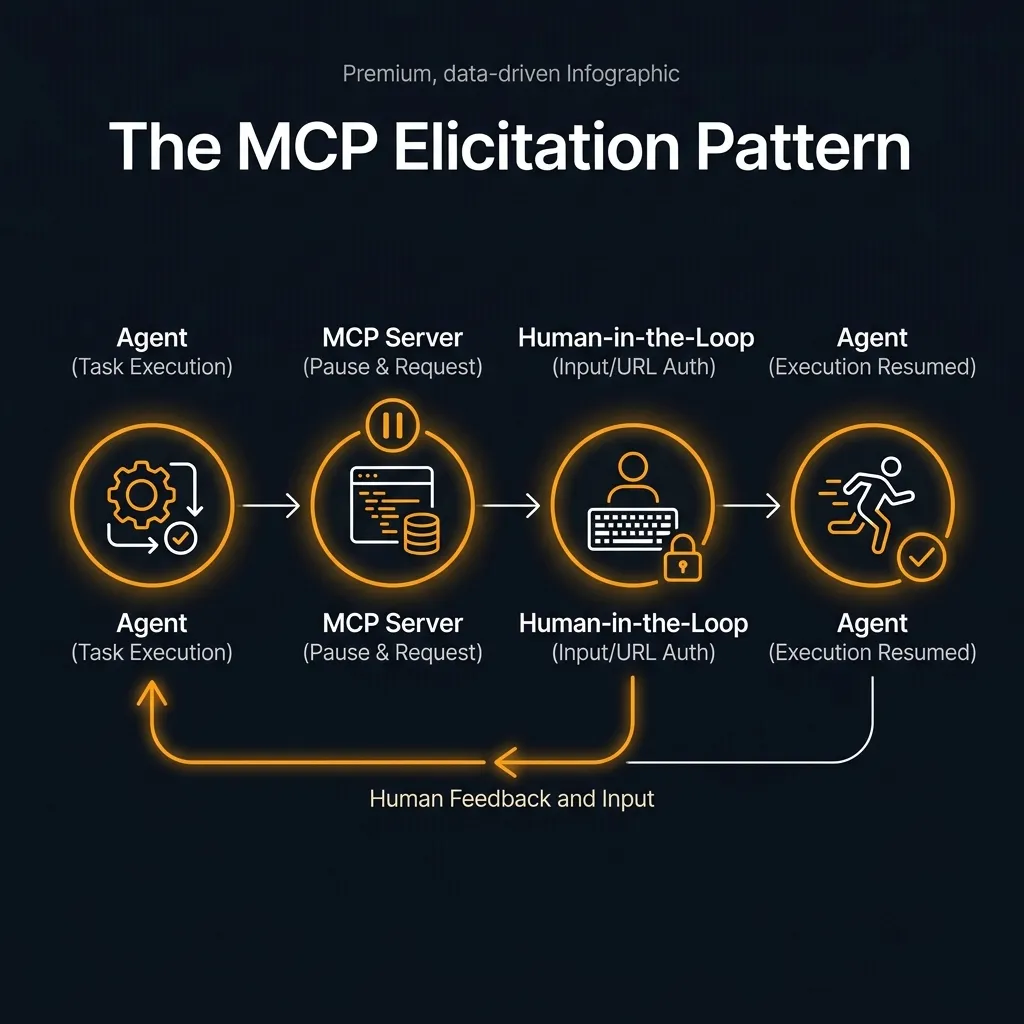
Elicitation is an MCP feature where an MCP server can ask the MCP client to collect extra user input and send it back in a structured way.
The important detail is control: the client owns the user interaction pattern. The protocol does not dictate UX; it gives a clean message flow and a small set of primitives.
The spec defines two modes:
- Form mode: the server requests structured data (optionally with a simplified JSON schema for validation).
- URL mode: the server returns a URL and asks the client to send the user through an out-of-band flow for sensitive interactions that must not pass through the MCP client.
That second one matters. URL mode exists because some “confirmations” are actually auth flows, payment steps, or secret entry, where the safe place to do it is a browser session with real identity checks.
The protocol also standardizes how the user responds:
accept: the user approved and (for forms) provided contentdecline: the user explicitly said nocancel: the user backed out of the flow
That is a small detail that makes agent workflows more reliable: your server can treat these paths differently instead of guessing from freeform text.
Why this matters for builders (not just protocol nerds)
Most teams already try to do “confirmation” with one of these patterns:
- the model prints “Are you sure?” and hopes the user replies correctly
- the tool takes a
confirm: trueflag and the model decides when to flip it - the UI pops a modal, but the server has no clean way to resume the flow
Those are all fragile in different ways.
Elicitation is a better default because it:
- makes the pause explicit (protocol-level, not prompt-level)
- gives you a structured approval signal (accept/decline/cancel)
- lets clients enforce UX consistency and safety policies
- supports secure out-of-band flows via URL mode
In other words: you can design “human-in-the-loop” as a first-class system behavior instead of a prompt convention.
The practical pattern: classify tool calls by risk
If you want to apply this immediately, do not start by “eliciting everything.” Start by splitting tool calls into three buckets:
1) Low risk: no elicitation
Read-only operations that are easy to undo or validate:
- search docs
- read repository files
- run non-destructive queries
2) Medium risk: form-mode elicitation
Actions where the model might have the right idea but you need human intent captured cleanly:
- “create a new API key named X with scope Y”
- “open a PR titled … with these files”
- “send a customer email to …”
Here you can ask for the missing fields and force an explicit “submit” moment.
3) High risk: URL-mode elicitation (or a hard block)
Actions that are dangerous to route through a chat UI at all:
- OAuth authorization flows
- entering secrets
- payments / billing changes
- permission escalation
URL mode is designed for this class of interaction, and the spec is explicit that the server must verify user identity and guard against phishing-style abuse.
What to do if the client does not support elicitation (yet)
Reality check: not every MCP client will support elicitation on day one.
So design your server to degrade safely:
- Hard requirement for high-risk operations: if the client cannot do URL mode, return an error and instruct the user to complete the flow elsewhere.
- Two-phase commits for medium-risk operations: require an explicit
intentIdorconfirmationTokenreturned by the first step before the second step will execute. - Never let the model self-authorize: avoid “if you are sure, set confirm=true” patterns where the model can satisfy its own gate.
This is the same principle we talk about in prompt testing: if the system can act, it needs tests and constraints. See: Prompt Testing Is Becoming Mandatory: A Practical Promptfoo Evals Workflow.
The .NET ecosystem angle (why this is not theoretical)
One reason elicitation matters right now is that SDKs are already forming around MCP.
If you build on .NET, Microsoft maintains documentation for an MCP C# SDK. Even if you are not on C#, it is a useful signal: when ecosystems start publishing SDK docs for MCP clients/servers, teams can implement protocol features like elicitation consistently instead of ad hoc. Start here: MCP C# SDK overview.
That is the adoption signal you should watch: when frameworks bake the human-in-the-loop primitive into their SDK surface area, teams stop treating confirmations as “prompting” and start treating them as engineering.
Defensive implementation pattern
The safest first pilot is a medium-risk form workflow: something useful enough to justify human confirmation, but not so dangerous that a failed client implementation can cause real damage. For example, let the server ask for missing issue metadata before creating a draft ticket, or ask for a title and branch name before preparing a pull request.
Avoid payments, account deletion, secret entry, and permission escalation until both the client and server behavior are boringly predictable. Elicitation is valuable because it moves human intent into a structured protocol step. That value disappears if teams use it as a thin wrapper around unsafe autonomous action.
The design rule is simple: the model may propose, the client may ask, the user must decide, and the server must still verify.
That final server-side verification is the part teams should not skip. Elicitation captures intent, but it does not prove authorization, validate business rules, or remove the need for audit logs.
SEO FAQ
What is MCP elicitation?
MCP elicitation is a Model Context Protocol feature that lets an MCP server ask the client to collect user input or approval during a tool workflow. The client controls the user interface, while the server receives a structured response.
Why is elicitation safer than a confirmation prompt?
It is safer because approval becomes a protocol step instead of a model-generated sentence. The server can distinguish accept, decline, and cancel outcomes rather than guessing from freeform chat text.
When should a tool use elicitation?
Use elicitation for medium-risk actions where human intent matters, such as creating tickets, opening pull requests, sending messages, or filling missing metadata. High-risk flows such as payments, secrets, and permission escalation should use URL-mode flows or hard blocks.
Does elicitation remove the need for server-side checks?
No. Elicitation captures user intent, but the server still needs authorization checks, business-rule validation, logging, and safe failure behavior.
Sources
