If you want an agent that can actually do work, the hard part is usually not the model.
It is the tool boundary.
More specifically:
- how the agent reaches external systems
- where tool execution actually happens
- which calls should pause for approval before they run
That is exactly where the OpenAI Agents SDK and MCP fit together well.
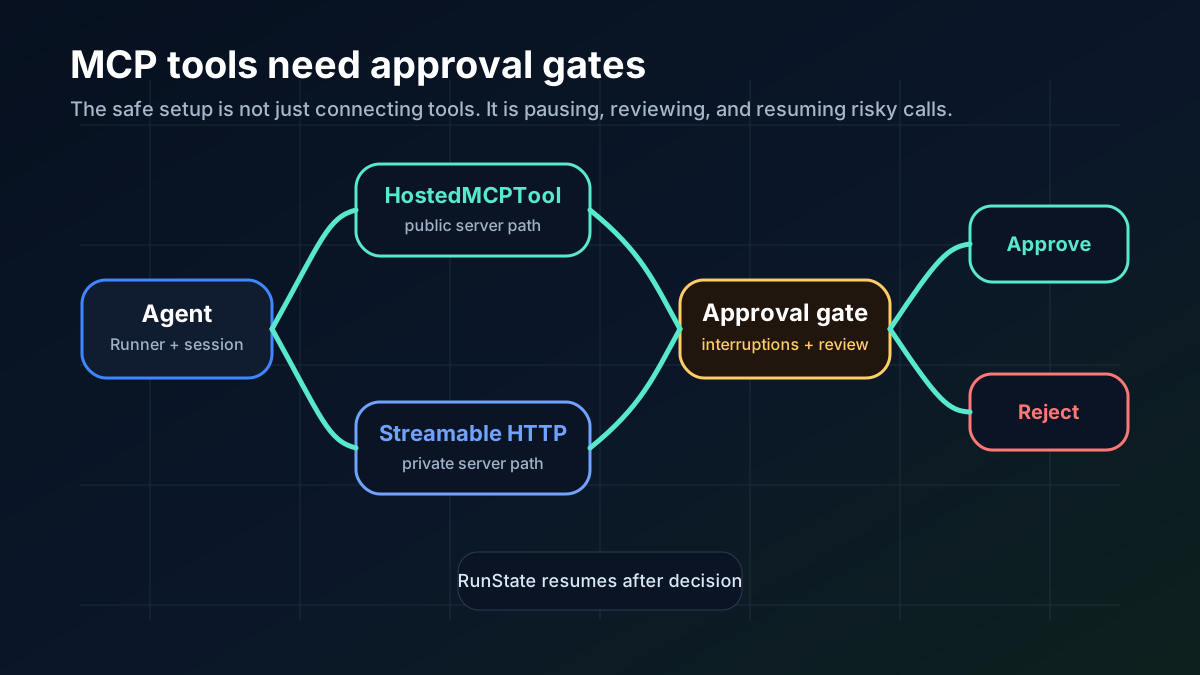
This guide is the practical version: when to use HostedMCPTool, when to use MCPServerStreamableHttp, how to keep memory sane, and how to add approval gates without turning your agent into an unsafe automation script.
If you want the broader protocol context first, read Why MCP Is Becoming the Default Standard for AI Tools in 2026. If you want the agent-framework comparison first, start with LangGraph vs OpenAI Agents SDK vs PydanticAI (2026): Which Agent Framework Should You Use?.
TL;DR
As of April 13, 2026, the clean default is:
- use
HostedMCPToolwhen the MCP server is publicly reachable and you want the Responses API to handle tool listing and execution on OpenAI’s side - use
MCPServerStreamableHttpwhen you want to control the transport yourself, keep the server in your own infrastructure, or expose only a local/private MCP endpoint - use approval policies for any tool that can mutate state, trigger external side effects, or touch sensitive systems
- use an SDK session when you want the agent to keep client-side conversation history across turns
- do not combine SDK sessions with
conversation_id,previous_response_id, orauto_previous_response_idin the same run
If your bigger question is still framework selection, read LangGraph vs OpenAI Agents SDK vs PydanticAI (2026): Which Agent Framework Should You Use?.
What this stack is actually good at
This setup is strongest when you want:
- a Python agent runtime instead of raw API orchestration
- MCP tools without inventing your own tool protocol
- explicit review steps before risky actions
- resumable workflows instead of one-shot scripts
It is especially useful for:
- internal copilots that can read docs, tickets, or repos but should not edit blindly
- agent workflows that can draft, analyze, and prepare actions, then wait for approval
- teams standardizing on MCP for tool access instead of one-off function wrappers
If you need the bigger protocol context first, read Why MCP Is Becoming the Default Standard for AI Tools in 2026.
Step 1: install the SDK and start with a minimal agent
The official Python SDK install path is still simple:
pip install openai-agents
export OPENAI_API_KEY=sk-...
Minimal smoke test:
from agents import Agent, Runner

agent = Agent(
    name="Assistant",
    instructions="Reply concisely and use tools when they help.",
)

result = Runner.run_sync(agent, "Write a haiku about deployment drift.")
print(result.final_output)
Do this before you touch MCP.
If the bare runner is not working, adding tools will only make debugging worse.
Step 2: choose the right MCP posture before you write code
OpenAI’s MCP docs for the Python Agents SDK lay out four transport choices, but for most teams the real decision is between two:
| What you need | Default choice |
|---|---|
| Let OpenAI’s Responses API call a publicly reachable MCP server on the model’s behalf | HostedMCPTool |
| Connect to a server you run locally or inside your own infrastructure over Streamable HTTP | MCPServerStreamableHttp |
That split matters because these two paths have different operating models.
Use HostedMCPTool when…
- the MCP server is reachable by OpenAI’s hosted tool flow
- you want the Responses API to list and execute remote tools directly
- you want a simpler client process with fewer network concerns in your own app
Use MCPServerStreamableHttp when…
- the MCP server is private, local, or only reachable from your own network
- you want to control headers, retries, timeouts, and transport behavior yourself
- you need local approval policies on the server connection
If you are still deciding whether the SDK is the right runtime at all, the comparison article above is the better first read. This guide assumes you already want the OpenAI runtime and now need the clean MCP path.
Step 3: start with a hosted MCP server if you want the simplest setup
The SDK docs show that hosted MCP tools belong in the agent’s tools list, not mcp_servers.
Minimal example:
import asyncio

from agents import Agent, HostedMCPTool, Runner

async def main() -> None:
    agent = Agent(
        name="Assistant",
        instructions="Use MCP tools when they help answer the question.",
        tools=[
            HostedMCPTool(
                tool_config={
                    "type": "mcp",
                    "server_label": "gitmcp",
                    "server_url": "https://gitmcp.io/openai/codex",
                    "require_approval": "never",
                }
            )
        ],
    )

    result = await Runner.run(agent, "Which language is this repository written in?")
    print(result.final_output)

asyncio.run(main())
Why this path is attractive:
- the hosted server exposes tools automatically
- you do not manage a persistent MCP client in your own process
- the same hosted path can also work with connector-backed MCP servers
One important caveat from the docs: hosted MCP tool execution depends on OpenAI Responses models that support hosted MCP integration. Treat this as an OpenAI-native path, not a generic runtime abstraction.
Step 4: use Streamable HTTP when you want control
If your MCP server runs inside your own environment, Streamable HTTP is usually the better default than SSE.
The SDK docs explicitly note that the MCP project has deprecated the older SSE transport for new integrations and recommends Streamable HTTP or stdio instead.
Basic Streamable HTTP example:
import asyncio
import os

from agents import Agent, Runner
from agents.mcp import MCPServerStreamableHttp
from agents.model_settings import ModelSettings

async def main() -> None:
    token = os.environ["MCP_SERVER_TOKEN"]

    async with MCPServerStreamableHttp(
        name="Private MCP Server",
        params={
            "url": "http://localhost:8000/mcp",
            "headers": {"Authorization": f"Bearer {token}"},
            "timeout": 10,
        },
        cache_tools_list=True,
        max_retry_attempts=3,
    ) as server:
        agent = Agent(
            name="Assistant",
            instructions="Use the MCP tools to answer the question.",
            mcp_servers=[server],
            model_settings=ModelSettings(tool_choice="required"),
        )

        result = await Runner.run(agent, "Add 7 and 22.")
        print(result.final_output)

asyncio.run(main())
Why this path is stronger for private infrastructure:
- you control the connection lifecycle
- you can inject auth headers directly
- you can add retries, timeouts, and tool filtering close to the transport
- you can keep the MCP server off the public internet
Step 5: add approvals before you add dangerous tools
This is the part too many examples skip.
The SDK’s human-in-the-loop docs are clear: if a tool needs approval, the run can pause, surface interruptions, and resume later from the same RunState.
That is the right default for anything that can:
- delete or modify records
- send email or external notifications
- trigger deploys, payments, or tickets
- write to customer or production systems
Hosted MCP approvals
Hosted MCP supports approval through require_approval in tool_config. The docs show you can use:
"always""never"- a per-tool approval map
You can also add an on_approval_request callback for programmatic approval decisions.
from agents import Agent, HostedMCPTool
from agents import MCPToolApprovalFunctionResult, MCPToolApprovalRequest

SAFE_TOOLS = {"read_project_metadata"}

def approve_tool(request: MCPToolApprovalRequest) -> MCPToolApprovalFunctionResult:
    if request.data.name in SAFE_TOOLS:
        return {"approve": True}
    return {"approve": False, "reason": "Escalate to a human reviewer"}

agent = Agent(
    name="Assistant",
    tools=[
        HostedMCPTool(
            tool_config={
                "type": "mcp",
                "server_label": "gitmcp",
                "server_url": "https://gitmcp.io/openai/codex",
                "require_approval": "always",
            },
            on_approval_request=approve_tool,
        )
    ],
)
Local or private MCP approvals
For MCPServerStreamableHttp, MCPServerSse, and MCPServerStdio, the SDK supports require_approval directly on the server object.
The docs show several allowed forms:
"always"or"never"TrueorFalse- a per-tool map like
{"delete_file": "always", "read_file": "never"} - a grouped object like
{"always": {"tool_names": [...]}, "never": {"tool_names": [...]}}
Practical pattern:
async with MCPServerStreamableHttp(
    name="Filesystem MCP",
    params={"url": "http://localhost:8000/mcp"},
    require_approval={"always": {"tool_names": ["delete_file", "write_file"]}},
) as server:
    ...
That lets you keep read-only tools fast while forcing explicit review for write paths.
Step 6: understand the pause, approve, resume flow
The most important thing to understand is that approvals are not just a yes/no callback.
They are a run-state transition.
The SDK docs describe the flow like this:
- the model emits a tool call
- the runner checks the approval rule
- if approval is needed and no decision is stored yet, execution pauses
- pending approvals appear in
result.interruptions - you convert the result to state, approve or reject items, then resume the original run
Minimal pattern:
result = await Runner.run(agent, "Delete temp files that are no longer needed.")

if result.interruptions:
    state = result.to_state()

    for interruption in result.interruptions:
        approved = human_review(interruption)
        if approved:
            state.approve(interruption)
        else:
            state.reject(interruption)

    result = await Runner.run(agent, state)

print(result.final_output)
Why this matters:
- you can serialize paused state and resume later
- the approval surface works across nested tools and handoffs
- you are not forced into a synchronous “approve immediately or fail” UX
If your agent uses specialist routing, it is worth knowing that the same approval surface can still apply after a handoff. The interruption is surfaced at the outer run, not hidden inside the nested tool path.
Step 7: pick one memory model and stay consistent
The SDK’s Sessions feature is useful when you want client-side memory across turns.
Basic example from the docs:
from agents import Agent, Runner, SQLiteSession

agent = Agent(
    name="Assistant",
    instructions="Reply very concisely.",
)

session = SQLiteSession("conversation_123", "conversations.db")

result = await Runner.run(agent, "What city is the Golden Gate Bridge in?", session=session)
print(result.final_output)

result = await Runner.run(agent, "What state is it in?", session=session)
print(result.final_output)
This is useful when:
- you are building a chat-style app
- you want local persistence with SQLite or a shared store like Redis
- you want approvals and resumed turns to keep app-level memory coherent
The sharp edge is important:
The docs say sessions cannot be combined with conversation_id, previous_response_id, or auto_previous_response_id in the same run.
So pick one posture:
- SDK sessions for client-managed memory
- Responses/Conversations primitives for server-managed continuation
Do not layer both and hope it works out later.
If you need the lower-level API migration path instead of the SDK runtime, read Chat Completions to Responses API: A Practical Migration Guide (2026).
Step 8: stream events if the tool path can take time
Hosted MCP tools and normal agent runs both support streaming through Runner.run_streamed.
That matters when:
- a remote MCP tool takes time to list or execute
- you want to surface incremental output in a UI
- you want to keep a live trace of what the run is doing
The docs show a simple event loop pattern:
result = Runner.run_streamed(agent, "Summarize this repository's top languages")

async for event in result.stream_events():
    if event.type == "run_item_stream_event":
        print(f"Received: {event.item}")

print(result.final_output)
If the run pauses for approvals while streaming, keep consuming the stream until it completes, inspect interruptions, then resume from the resulting state.
The setup pattern I would actually use
If I were shipping this into a real internal workflow, I would start with:
- one agent
- one MCP server
- read-only tools first
- explicit approval on all write tools
- SQLite session in local development
- streaming enabled for observability
Then I would add complexity only after those basics are stable.
That means:
- do not start with three MCP servers when one will do
- do not let the model auto-write to production systems on day one
- do not mix local session memory and Responses continuation primitives unless you have a clear reason
- do not keep SSE around for new work unless a legacy server forces it
If your broader concern is tooling sprawl and model costs, Practical AI Workflow Without Wasting Money is the complementary read.
Common mistakes to avoid
- Treating hosted and self-managed MCP as interchangeable. They solve related problems, but the execution model is different.
- Skipping approvals for write-capable tools. If a tool can mutate real state, require approval by default.
- Adding memory twice. Sessions and
previous_response_idare different continuation models. - Choosing SSE for new work. The MCP project has already deprecated that transport.
- Starting with tool sprawl. One clean MCP server is easier to debug than five half-curated ones.
Final takeaway
The OpenAI Agents SDK plus MCP is useful when you want the agent to do real work, but only inside a reviewable envelope. The SDK handles orchestration, MCP exposes tools cleanly, and approvals keep the risky steps visible instead of hidden inside prompt behavior.
That makes the stack especially strong for workflows that need a pause-and-approve moment before something external happens. If your process already has human checkpoints, this pattern fits naturally and gives you a safer path to automation than a fully free-running agent.
Step-by-step workflow
Step 1: Prepare the SDK, MCP server, and approval boundary
Validate access, dependencies, and baseline configuration before execution.
Step 2: Run one agent action through MCP
Run the workflow in a controlled scope, capture outputs, and verify expected behavior.
Step 3: Enforce approval and resume behavior
Review results, document exceptions, and finalize rollout criteria for repeatability.
SEO FAQ
What is the difference between HostedMCPTool and Streamable HTTP in the OpenAI Agents SDK?
HostedMCPTool lets the Responses API handle tool listing and execution when the MCP server is publicly reachable. Streamable HTTP gives you more control by managing the MCP connection in your own code. Use HostedMCPTool for simplicity; use Streamable HTTP when you need custom transport, auth, or logging.
How do approvals work in the OpenAI Agents SDK?
The SDK supports a pause-approve-resume flow. When an agent encounters a high-risk tool call, it can pause execution, surface the proposed action to a human, wait for approval, then resume. This pattern is critical for irreversible operations like deletes, deployments, or financial transactions.
Can I use the OpenAI Agents SDK with self-hosted MCP servers?
Yes. The SDK supports connecting to self-hosted MCP servers via Streamable HTTP transport. You manage the server lifecycle, authentication, and networking yourself. This gives you full control over tool behavior and data flow.
Does the OpenAI Agents SDK support memory across sessions?
The SDK supports memory through agent-level context that persists within a session. For cross-session memory, you need to implement your own persistence layer — storing conversation history, tool outputs, or summaries in a database and injecting them into future sessions.
Sources
