TL;DR
Most teams are still treating prompts like copywriting.
That made sense when the output was “just text.” But the moment you plug an LLM into tools, tickets, deployments, or customer workflows, the prompt stops being writing and starts being software behavior.
And software behavior needs tests.
On March 9, 2026, OpenAI announced it would acquire Promptfoo, a tool built around evaluating prompts and stress-testing AI systems. (The deal was described as subject to customary closing conditions.) That is not a random tools acquisition. It is a market signal: evaluation and red teaming are moving from “nice-to-have” to “default infrastructure.”
This post is the practical version of that signal: how to set up a minimal eval workflow with Promptfoo, what to test first, and how to avoid the most common “we have evals” traps.
If you want the bigger context on why tool access changes the risk profile, read: AI Coding Agents Need Guardrails, Not More Autonomy.
What Promptfoo actually does
Promptfoo is a framework for running the same prompt(s) across:
- multiple test cases (inputs)
- multiple model providers (OpenAI, Anthropic, Google, local models via Ollama, and more)
- optional assertions (does the output contain required text, match a rubric, stay under a cost threshold, return valid JSON, etc.)
The important part is not the tool. The important part is the discipline it enforces:
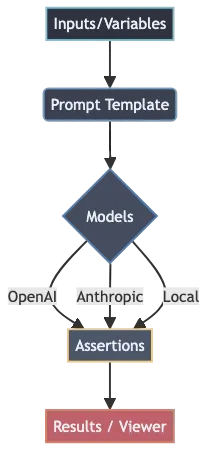
- Define inputs you care about.
- Run them repeatedly.
- Make failures obvious.
That is prompt engineering that can survive contact with production.
Why this matters now (and not “later”)
If your LLM only drafts messages, the worst failure mode is usually embarrassment.
If your LLM can act, failure looks different:
- it can open a PR that compiles but breaks a user flow
- it can run a “reasonable” shell command that deletes the wrong directory
- it can summarize a policy incorrectly and cause compliance mistakes
- it can follow hostile text in a repo or document and steer tool calls (prompt injection)
This is why evals are becoming the second half of “prompting.” They reduce the cost of change. They also force you to write down what “good” means.
The minimum viable eval stack
If you are starting from zero, do not build a giant benchmark harness.

Start with four things:
1) Golden tasks (your top 10)
Write down the 10 tasks your LLM is supposed to do reliably. These are usually the tasks that happen every day:
- summarize a bug report into a fix plan
- classify a customer message into a route
- extract fields from a form-like email
- generate a SQL query from a structured request
- produce a code diff with a specific constraint
If you cannot list 10 tasks, you do not yet have an LLM product. You have a demo.
2) Failure-mode cases (your top 10)
Now write the 10 cases you are most afraid of:
- missing a required safety disclaimer
- leaking secrets from context
- producing invalid JSON
- refusing when it shouldn’t (over-refusal)
- obeying untrusted instructions embedded in content
This list becomes your first “don’t regress” suite.
3) A small model matrix
Pick a small set of providers/models that represent real operational choices:
- your default production model
- your “cheap fallback” model
- the strongest model you are willing to use for hard cases
The point is not to compare every model on earth. The point is to catch “this looks fine on model A but fails on model B,” especially if you ever switch providers or add fallbacks.
4) One human review habit
Automated assertions are useful, but they are not enough.
Keep one habit that forces human review of outputs at least weekly:
- open the Promptfoo viewer
- skim the failures and the “almost failures”
- update prompts and add at least one new test case
That loop is how you make the system stronger over time instead of “stable until it breaks.”
A practical Promptfoo workflow (step by step)
You can set up a working eval loop in under an hour.
Step 1: Create a starter eval
Promptfoo can generate an example project:
npx promptfoo@latest init --example getting-started
cd getting-started
If you are integrating into an existing repo, you can instead create a config in your own project directory.
Step 2: Define prompts with variables
In promptfooconfig.yaml, prompts use {{vars}} placeholders. Keep the first version simple:
prompts:
  - |
    You are a careful assistant.
    Convert the following English text to {{language}}:
    {{input}}
In real systems, you will likely load prompts from files and version them like code.
Step 3: Choose providers (models)
Add a small provider list that matches your reality:
providers:
  - openai:gpt-5.2
  - openai:gpt-5-mini
If you are serious about regression risk, include at least one “fallback” model, because that is where surprises happen.
Step 4: Add tests + assertions
Start with 5–20 tests. Use assertions only where you can be precise:
tests:
  - vars:
      language: French
      input: Hello world
    assert:
      - type: contains
        value: Bonjour
  - vars:
      language: Spanish
      input: Where is the library?
    assert:
      - type: icontains
        value: biblioteca
Assertions are not about “making the model obey.” They are about catching regressions quickly.
Step 5: Add cheap guardrails (cost + latency caps)
You can enforce basic operational constraints in the eval suite, like cost and latency thresholds. This is underrated.
It stops the classic failure where a prompt change dramatically increases token usage and nobody notices until the bill arrives.
In Promptfoo, these can be expressed as assertions, for example:
defaultTest:
  assert:
    - type: cost
      threshold: 0.002
    - type: latency
      threshold: 3000
Step 6: Run evals and review outputs
Run the suite:
npx promptfoo@latest evalThen open the viewer:
npx promptfoo@latest viewThe viewer is where you learn. The CLI is just the gate.
Where teams mess this up
Most “we have evals” efforts fail for predictable reasons:
They test trivia instead of behavior
If your tests only check for exact strings, you will either:
- overfit the suite to one phrasing, or
- stop trusting the suite because it’s always noisy
Prefer behavioral checks: required fields, safety constraints, stable structure, rubric-style quality checks, and “did it do the job.”
They don’t version prompts like code
If prompts can change without review, your system has no stable interface.
The most practical setup is:
- prompts in files
- changes via PR
- eval suite runs in CI
- failures block merges (at least for the “golden tasks” suite)
They treat red teaming as a one-time event
Red teaming is not “a week of security theater.”
For LLM products, it should be:
- lightweight, continuous pressure
- integrated into the same workflow as feature changes
- focused on realistic threats (prompt injection, policy bypass, data leakage, tool misuse)
If you already have a lean workflow for the rest of your stack, this is the LLM-specific extension: How to Build a Practical AI Workflow Without Wasting Money.
A simple decision rule for 2026
If an LLM output can change money, permissions, or production state, you need two things:
- Evals (to catch regressions)
- Constraints (to limit blast radius)
Promptfoo is one way to do the first part.
The deeper point is the same one we keep coming back to across the AI tool stack: the competitive advantage is shifting from “my model is smarter” to “my system is governable.”
Sources
