If your content work is already spread across drafts, source links, notes, inbox items, and recurring checks, OpenClaw is interesting for a different reason than most AI tools.
It is not just a chatbot.
It is a self-hosted gateway, task runner, and orchestration layer that can sit in front of a content workflow without forcing you to build the whole stack yourself.
That makes it a good fit when you want one system to:
- capture content ideas
- run scheduled research or briefing jobs
- route longer work through a durable multi-step flow
- trigger work from external systems through webhooks
- keep editorial rules in workspace instructions instead of scattered prompts
This guide is the practical version: how to set up OpenClaw for content automation workflows, what to turn on first, what to keep locked down, and how to avoid the setup mistakes that turn a useful pipeline into an overcomplicated one.
TL;DR
Use this setup:
- Install OpenClaw and run onboarding so you have a working Gateway and dashboard.
- Lock down the channel surface before you automate anything content-related.
- Put durable editorial rules in workspace instructions such as
AGENTS.md. - Use
cronfor scheduled briefs, monitoring, and recurring content tasks. - Use
Task Flowfor multi-step work like research, outline, draft, and revision. - Use the Webhooks plugin only when an external system needs to trigger the workflow.
As of April 22, 2026, the current OpenClaw docs say:
- Node 24 is recommended, while Node 22.14+ is also supported
- onboarding can get you from install to a running Gateway in about 5 minutes
cronruns inside the Gateway and persists jobs on diskTask Flowis the durable orchestration layer above background tasks- the Webhooks plugin binds authenticated HTTP routes to managed TaskFlows
- allowlists and mention rules are part of the security model, not optional garnish
That combination is what makes OpenClaw useful for content operations instead of just personal chat.
If you are still deciding whether OpenClaw itself is the right assistant layer, read Hands-on Review: Is OpenClaw Actually Useful for Personal Automation? first. If you are choosing between OpenClaw and another local operator stack, Hermes Agent vs OpenClaw (2026): Which Self-Hosted AI Agent Should You Use? is the better comparison.
What this setup is actually good at
This is the right pattern when you want a content pipeline that is:
- self-hosted
- auditable
- good at recurring work
- able to survive restarts
- narrow enough to manage safely
It works especially well for:
- daily or weekly content briefs
- research summaries before a draft starts
- long-form article pipelines with multiple checkpoints
- editorial review loops that should not happen inside one giant prompt
- internal content ops where a webhook or team channel starts the work
It is a weaker fit if your only goal is a single one-off blog draft. In that case, OpenClaw is probably more infrastructure than you need.
The architecture that usually works best
The clean mental model is:
Workspace instructions
  -> Task Flow
      -> background tasks
      -> cron jobs
      -> webhook-triggered runs
      -> delivery to a channel or local artifact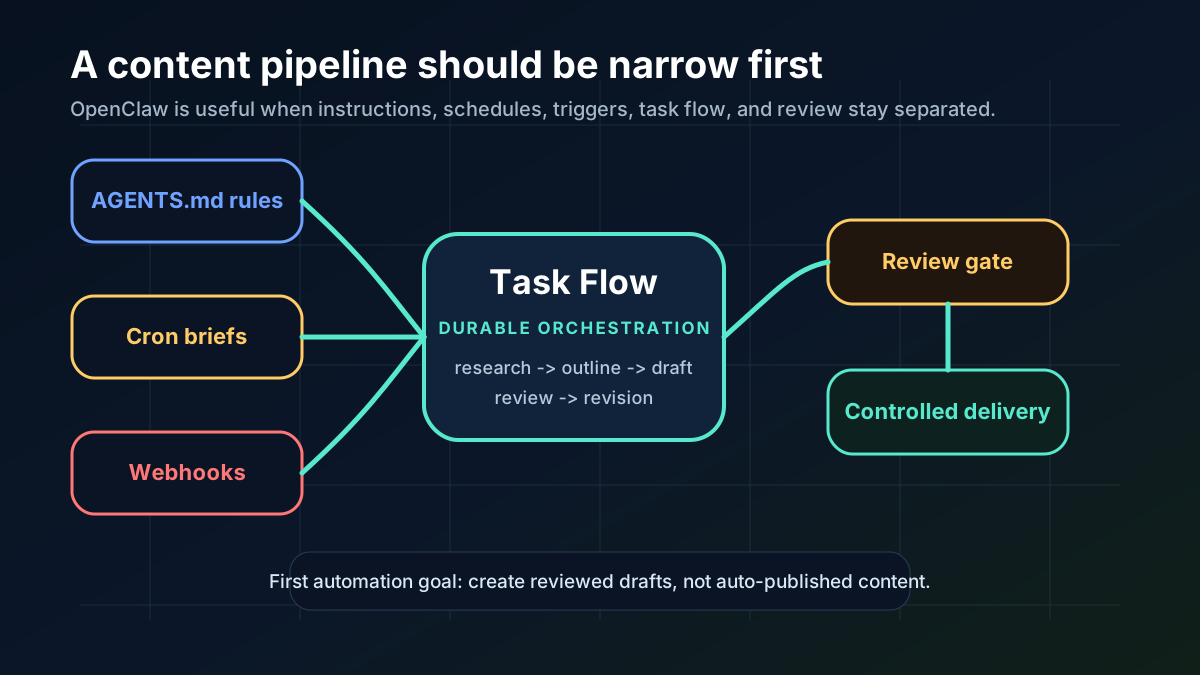
That matters because content automation falls apart when all of the following get mixed together:
- long-lived policy
- recurring schedules
- external triggers
- draft generation
- human review
- delivery
OpenClaw splits those concerns better than a single prompt loop does.
For a content workflow, I would think about the pieces like this:
AGENTS.mdor another workspace file holds stable editorial rulescroncreates scheduled runs for recurring briefs or checksTask Flowcoordinates the multi-step pipeline- hooks enforce local policy or event-based checks
- the Webhooks plugin lets another trusted system trigger the flow
That is the shape you want if you care about repeatability.
Step 1: Install OpenClaw and confirm the Gateway is alive
Start with the official onboarding path.
The docs recommend onboarding as the normal setup path, and that is the right default here too:
openclaw onboardIf you are automating the install itself, OpenClaw also documents a non-interactive path with --non-interactive.
Once onboarding finishes, verify the Gateway and dashboard before you build any content automation on top of it:
openclaw gateway status
openclaw dashboard
Why start here?
Because content workflows are only useful if the Gateway is actually running and the UI or CLI can inspect what happened.
If you skip this, every later failure looks like a content problem when it is really just an install problem.
Step 2: Lock down the trust boundary first
This is the part people usually underdo.
If you are going to let an agent handle content-related work, even if that work is just research and drafting, you should treat the inbound surface as hostile until proven otherwise.
The OpenClaw security docs are clear about the basics:
- use DM allowlists
- use group allowlists and mention gating
- do not assume open DMs or public rooms are safe defaults
- keep high-risk tools narrow
- treat prompt injection as a real problem, not a hypothetical
For a content workflow, the practical version is:
- Choose one delivery surface first.
- Allowlist only the people or channels that should trigger content work.
- Avoid open public chat rooms until the workflow is already stable.
- Keep browser and exec capabilities limited to the smallest useful surface.
If the content pipeline can be triggered by anyone, it is not a content pipeline. It is a live incident waiting for a prompt injection to land.
Step 3: Put the editorial rules in workspace instructions
OpenClaw is strongest when it can read stable instructions from the workspace instead of relying on repeated prompt stuffing.
That is the right place for things like:
- house style
- source requirements
- allowed claims
- forbidden tone
- output structure
- review checklist
If your workflow lives in a repo or a vault, keep those rules in a durable file such as AGENTS.md and make the content pipeline reference it consistently.
For content automation, the point is not to make the model write more. It is to make it write to a predictable spec.
A good content instruction block usually includes:
- article type
- target audience
- citation rules
- length range
- headline style
- no-go claims
- review requirements before delivery
That is far more useful than a giant generic prompt you have to paste into every run.
Step 4: Use cron for recurring briefs and routine checks
cron is the right tool when the content task should happen on a schedule.
The docs say scheduled jobs run inside the Gateway and persist on disk, so restarts do not erase them. That makes cron a good fit for things like:
- a weekday content brief
- a weekly roundup draft
- a recurring source scan
- a reminder to review stale draft queues
Example:
openclaw cron add \
  --name "Daily content brief" \
  --cron "0 8 * * 1-5" \
  --session isolated \
  --message "Summarize the new source items and draft a content brief with a recommended angle, headline options, and source list." \
  --announce \
  --channel slack \
  --to "channel:content"
That example is useful because it does not try to auto-publish anything.
It just creates a useful intermediate artifact for a person to review.
That is the right first move.
If the job should stay local instead of messaging a team channel, use a local output path or another controlled delivery surface instead of widening access too early.
Step 5: Use Task Flow for multi-step content work
This is the most important distinction in the whole stack.
cron is for timing.
Task Flow is for orchestration.
The docs describe Task Flow as the durable layer for multi-step work with revision tracking. That is exactly what a content pipeline needs when it has more than one phase.
For example:
- gather source material
- summarize the source set
- generate a rough outline
- produce a draft
- run a review pass
- deliver the draft for human approval
That is not a single task. That is a flow.
Use Task Flow when you want:
- durable progress across restarts
- visibility into which stage produced which artifact
- a clean way to inspect the whole process later
- branching or revision checkpoints
If you are designing a content engine, this is where you keep the work legible.
Do not flatten the whole editorial process into one prompt just because the model can technically do that in a single pass.
Step 6: Use webhooks only for trusted upstream systems
The Webhooks plugin exists for a practical reason: trusted systems often need to start the work.
The docs say it adds authenticated HTTP routes that bind external automation to OpenClaw TaskFlows. In other words, use it when something like n8n, Zapier, CI, or an internal app should kick off the pipeline.
That is useful for content work in cases like:
- a CMS saves a new brief and needs drafting to begin
- an editorial form submits an idea for research
- a CI job refreshes a knowledge article after a docs change
- an internal tool opens a content task from a queue
The right posture is still narrow:
- authenticate the route
- bind it to one flow
- keep the payload small
- keep the downstream policy strict
If the trigger source is not trusted, do not wire it into the workflow.
Step 7: Keep the first content pipeline small
The most useful first pipeline is boring.
It should not attempt to publish finished content automatically.
It should do one of these:
- create a content brief from source links
- draft an outline from that brief
- produce a first-pass article skeleton
- queue a human review step
That gives you a repeatable loop without turning the assistant into an uncontrolled publishing engine.
My recommended starter shape is:
- Cron creates the brief every weekday morning.
- Task Flow turns the brief into an outline and first draft.
- A review step checks for source completeness and tone.
- The final artifact lands in a local markdown folder or a controlled team channel.
That is enough to prove the workflow is useful.
You can always add more automation later.
Common mistakes to avoid
1) Exposing too many channels at once
One narrow trigger surface is better than five noisy ones.
If you connect Slack, Telegram, WhatsApp, and a webhook before the first flow is stable, you will not know where failure started.
2) Confusing scheduling with orchestration
cron decides when work starts.
Task Flow decides how the work moves through steps.
Treating them as interchangeable makes debugging much harder.
3) Skipping source review
Content automation is not just text generation.
If the workflow cannot show its sources, the output should be treated as a draft, not a publishable fact base.
4) Letting the agent reach too much of your system
Limit tool scope.
Keep the workspace focused.
Use allowlists and narrow tool access instead of assuming “trusted assistant” means safe assistant.
5) Turning the first version into a fully autonomous publisher
That is the wrong first milestone.
The first milestone is a workflow that consistently produces a useful draft and a clean audit trail.
SEO FAQ
Is OpenClaw a good fit for content automation?
OpenClaw is a good fit when the workflow needs recurring jobs, Task Flow orchestration, controlled triggers, and review gates. It is more infrastructure than needed for a one-off draft.
Should OpenClaw publish content automatically?
Not as a first milestone. A safer starting point is automated research, briefs, outlines, and drafts that require human review before anything is published.
What should be locked down first?
Lock down the trigger surface first: allowlisted users or channels, authenticated webhooks, narrow tool access, and clear workspace instructions for source and editorial rules.
Sources
