If you want a private document assistant without building a full custom RAG stack, AnythingLLM is one of the cleaner starting points.
The trap is assuming it is just “ChatGPT with file upload.”
It is not.
AnythingLLM has separate choices for:
- the LLM that writes the answer
- the embedder that turns document chunks into vectors
- the document workflow that decides whether a file is attached to one chat or embedded for a whole workspace
- the workspace and role model that determines who can see what
That separation is why the product is useful, but it is also where most bad setups start.
This guide is the practical version: run self-hosted AnythingLLM, connect OpenAI the right way, decide when to attach documents versus embed them, and avoid the permission and scope mistakes that make “private document chat” less private than teams expect.
TL;DR
Use this setup:
- Run the self-hosted
mintplexlabs/anythingllm:latestimage with persistent storage mounted to/app/server/storage. - Open the app on
http://localhost:3001. - In
Settings, set OpenAI as your LLM provider and choose an actual text-generation model. - In
Settings, set OpenAI as your embedder provider if you want OpenAI-generated embeddings for document retrieval. - Start by attaching small documents directly in chat.
- Move larger or reusable documents into a workspace when you want RAG across multiple threads.
- Turn on multi-user mode only when you are ready for shared workspaces and role-based permissions, because the docs say that change is not reversible.
As of April 15, 2026:
- AnythingLLM docs surface v1.12.0 as the current release banner
- the self-hosted docs show Docker as the standard setup path, defaulting to port
3001 - the docs warn that mounting
/app/server/storageis required if you want your data to survive container restarts - the document workflow docs say attached files are thread-scoped, while embedded documents become workspace-scoped
- the security docs say multi-user mode cannot be reverted and adds role-based access controls
- the agent docs say a workspace can use the system LLM by default or override the agent model/provider per workspace
That combination makes AnythingLLM strongest when your real goal is:
- a private document assistant for yourself or a small team
- one admin-controlled UI instead of a hand-built retrieval app
- a path that can later grow into agents and MCP without forcing that complexity on day one
If you are still deciding which self-hosted AI workspace deserves standardization, start with Open WebUI vs LibreChat vs AnythingLLM (2026): Which Self-Hosted AI Workspace Should You Use?.
Who this setup is actually for
This guide fits best if you are one of these:
- a developer who wants private document chat without building ingestion, chunking, and retrieval from scratch
- an ops or knowledge lead who wants one internal document assistant with controlled workspace access
- a small team that prefers OpenAI model quality but does not want raw company documents living in consumer chat tabs
It is a weaker fit if your real requirement is “one general-purpose AI portal for many providers and many chat-first use cases.” In that case, How to Use Open WebUI with Ollama and OpenAI (2026) is the closer comparison.
The architecture that usually works best
The clean mental model is:
Browser
  -> AnythingLLM
      -> OpenAI LLM for answer generation
      -> OpenAI embedder for document vectors
      -> Workspace document store + vector database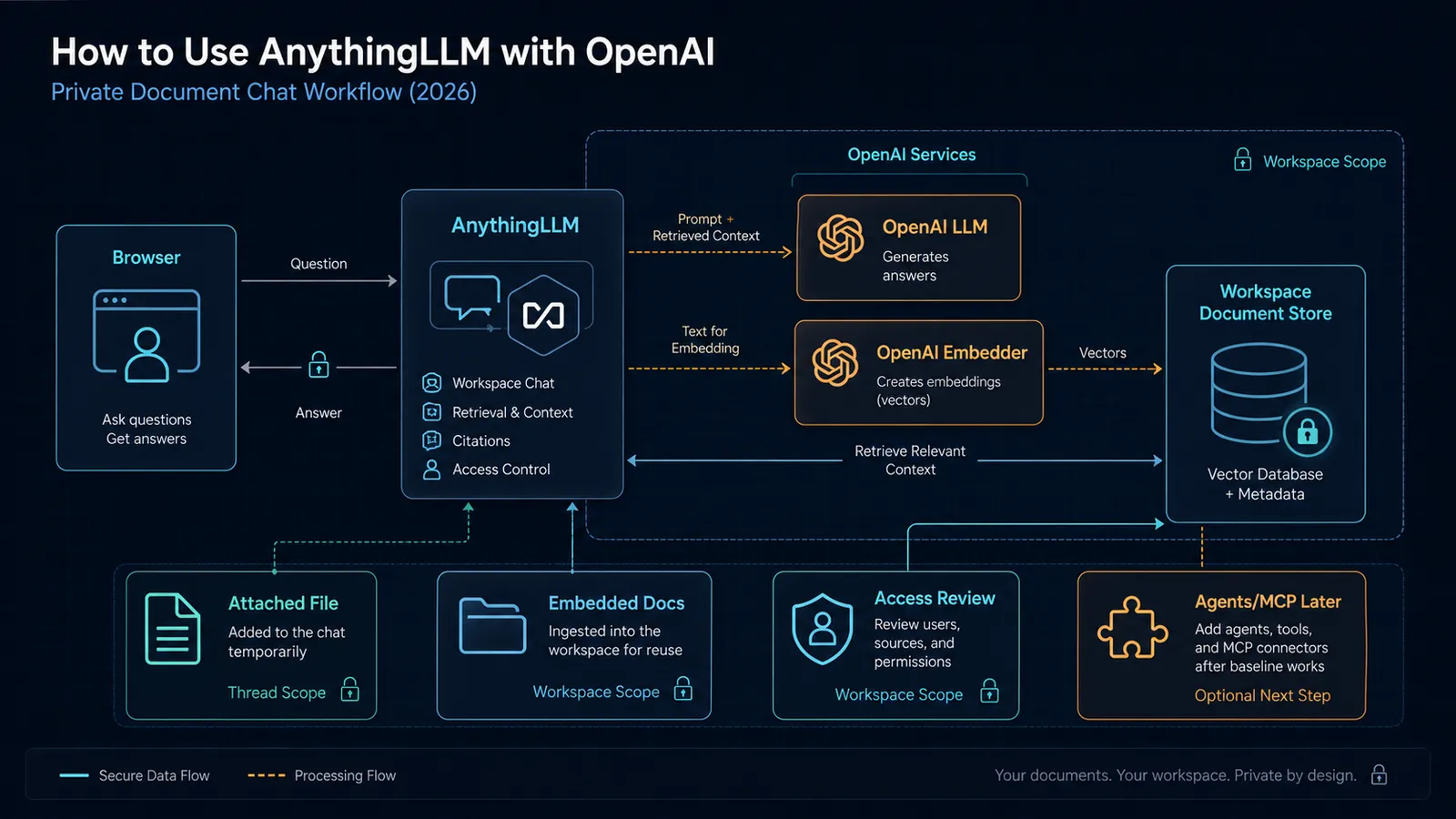
That matters because “OpenAI setup” in AnythingLLM is not one switch.
You are making at least two separate configuration choices:
- which model generates the answer
- which model creates the embeddings used for retrieval
If you blur those together, debugging gets harder fast.
Step 1: Run self-hosted AnythingLLM with persistent storage
AnythingLLM’s self-hosted docs point to Docker as the standard path and explicitly warn that you need a persistent mount for storage.
Two practical details matter right away:
- the docs expose the app on
http://localhost:3001 - the docs warn that without mounting
/app/server/storage, your data will be lost when the container restarts
That means your first job is not “make the container boot.”
It is “make the container boot in a way that preserves state.”
The docs also call out a pg image variant for teams that want PostgreSQL plus the pgvector extension. Do not start there unless you already know why you need it. The safer default is the normal self-hosted image first, then a database-backed architecture later if your scale and ops model justify it.
If your bigger retrieval decision is still open, this framework will save you time: pgvector vs Qdrant (2026): Postgres vs a Vector Database for RAG.
Step 2: Configure OpenAI as the language model
AnythingLLM treats model setup as a provider configuration decision, not a hidden default.
In the LLM settings:
- choose OpenAI as the provider
- add your OpenAI API key
- choose your Text Generation Model Preference
That last part matters more than people think.
AnythingLLM is not choosing the “best OpenAI model” for you. You are telling the workspace what default model should answer questions. If you pick an expensive or overly slow model by default, your document assistant will feel heavier than it needs to.
The right starting rule is simple:
- choose a model you are comfortable using for repetitive document Q&A
- only move upward when your actual prompt complexity demands it
Do not optimize for frontier bragging rights when your day-to-day workload is contract lookup, internal policy Q&A, or document summarization.
Step 3: Configure OpenAI as the embedder
AnythingLLM also separates embedder setup from LLM setup.
That is correct architecture, because embeddings and answer generation do different jobs.
In the embedder settings:
- choose OpenAI
- add the API key if needed
- select the embedding model preference
This is the part many teams skip mentally. They assume retrieval quality is mostly a chat-model decision.
It is not.
Retrieval quality is heavily shaped by:
- your embedder
- your chunking path
- your similarity settings
- whether you attached or embedded the file in the first place
OpenAI’s own embeddings docs are a useful reminder here: embeddings are the numeric representation layer used for search, clustering, recommendations, and similarity-based retrieval. In AnythingLLM, that layer is what makes workspace RAG work at all.
Step 4: Understand attached documents versus embedded documents
This is the most important product distinction in AnythingLLM, and the docs are clear about it.
Attached documents
Attached documents are:
- scoped to the workspace and thread
- useful for one-off chat sessions
- inserted as full text until you hit context pressure
That makes them the better default for:
- short PDFs
- one-time document reviews
- temporary analysis work you do not want exposed across a whole workspace
Embedded documents
If you exceed the context window, AnythingLLM can prompt you to embed the document instead.
The current docs say that embedding:
- moves the document into RAG
- makes it available to the workspace
- and in multi-user mode, makes it available to every user who has access to that workspace
That means “embed” is not just a performance choice.
It is also an access-scope choice.
If you embed HR files or internal contracts into a broad workspace, you have not just optimized retrieval. You may have widened visibility.
This is why AnythingLLM works well for private document chat when the workspace model is deliberate, and badly when teams treat workspaces as one giant junk drawer.
If you need the broader architectural context on when retrieval is worth the effort at all, read RAG vs Long Context in 2026: A Decision Framework That Actually Holds Up.
Step 5: Start with a narrow workspace model
A lot of document-assistant deployments fail because admins create one workspace for everything.
That is lazy, not simple.
A better pattern is:
- one workspace per sensitive function, team, or document domain
- only embed documents that should actually be reusable across threads
- keep one-off file analysis attached to a single conversation unless it truly belongs in shared retrieval
AnythingLLM’s document model pushes you toward this whether you notice it or not. Workspace scope is the real unit of retrieval visibility.
Step 6: Treat multi-user mode as a one-way change
AnythingLLM’s security docs are unusually direct here:
- multi-user mode cannot be reverted
- it introduces per-user role-based access permissions
The documented roles are:
- Admin
- Manager
- Default
That is enough to support a real internal tool, but it also means you should not casually toggle multi-user mode on a whim.
Use this rule:
- stay single-user while you are still shaping the ingestion flow, model defaults, and workspace boundaries
- move to multi-user mode once you are ready to own access design on purpose
The product gives you roles, but it will not design your workspace boundaries for you.
Step 7: Add agents only after plain document chat works
AnythingLLM’s agent docs say that a workspace uses the system LLM by default for agentic sessions, and that you can optionally override the model/provider per workspace.
That is useful, but it changes the debugging surface.
So the right order is:
- confirm normal OpenAI-backed document chat works
- confirm your attach-versus-embed workflow is sane
- confirm your workspace boundaries are correct
- only then add agents
Otherwise every issue turns into a mush of:
- provider config
- retrieval config
- tool config
- workspace config
Agents are valuable after the foundation is stable, not before.
Step 8: Add MCP only when your workflow genuinely needs tools
AnythingLLM supports MCP for use with AI Agents, and the docs say MCP servers can be added through the anythingllm_mcp_servers.json file in the storage plugins directory or managed in the UI.
The MCP docs also distinguish transport requirements:
- stdio servers require a
command - sse and streamable servers require a
url
That is a real implementation detail, not trivia. A lot of “MCP is broken” reports are just wrong transport assumptions.
But here is the stronger point:
do not add MCP just because it sounds advanced.
For many private document assistants, plain retrieval plus good workspace boundaries is enough.
Add MCP when you specifically need the assistant to do something beyond answer from documents, such as:
- browse the web
- hit an internal API
- query a database
- trigger an action in another system
If MCP is the actual reason you are evaluating AnythingLLM, pair this with Why MCP Is Becoming the Default Standard for AI Tools in 2026.
The practical default in 2026
If you want the boring, durable setup that survives first contact with real work, use this default:
| Decision | Default |
|---|---|
| Deployment | Self-hosted Docker |
| Answer model | OpenAI LLM configured centrally |
| Embeddings | OpenAI embedder configured separately |
| Small one-off files | Attach in chat |
| Reusable knowledge | Embed into a tightly scoped workspace |
| User model | Single-user first, multi-user later |
| Agents | Add later |
| MCP | Add only when a real tool workflow exists |
That is not the flashiest setup.
It is the setup least likely to create accidental complexity.
Mistakes to avoid
Mistake 1: treating attach and embed as the same thing
They are not.
Attached documents are thread-scoped. Embedded documents change retrieval scope for the workspace.
Mistake 2: enabling multi-user mode before workspace design is ready
The docs say you cannot roll multi-user mode back. Make the change when the access model is intentional.
Mistake 3: assuming retrieval quality is only a chat-model issue
Your embedder choice and document workflow matter just as much.
Mistake 4: adding agents and MCP before ordinary chat works
If the base OpenAI and document path is unstable, the more advanced layers will only hide the real problem.
Bottom line
AnythingLLM is a strong choice when your real requirement is not “general AI chat,” but private document chat with a path to more advanced workflows later.
The important thing is to respect the product’s actual boundaries:
- OpenAI LLM config is not the same as embedder config
- attached files are not the same as workspace retrieval
- workspace scope is also access scope
- agents and MCP are extensions, not the starting point
If you set it up with those distinctions in mind, AnythingLLM is easier to live with than a hand-rolled retrieval app and less chaotic than overbuilding your stack on day one.
Step-by-step workflow
Step 1: Prepare the private document workspace
Validate access, dependencies, and baseline configuration before execution.
Step 2: Run a grounded document question
Run the workflow in a controlled scope, capture outputs, and verify expected behavior.
Step 3: Check citations, access, and retrieval quality
Review results, document exceptions, and finalize rollout criteria for repeatability.
Visual checkpoints
Before you invite another user or embed more documents, confirm these checkpoints:
- the app still has your workspace data after a container restart
- OpenAI is configured separately for the LLM and embedder paths
- an attached file stays limited to the intended thread
- an embedded document appears only in the workspace where it belongs
- a test query cites or references the expected document set instead of guessing
- multi-user mode is still off unless your role and workspace boundaries are final
- agents and MCP are absent from the first baseline unless you have a specific action workflow to test
SEO FAQ
Can AnythingLLM run completely offline with OpenAI?
No. AnythingLLM itself is self-hosted and runs locally via Docker, but if you configure OpenAI as the LLM or embedder, document content is sent to OpenAI’s API for processing. For fully offline operation, you would need to use a local model like Ollama instead of OpenAI.
What is the difference between attaching and embedding documents in AnythingLLM?
Attached documents are thread-scoped — they exist only in the current chat session. Embedded documents are indexed into a workspace and become part of the retrieval pool for all future queries in that workspace. Use attach for one-off questions; embed for reusable knowledge.
Can I switch from single-user to multi-user mode in AnythingLLM?
You can enable multi-user mode, but the docs warn you cannot roll it back easily. Design your workspace and access model before making the switch. Start single-user, prove the workflow works, then add multi-user when the access model is intentional.
Does AnythingLLM support MCP servers?
Yes, AnythingLLM supports MCP through a Streamable HTTP transport. However, MCP adds complexity. For many private document assistants, plain retrieval with good workspace boundaries is sufficient. Add MCP only when you need the assistant to do something beyond answering from documents, like browsing the web or calling APIs.
Sources
- docs.anythingllm.com — Quickstart
- docs.anythingllm.com — Local Docker
- docs.anythingllm.com — Openai
- docs.anythingllm.com — Openai
- docs.anythingllm.com — Introduction
- docs.anythingllm.com — Security And Access
- docs.anythingllm.com — Setup
- docs.anythingllm.com — Overview
- platform.openai.com — Embeddings
When to Use
Use AnythingLLM with OpenAI when the main job is private document Q&A, reusable workspace knowledge, and a guided admin-controlled experience for a small team. It is a strong fit when you want OpenAI answer quality but still need to control document ingestion, retrieval scope, workspace boundaries, and later agent/MCP expansion from one self-hosted surface.
When Not to Use
Do not use this setup as a shortcut for broad enterprise knowledge governance if your access model is not designed yet. If you need strict audit workflows, custom application logic, or complex multi-tenant isolation, treat AnythingLLM as a pilot layer first and build a more explicit retrieval architecture after you know the document domains and permission boundaries.
