If you are choosing an AI coding agent in 2026, the wrong question is:
Which one writes the best code in a vacuum?
The better question is:
Which operating model fits how you actually work?
That is where Claude Code, Codex, and OpenCode diverge.
- Claude Code is strongest when you want a cautious, multi-surface coding system with strong permission controls and serious background workflow options.
- Codex is strongest when you want a coding agent that spans local work, cloud tasks, app/IDE workflows, team config, and review-heavy engineering process.
- OpenCode is strongest when you want an open-source, model-flexible coding harness that you can shape aggressively, including local models and non-vendor-specific provider choices.
This is not a benchmark post.
It is a decision guide for people who need to ship software without turning their repo into an unattended experiment.
TL;DR
| If your priority is… | Default pick | Why |
|---|---|---|
| strong guardrails and a cautious default posture | Claude Code | Its docs are explicit that edits and shell commands prompt by default, and its permission system is unusually mature |
| the broadest managed product surface across local and cloud work | Codex | It spans CLI, IDE, app, web, cloud tasks, worktrees, automations, and managed enterprise policy |
| open-source control plus broad model/provider flexibility | OpenCode | It is open source, supports 75+ providers through Models.dev, supports local models, and is highly configurable |
| recurring background engineering work in a polished product | Codex | Automations, cloud tasks, code review, and connected repository workflows are part of the core product shape |
| terminal-first work with strong permissions and scheduling without going full platform | Claude Code | It combines a serious CLI with desktop, browser, routines, and project-level controls |
| the most hackable agent stack for advanced builders | OpenCode | Its agent, permission, config, model, plugin, and MCP layers are exposed more directly than the managed products |
The real comparison: managed coding system vs coding platform vs open harness
Most comparisons flatten these tools into “terminal coding agents.”
That is too shallow.
The more useful framing is:
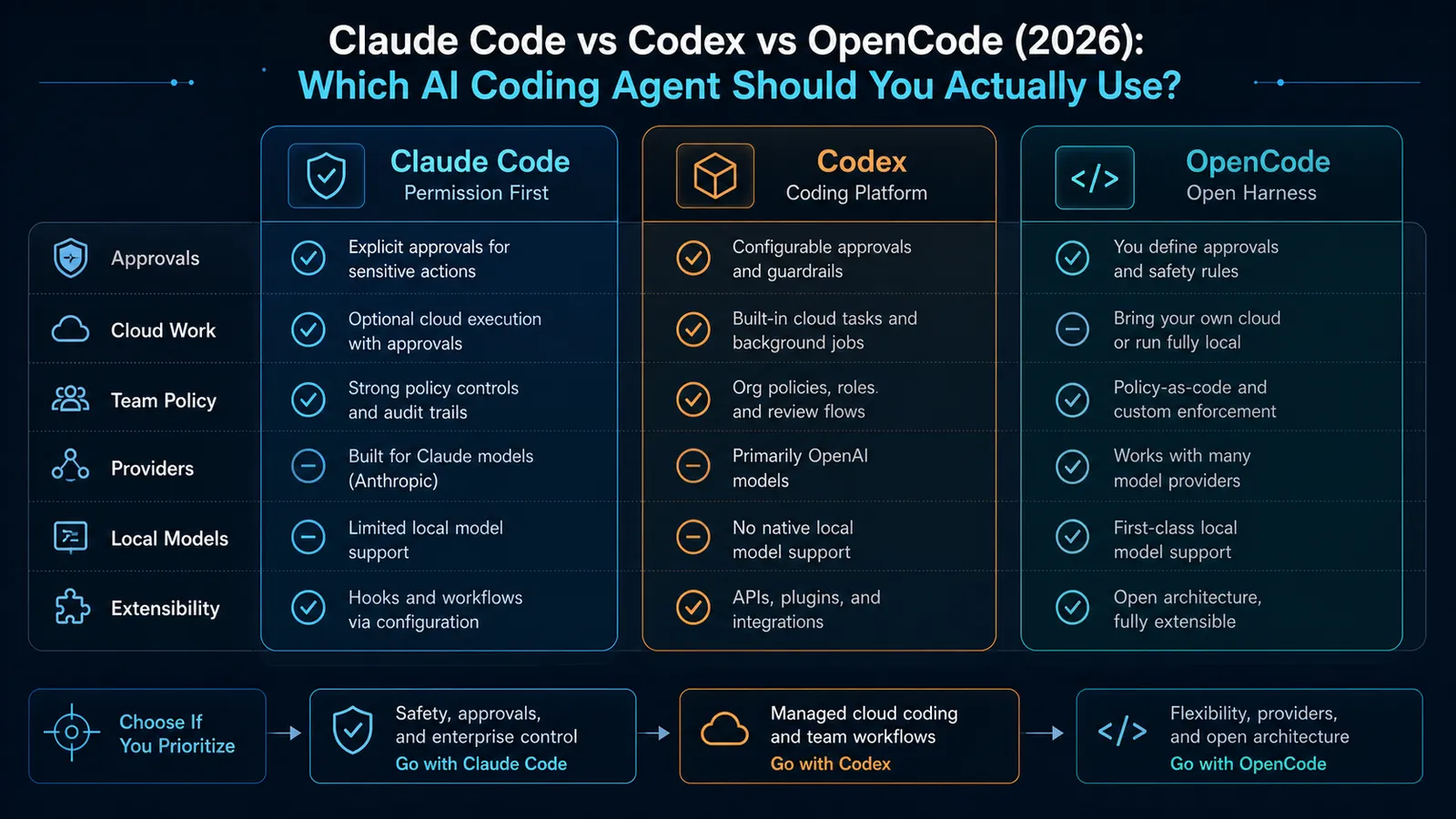
- Claude Code is a managed coding system. It is designed to work across terminal, IDE, desktop, browser, CI, and chat surfaces, but it keeps a strong bias toward permissioned operation.
- Codex is a coding platform. It is not just a terminal tool. OpenAI is clearly building it as a coordinated local-plus-cloud product with enterprise controls, review workflows, and long-running task surfaces.
- OpenCode is an open harness. It gives you a coding agent across terminal, desktop, and IDE, but the bigger value is that you can shape the stack around your preferred providers, rules, and extensions.
If you pick the wrong operating model, the feature list will not save you.
Setup and access: Codex and Claude Code are productized, OpenCode is more builder-native
Claude Code
Anthropic’s current docs say Claude Code is available in the terminal, IDE, desktop app, and browser. The getting-started docs also say Claude Code requires a Pro, Max, Team, Enterprise, or Console account, and that the free Claude plan does not include Claude Code. Anthropic also documents support for third-party provider paths like Amazon Bedrock, Google Vertex AI, and Microsoft Foundry. As of April 20, 2026, that gives Claude Code a fairly broad deployment story without making it a provider-agnostic free-for-all.
The install story is straightforward:
- native installer
- Homebrew
- WinGet
- npm package requiring Node.js 18 or later
That is polished product territory, not a hobbyist setup.
Codex
OpenAI’s current Codex docs position the product across CLI, IDE extension, app, and web. The CLI docs say Codex is included with ChatGPT Plus, Pro, Business, Edu, and Enterprise, and the first run lets you sign in with either your ChatGPT account or an API key.
The local CLI install is also simple:
npm i -g @openai/codex- run
codex
But Codex’s real distinction is not installation. It is that OpenAI is connecting local Codex use to a bigger system of cloud tasks, managed policy, code review, worktrees, and automations.
That makes Codex feel less like “just a CLI” and more like an engineering workflow surface.
OpenCode
OpenCode’s docs describe it as an open source AI coding agent available in the terminal, desktop app, or IDE extension. The current install docs point to a simple install script and npm package, and the site says the desktop app is in beta on macOS, Windows, and Linux.
The important difference is access model.
OpenCode’s docs emphasize:
- bring your own provider credentials
- use OpenCode Zen
- or connect existing accounts such as GitHub Copilot and OpenAI ChatGPT Plus/Pro
This is much closer to a builder-native toolchain than a tightly managed product stack.
Guardrails and approvals: Claude Code is the strictest by default, OpenCode is the loosest
This is the section that matters most.
Not because safety is fashionable, but because coding agents stop being useful the moment you no longer trust their operating boundaries.
Claude Code has the best documented permission model
Claude Code’s permission docs are unusually explicit.
Anthropic says:
- read-only actions do not require approval
- bash commands require approval
- file modification requires approval
It also documents multiple permission modes, including default, acceptEdits, plan, auto, dontAsk, and bypassPermissions.
That is a strong model because the default starts cautious, then gives you ways to loosen autonomy intentionally.
Anthropic’s security docs also say Claude Code uses strict read-only permissions by default and asks for explicit permission when additional actions are needed.
If you care about human review and bounded autonomy first, Claude Code sets the cleanest tone.
Codex also takes safety seriously, but in a more workflow-shaped way
OpenAI’s Codex CLI docs describe three approval modes:
- Suggest: read files, but ask before edits or commands
- Auto Edit: auto-write files, but still ask before shell commands
- Full Auto: read, write, and execute commands autonomously inside a sandboxed, network-disabled environment scoped to the current directory
That is a strong progression because it makes the autonomy ladder obvious.
Codex goes further than that in team settings. OpenAI’s enterprise docs say managed policies can control:
- allowed approval policies
- sandbox modes
- web search modes
- MCP allowlists
- restrictive command rules
And Team Config can be checked into the repository under .codex to share defaults, rules, and skills.
So Codex is not merely “safe by default.” It is increasingly designed to be standardized across teams.
If you care about governance and repeatability, that matters.
OpenCode gives you power, but it starts from permissive defaults
OpenCode’s permissions docs are blunt:
- most permissions default to
allow doom_loopandexternal_directorydefault toask.envfiles are denied by default for reads
That is not automatically bad. In fact, for advanced users it can be excellent. But it is a materially different trust posture from Claude Code and Codex.
OpenCode lets you shape permissions with:
- global rules
- per-tool rules
- pattern-matched command rules
- per-agent overrides
That is extremely flexible.
It also means OpenCode is best when you are prepared to design the boundaries instead of expecting the product to choose conservative defaults for you.
If this tradeoff matters to you, this adjacent piece is worth reading: AI Coding Agents Need Guardrails, Not More Autonomy.
Parallel work and background execution: Codex is the strongest productized option
All three tools support multi-step work.
They do not support it in the same way.
Claude Code
Claude Code supports custom subagents, and Anthropic’s docs say those subagents can work independently and return results while saving context. Claude Code also supports:
- desktop scheduled tasks
- Anthropic-hosted Routines
- browser and desktop surfaces
- remote continuation between surfaces
- GitHub Actions and CI/CD workflows
That makes Claude Code much broader than people who only know the terminal version realize.
Codex
Codex feels strongest when the work is not fully local anymore.
OpenAI’s current docs emphasize:
- local CLI work
- separate code review agents
- subagents
- Codex Cloud tasks
- app-level worktrees
- automations
- repository-connected cloud workflows
That is why Codex is the best fit when you want:
- one-off local fixes
- long-running background tasks
- app-level multi-agent coordination
- team-managed repository behavior
If you are evaluating Codex as only a terminal agent, you are missing the point.
The closer mental model is “engineering operations layer with a coding agent inside it.”
Related context: Codex Computer Use Update (April 2026): What Changed on April 16 and Why It Matters.
OpenCode
OpenCode supports multi-session work and built-in agents like Build, Plan, General, and Explore. Its docs also show that agent permissions can be scoped independently, which is useful.
But OpenCode still feels more local-first and operator-driven.
It gives you parallelism and delegation, but not the same polished managed cloud layer that Codex now exposes.
That is not a weakness if your goal is control.
It is a weakness if your goal is “set up a durable organization-wide coding-agent platform with managed workflows and reviews.”
Model and provider flexibility: OpenCode wins this category easily
This is the clearest part of the comparison.
Claude Code
Claude Code is flexible in deployment path, but not in the “anything goes” sense.
Anthropic documents support for:
- Claude subscriptions
- Anthropic Console
- Amazon Bedrock
- Google Vertex AI
- Microsoft Foundry
That is good enterprise flexibility.
It is not broad multi-provider experimentation in the way OpenCode is.
Codex
Codex is also not trying to be provider-neutral.
Its local and cloud surfaces are centered on OpenAI’s own coding stack. The CLI docs point to model controls inside Codex and current support for models like GPT-5.4 and GPT-5.3-Codex, but the product direction is clearly about making OpenAI’s own agent stack easier to use everywhere.
That can be a strength if you want one vertically integrated path.
It is a limitation if your evaluation criteria starts with “I need to swap between many providers and local runtimes.”
OpenCode
OpenCode’s docs say it supports 75+ LLM providers through Models.dev and supports local models. The site also highlights existing account paths for GitHub Copilot and OpenAI ChatGPT Plus/Pro.
That is a different category of flexibility.
OpenCode is the best fit when you want to:
- compare providers without switching tools
- run local models
- keep your coding agent harness while changing model backend
- avoid binding your workflow to one AI vendor’s product roadmap
If provider flexibility is your first requirement, OpenCode wins.
Extensibility and standards: OpenCode is the most open, Codex is the most standardized, Claude Code is the most disciplined
All three now have meaningful extension stories.
- Claude Code supports MCP, project instructions, permissions, hooks, scheduled workflows, and CI integrations.
- Codex supports MCP, plugins, skills, subagents, hooks, rules, and Team Config in
.codex. - OpenCode exposes agents, permissions, tools, MCP servers, plugins, skills, commands, rules, and config layering very directly.
So the useful distinction is not “which one is extensible?”
They all are.
The useful distinction is:
- choose Claude Code if you want extensibility inside a disciplined permission-first workflow
- choose Codex if you want extensibility that can be rolled out across teams with shared policy and repo-level defaults
- choose OpenCode if you want the extension surface itself to feel like part of the product
If MCP interoperability matters to your stack, this background is relevant: Why MCP Is Becoming the Default Standard for AI Tools in 2026.
Which one should you use?
Choose Claude Code if:
- you want the strongest default guardrails
- you value approvals and permission modes more than raw flexibility
- you want terminal, desktop, browser, and scheduled workflows without going fully open-ended
- you like Anthropic’s “tight workflow, broad surface” model
Choose Codex if:
- you want the most complete managed product across local and cloud work
- you care about automations, worktrees, code review, and team config
- you want a coding agent that can become organization infrastructure, not just a personal tool
- your team is comfortable standardizing on OpenAI’s stack
Choose OpenCode if:
- you want an open-source coding agent you can shape deeply
- you need broad model/provider support or local models
- you are willing to design your own safety posture
- you want a flexible harness more than a vertically integrated platform
SEO FAQ
Which coding agent is best for strict guardrails?
Claude Code is the strongest default pick when approval prompts, permission modes, and cautious local operation matter most.
Which coding agent is best for team workflows?
Codex is the strongest fit when a team wants local work, cloud tasks, code review, worktrees, automations, and shared repository policy in one managed product surface.
Which coding agent is best for provider flexibility?
OpenCode is the strongest fit when model/provider flexibility, local models, and open configuration matter more than a tightly managed vendor workflow.
When to Use
Use this comparison when you are choosing the coding-agent operating model for real repo work, not just testing which tool can complete a demo task. It is most useful when approvals, local autonomy, cloud tasks, team policy, provider flexibility, and extension control matter more than one isolated coding benchmark.
When Not to Use
Do not use this as a permanent ranking. These tools move quickly, pricing and model defaults change, and the right choice can vary by repository risk. Before standardizing, run the same small issue through each candidate with your actual approval policy, test command, branch workflow, and review expectations.
Sources
- Claude Code Docs — overview
- Claude Code Docs — getting started
- Claude Code Docs — permissions
- Claude Code Docs — permission modes
- Claude Code Docs — subagents
- OpenAI Developers — Codex CLI
- OpenAI Developers — Codex enterprise admin setup
- OpenAI — introducing the Codex app
- OpenCode Docs — documentation home
- OpenCode Docs — agents
- OpenCode Docs — permissions
- OpenCode Docs — tools
- OpenCode Docs — config
- OpenCode Docs — models
