If you want a visual builder for AI workflows in 2026, the hard part is not dragging nodes onto a canvas.
It is picking the product whose center of gravity matches the system you are actually trying to ship.
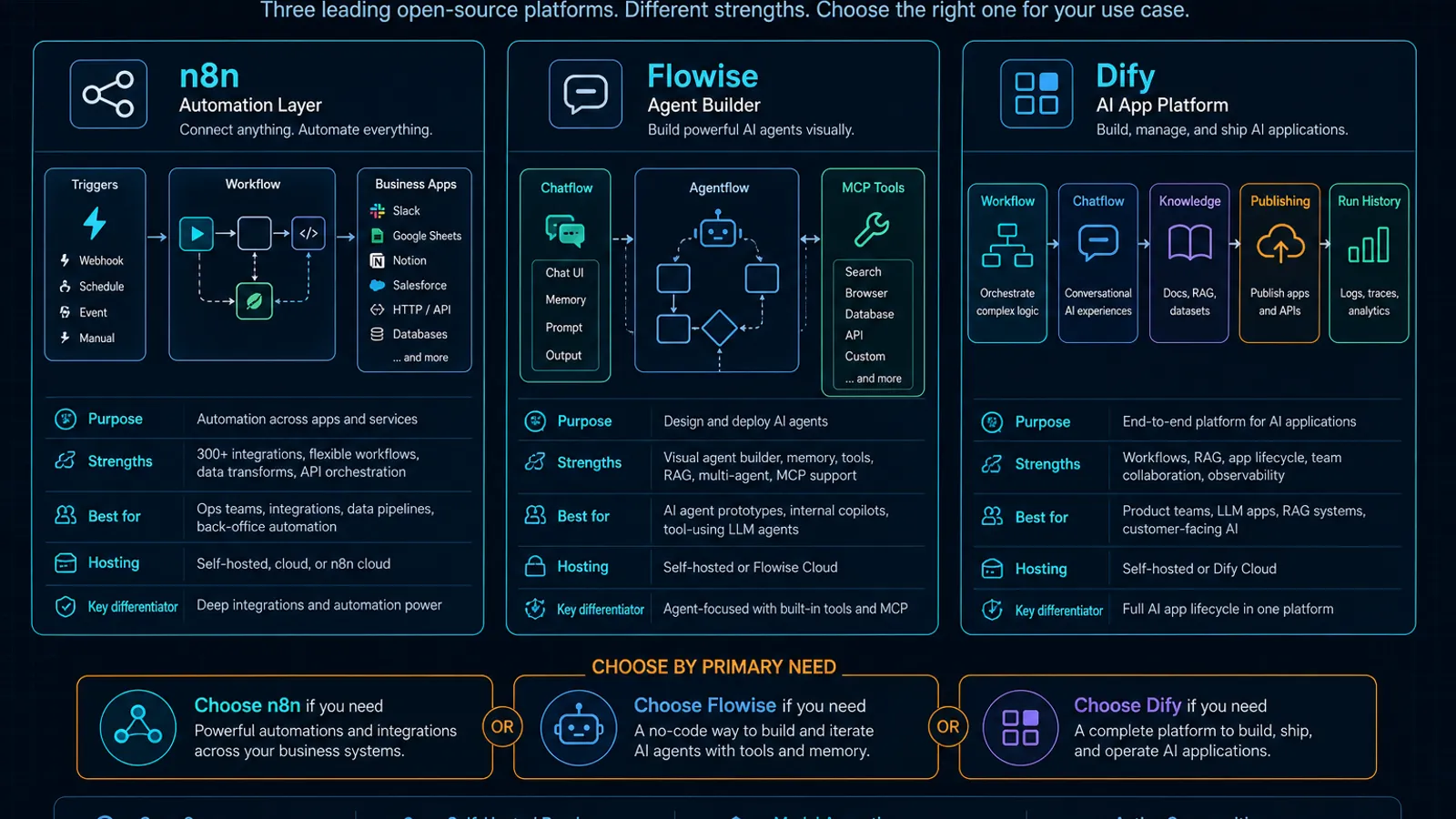
That is the real split between n8n, Flowise, and Dify:
- n8n is strongest when AI is one part of a broader automation system.
- Flowise is strongest when agent orchestration, chat flows, and MCP-heavy workflow design are the point.
- Dify is strongest when you want to build and publish AI apps with workflow/chatflow logic, tools, and knowledge features in one platform.
They overlap, but they are not aimed at the same default job.
As of April 18, 2026, the official docs make that pretty clear. n8n describes itself as a workflow automation tool that combines AI with business process automation, Flowise positions Chatflow and Agentflow around single-agent through multi-agent orchestration, and Dify positions itself as an open-source platform for building AI applications with prompt orchestration, RAG, agents, and low-code workflows.
If you are actually deciding between self-hosted chat workspaces instead of workflow builders, start here: Open WebUI vs LibreChat vs AnythingLLM (2026): Which Self-Hosted AI Workspace Should You Use?.
TL;DR
| If your real need is… | Default pick | Why |
|---|---|---|
| AI steps inside broader business automation, triggers, and app integrations | n8n | Its docs center workflow automation first, then layer AI Agent nodes, chat triggers, and AI workflow generation on top. |
| Visual agent orchestration with chat flows, multi-agent patterns, and MCP in the workflow itself | Flowise | Its docs explicitly separate Chatflow from Agentflow and document MCP tools as part of workflow design. |
| Publishing AI apps with structured workflow/chatflow logic, tools, and knowledge workflows | Dify | Its docs frame the product as an AI application platform with workflow/chatflow, tools, knowledge, and publishable web apps. |
| Lowest-friction starting point for a team already living in operational automations | n8n | It is the clearest fit when AI needs to sit beside non-AI steps instead of replacing the automation layer. |
| The most agent-builder-shaped interface of the three | Flowise | Agentflow is explicitly described as the superset for chat assistants, single-agent, multi-agent, and complex orchestration. |
| The cleanest fit for app-like AI products instead of internal workflow boards | Dify | Workflow and Chatflow are tied directly to app types, publishing, triggers, logs, and run history. |
The real decision: automation layer, agent builder, or AI app platform?
Most comparison posts flatten these tools into “low-code AI builders.”
That description is technically true and operationally weak.
The better question is:
What do you want the product to be first when the workflow gets more complicated?
- n8n wants to be your automation layer.
- Flowise wants to be your agent builder.
- Dify wants to be your AI app platform.
Once you frame it that way, the tradeoffs stop looking random.
n8n is best when AI is part of a larger automation graph
n8n’s docs still describe the core product as a workflow automation tool that combines AI capabilities with business process automation.
That matters because the platform story is not “start with an AI app.”
It is “start with workflows, then decide where AI belongs inside them.”
The AI docs reinforce that framing:
- the AI Agent is a node inside the workflow,
- it can be combined with traditional programming steps,
- and n8n explicitly contrasts LLM text generation with AI agents that select and execute actions.
That is why n8n fits best when your real workflow looks like:
- receive an event,
- call an LLM or agent at the messy part,
- then continue with ordinary automation steps.
Where n8n is strongest
Choose n8n when:
- the workflow starts from triggers, webhooks, or operational events
- AI is one subsystem in a larger business flow
- you want chat-style entry points without abandoning automation structure
- your team is already comfortable thinking in terms of workflow nodes rather than AI apps
n8n’s docs now also push two AI-specific surfaces that matter:
- AI Workflow Builder, which creates and refines workflows from natural-language descriptions
- Chat Hub, a centralized chat interface where users can access models, interact with n8n agents, and use workflow agents
That makes n8n more flexible than the old “Zapier but with LLMs” mental model.
Still, the limits are important. The Chat Hub docs explicitly note that simple personal agents cannot add file knowledge, tool selection is limited, and workflow agents only work when the workflow meets specific Chat Trigger and streaming requirements.
Where n8n is weaker
n8n is weaker when your main goal is to design agent systems as a first-class product surface.
You can absolutely build AI workflows in it. The docs show that clearly.
But the product’s center of gravity is still automation. If what you want most is a specialized agent canvas, n8n can feel like you are bending a general workflow system toward an AI-native use case.
The self-hosted AI Starter Kit is also worth reading carefully: n8n documents it as a Docker Compose template for local AI workflows, but explicitly says it is for testing only and should be secured and hardened before production use.
Flowise is best when the workflow itself is an agent system
Flowise documents its own product split more clearly than most tools in this category:
- Chatflow is designed for single-agent systems, chatbots, and simple LLM flows
- Agentflow is the superset for chat assistants, single-agent systems, multi-agent systems, and complex workflow orchestration
That distinction is useful because it tells you what Flowise thinks the product is for.
It is not primarily about general automation.
It is about building AI-native flows and agent systems visually.
Where Flowise is strongest
Choose Flowise when:
- agent design is central to the product
- you want a visual builder that is explicitly shaped around chat and agent flows
- MCP matters at the workflow level, not just as a side integration
- you want self-hosting options without giving up an AI-native canvas
Flowise’s Agentflow V2 docs are especially revealing here. They explicitly say MCP tools can be connected as part of the workflow rather than acting only as agent tools.
That is a materially different posture from “we support tools.”
It means the orchestration surface itself is being designed around modern AI tool composition.
Flowise also has a stronger documented self-host path than many people assume:
- local npm quick start
- Docker deployment
- app-level auth
- queue-based execution docs
But the docs are also blunt that self-hosting requires more technical skill and that people who just want the web app should prefer Flowise Cloud.
That is the right level of honesty. You are not just installing a toy here.
Where Flowise is weaker
Flowise is weaker when you need clear product-level publishing patterns for end-user AI apps more than you need agent-builder flexibility.
It also has a more segmented feature story than some buyers expect:
- workspaces with RBAC are documented as Cloud and Enterprise only
- evaluations are documented as Cloud and Enterprise only
So if your buying criteria include governance, team partitioning, and built-in evaluation workflows from day one, you need to read the plan boundaries closely instead of assuming the open-source self-host path includes the whole story.
Dify is best when you want to build and publish AI apps, not just flows
Dify’s docs describe the platform as an open-source system for building AI applications that combines:
- support for mainstream LLMs
- prompt orchestration
- RAG engines
- an agent framework
- low-code workflows
- and publishable interfaces and APIs
That is a different product thesis from both n8n and Flowise.
Dify is not mainly saying “automate operations” or “design agents visually.”
It is saying: build AI applications and ship them.
Where Dify is strongest
Choose Dify when:
- the end result is an AI app, not just an internal workflow
- you want a clean distinction between one-shot workflows and conversational flows
- knowledge, tools, and publishable app surfaces matter early
- you want workflow logic plus built-in publishing and runtime inspection
The docs distinguish Workflow and Chatflow in a way that is more app-centric than Flowise’s framing:
- a Workflow runs once from input to result
- a Chatflow adds a conversation layer so each user message triggers the flow before the response is generated
That is an excellent abstraction for product teams.
Dify also documents:
- event-driven triggers for workflow apps
- Run History at both application and node level
- publishing workflows as web apps
- self-hosted environment controls like
INIT_PASSWORDto gate first-time setup on exposed servers
This is why Dify makes sense when your team wants something closer to an internal AI product platform than a pure orchestration board.
Where Dify is weaker
Dify is weaker when your main problem is broad business automation outside the AI application itself.
It is also weaker if your core selection criterion is deep MCP-centric workflow design, because the official docs we checked are much louder about workflows, tools, publishing, and knowledge than about MCP as a defining platform shape.
And, like Flowise, some access-control functionality is not universal. The current web app access docs we verified are for Dify Enterprise, which means teams should be careful not to over-assume enterprise governance features on every deployment tier.
The comparison that actually matters
1. What the product is “for” before you customize it
- n8n: workflow automation with AI inside it
- Flowise: chat and agent orchestration
- Dify: AI application building and publishing
This is the most important comparison because it shapes all the others.
2. Workflow model
- n8n uses trigger-driven workflows where AI Agent is one node among many other automation nodes.
- Flowise separates Chatflow and Agentflow, with Agentflow explicitly covering more complex multi-agent orchestration.
- Dify separates Workflow and Chatflow based on interaction style: one-shot execution versus conversational flow execution.
If your team already knows it wants conversational AI products, Dify and Flowise will usually feel more native than n8n.
If your team already knows the workflow must connect many non-AI systems, n8n usually makes more sense.
3. Event-driven behavior
- n8n is naturally strong here because event-driven automation is the product’s historical center.
- Dify also documents triggers for workflow apps, including plugin triggers and webhook triggers.
- Flowise can orchestrate richly, but the sources we verified do not present event-driven external automation as its defining strength.
If “what kicks this off?” is usually a webhook, schedule, or business system event, n8n has the clearest default fit.
4. Agents and tools
- n8n documents AI Agent as a node and supports workflow agents through Chat Hub
- Flowise is the most explicitly agent-centered of the three
- Dify includes agent, tools, and workflow nodes inside a broader app platform
If you want the most visibly agent-native builder, Flowise is the strongest fit from the docs we reviewed.
If you want agents as one capability inside a larger application platform, Dify is more coherent.
5. Publishing and end-user surface
- n8n gives you chat interfaces and workflow access, but the platform identity is still workflow automation
- Flowise gives you chatflows and agentflows, but its docs emphasize builder/runtime configuration more than app publishing as the central story
- Dify explicitly ties workflows to publishable web apps and app-facing runtime surfaces
If the end product is something users should treat like an app, Dify is usually the cleanest default.
6. Observability and evaluation
- n8n documents logs in the AI Agent flow and workflow-level inspection
- Flowise documents queue dashboards plus evaluation workflows, but evaluations are limited to Cloud and Enterprise
- Dify documents detailed Run History, node-level history, and logs for published usage
If you want strong built-in app/run inspection, Dify is very strong.
If you want formal evaluation features from the vendor surface, Flowise has them, but not as a universal self-host assumption.
If evaluation discipline is a priority regardless of stack, pair this decision with Promptfoo Workflow for LLM Evals and Red Teaming.
7. Team controls and security posture
- n8n documents Chat user roles in Chat Hub and broader role systems
- Flowise documents app-level auth and security token settings, but also makes clear that some workspace/RBAC features are plan-limited
- Dify documents self-host config controls like
INIT_PASSWORD, and its richer published-app access controls are documented under Enterprise
This is where teams make lazy assumptions. “Open source” does not mean “every governance feature is equally available in every deployment mode.”
Read the plan boundaries before you standardize.
The decision framework I would actually use
Choose n8n if…
- the workflow is broader than AI
- external triggers and operational automation matter more than agent design purity
- AI is one node in a larger business process
- your team already lives in automation tooling
Choose Flowise if…
- the workflow itself is an agent system
- you want visual agent and chat orchestration first
- MCP matters materially to the workflow design
- you are comfortable with a more technical self-host path
If your next decision is code-first agent frameworks rather than visual builders, read LangGraph vs OpenAI Agents SDK vs PydanticAI (2026): Which Agent Framework Should You Use?.
Choose Dify if…
- you want to build and publish AI apps
- you need both one-shot workflow apps and conversational flow apps
- knowledge, tools, and runtime visibility belong in the same platform
- the product outcome matters more than the workflow editor itself
The most common mistake
Teams pick the builder whose demo feels smartest, not the one whose operating model matches the actual job.
That usually looks like:
- choosing n8n when the team really wanted an AI product builder
- choosing Flowise when the harder problem was operational automation across systems
- choosing Dify when the team really needed a flexible agent workbench rather than an app platform
The right question is not:
Which one has the best canvas?
It is:
Which one will still feel correctly shaped after the workflow grows, the users multiply, and the governance questions start?
When to Use
Use this comparison when your team wants a visual AI builder but has not yet decided whether the product should be an automation layer, an agent design canvas, or an AI app platform. It is especially useful before committing to a self-hosted deployment, because the operational model matters more than the canvas demo.
When Not to Use
Do not use this as a shortcut for licensing, plan, or governance review. n8n, Flowise, and Dify expose different self-hosting, team-control, evaluation, and publishing assumptions, so a production choice still needs a pilot with your real triggers, documents, users, and approval process.
SEO FAQ
Which AI workflow builder is best for business automation?
n8n is usually the strongest default when AI is one step inside a broader automation graph with triggers, webhooks, business apps, and non-AI operations.
Which AI workflow builder is best for agent orchestration?
Flowise is usually the strongest fit when the workflow itself is an agent or multi-agent system and the team wants an AI-native visual builder.
Which AI workflow builder is best for publishing AI apps?
Dify is usually the strongest fit when the goal is to build and publish AI apps with workflow/chatflow logic, tools, knowledge, run history, and app-facing surfaces.
Sources
- n8n Docs — documentation home
- n8n Docs — intro tutorial
- n8n Docs — AI Workflow Builder
- n8n Docs — Chat Hub
- n8n Docs — AI Starter Kit
- Flowise Docs — documentation home
- Flowise Docs — getting started
- Flowise Docs — Agentflow V2
- Flowise Docs — app-level authorization
- Flowise Docs — workspaces
- Flowise Docs — running Flowise using queue
- Flowise Docs — evaluations
- Dify Docs — Docker Compose self-hosting
- Dify Docs — Workflow and Chatflow
- Dify Docs — trigger overview
- Dify Docs — history and logs
- Dify Docs — environments
- Dify Docs — web app access
