If your app now depends on more than one model provider, the real problem is usually not model quality.
It is operational sprawl.
You end up with separate SDKs, separate keys, separate fallback logic, and separate places to look when requests fail.
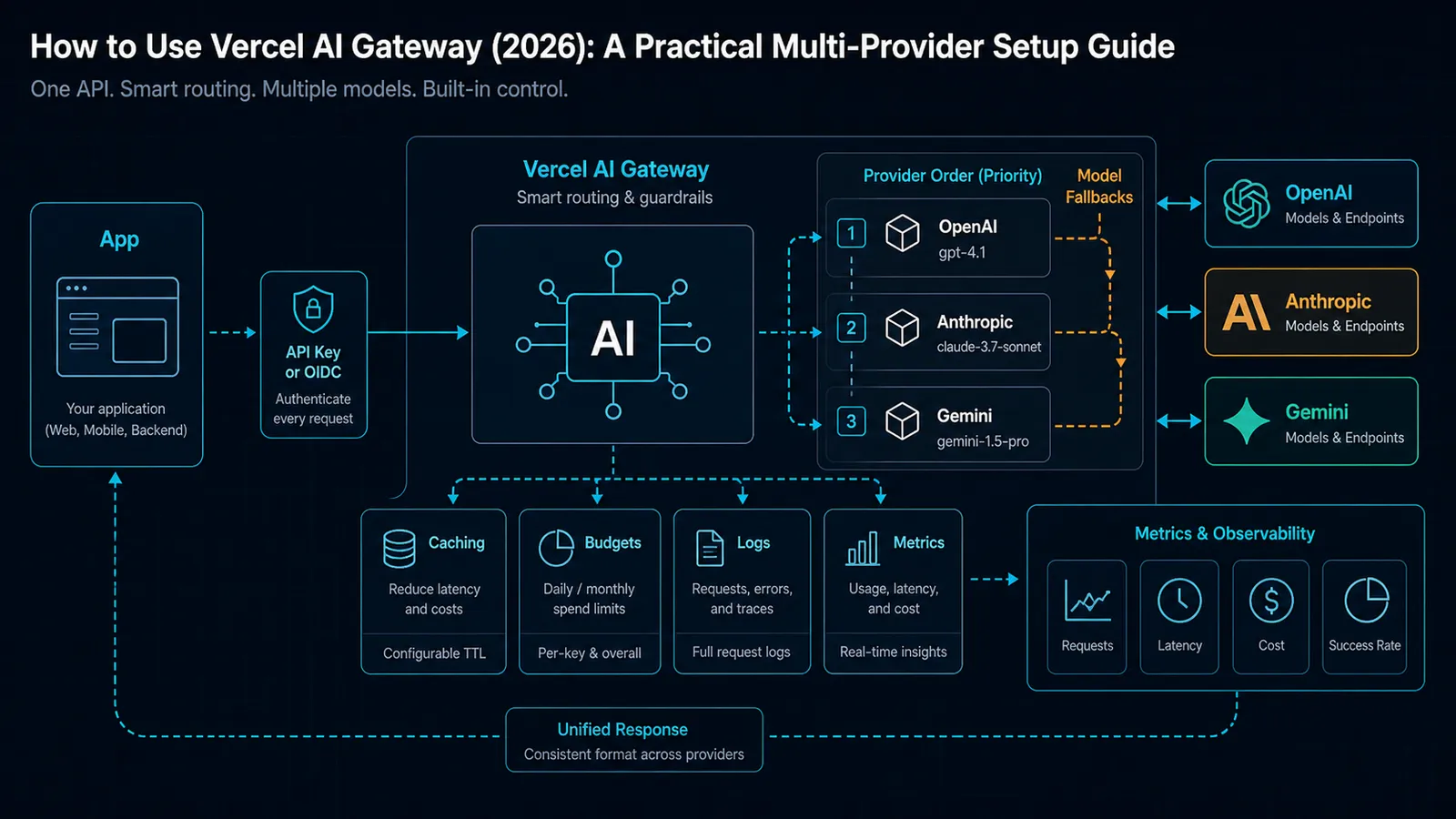
Vercel AI Gateway exists to reduce that mess. It gives you one endpoint, one auth pattern, and one place to manage routing, fallbacks, budgets, and usage visibility across many models.
That makes it a good fit for teams that want a practical control plane without building one from scratch.
If your bigger decision is still gateway selection, start with LiteLLM vs OpenRouter vs Vercel AI Gateway (2026): Which LLM Gateway Should You Use?. This guide assumes you already picked Vercel AI Gateway and now want the clean setup path.
TL;DR
As of March 7, 2026, Vercel’s docs position AI Gateway as a drop-in compatible API layer that lets you switch providers by changing a base URL. As of February 26, 2026, the gateway supports API keys and OIDC tokens for auth. As of February 9, 2026, provider options include routing order, allowlists, automatic caching, and failover behavior.
Use Vercel AI Gateway when:
- you want one OpenAI-compatible endpoint for multiple providers
- you want built-in routing and fallback behavior instead of per-provider glue code
- you want budgets, usage monitoring, and request logs in the same platform
- your app already lives in or near Vercel’s ecosystem
Do not use it as a default if:
- you only need one provider and no routing
- you want the gateway to live entirely inside your own trust boundary
- you are not willing to depend on Vercel for another layer of operational control
If you need a self-hosted control plane instead, the comparison post above is the better fit.
The real decision: one gateway vs many direct SDKs
The simplest mistake is to treat AI Gateway like a magic performance upgrade.
It is not.
It is a control plane.
That means the value is mostly about:
- fewer provider-specific code paths
- simpler failover
- centralized spending and logs
- one place to change provider preferences later
In practice, that makes AI Gateway most useful when your application is already at the point where “just call the provider directly” has become a maintenance problem.
If you are still at the stage where one hosted model is enough, direct SDK calls are simpler and cheaper to reason about.
What Vercel AI Gateway gives you
Vercel’s docs describe AI Gateway as a unified API with a single endpoint for hundreds of models. The docs also call out:
- budgets
- usage monitoring
- load balancing
- fallback management
- OpenAI Chat Completions support
- OpenAI Responses support
- Anthropic Messages support
- AI SDK integration
- zero markup on tokens, including BYOK flows
That combination is why the gateway is attractive for product teams. It is not just a compatibility shim. It is a managed routing layer with enough metadata and policy surface to be useful in real applications.
This is especially relevant if you are building:
- user-facing AI features that need provider failover
- internal copilots that should not break when a provider has an incident
- apps that need to swap models over time without rewriting everything
- workflows where a platform team wants spend visibility and routing control
Step 1: choose authentication first
Vercel supports two auth methods for AI Gateway:
- API key authentication for the most direct setup
- OIDC token authentication for Vercel-linked local development
If you are deploying an app, the API key path is usually the cleanest starting point. If you are developing locally in a Vercel-linked project, OIDC can reduce manual key handling.
The important detail is that auth is not just a formality here. It is the first thing to get right because every other request depends on it.
API key setup
Create a gateway key in the Vercel dashboard, then store it as an environment variable:
AI_GATEWAY_API_KEY=your_api_key_hereOIDC setup for local development
If you are using the OIDC flow, Vercel’s docs say the token is valid for 12 hours, so you should expect to refresh it during development.
The practical sequence is:
- link the project with
vercel link - pull env vars with
vercel env pull - use the generated token in your local requests
Step 2: point your client at the gateway base URL
The OpenAI-compatible endpoint lives at:
https://ai-gateway.vercel.sh/v1That means the simplest migration path is often just a base URL swap.
OpenAI client example
import OpenAI from 'openai';

const client = new OpenAI({
  apiKey: process.env.AI_GATEWAY_API_KEY,
  baseURL: 'https://ai-gateway.vercel.sh/v1'
});

const response = await client.chat.completions.create({
  model: 'anthropic/claude-sonnet-4.6',
  messages: [{ role: 'user', content: 'Summarize this feature request in three bullets.' }]
});

console.log(response.choices[0]?.message?.content);
AI SDK example
If you are already using Vercel’s AI SDK, the gateway fits even more naturally. On Vercel, string model IDs can resolve through AI Gateway by default:
import { generateText } from 'ai';

const result = await generateText({
  model: 'openai/gpt-5.4',
  prompt: 'Draft a concise release note for a routing fallback update.'
});

console.log(result.text);
The practical point is not the exact client shape.
It is that the same app can keep its existing request style while changing where requests go.
Step 3: decide your provider routing strategy
This is where AI Gateway becomes more than a simple proxy.
Vercel’s provider-options docs say you can control:
orderto prefer some providers before othersonlyto restrict which providers are allowedcaching: 'auto'to let the gateway choose the right caching behavior- per-provider timeouts for faster failover
In plain English, this means you can make the gateway do the boring routing work for you.
A practical routing pattern
Use a preferred provider order when you have a stable primary vendor, but keep a backup path in case that provider slows down or fails.
import { streamText } from 'ai';

const result = streamText({
  model: 'openai/gpt-5.4',
  prompt: 'Outline a safe rollout plan for a gateway migration.',
  providerOptions: {
    gateway: {
      order: ['openai', 'anthropic'],
      only: ['openai', 'anthropic'],
      caching: 'auto'
    }
  }
});
That pattern is useful when you want:
- OpenAI first, Anthropic second
- or Anthropic first, OpenAI second
- but still want a controlled fallback path if one provider misbehaves
If your app spans multiple request types, the provider order can be different per route. For example, you might prefer one vendor for fast chat responses and another for longer reasoning or structured generation.
Step 4: add model fallbacks, not just provider fallbacks
Provider routing is only half the story.
Vercel also supports model fallbacks. The docs show a models array inside providerOptions.gateway, which lets the gateway try backup models if the primary one fails or cannot handle the request.
That matters because failures are not always outages.
Sometimes the issue is:
- a capability mismatch
- a context limit
- an unsupported input shape
- a provider-specific error
Example fallback chain
import { streamText } from 'ai';

const result = streamText({
  model: 'openai/gpt-5.4',
  prompt: 'Write a migration summary for a product team.',
  providerOptions: {
    gateway: {
      models: ['openai/gpt-5.4', 'anthropic/claude-sonnet-4.6', 'google/gemini-3-flash']
    }
  }
});
This is the kind of setup you want when request continuity matters more than provider purity.
The gateway can take care of the first acceptable success path instead of making your app learn every provider failure mode itself.
Step 5: use budgets and visibility as part of the design
This is where the practical value becomes obvious.
The docs say AI Gateway can monitor usage and help manage spend. Vercel also surfaces request logs, token counts, and time-to-first-token in the gateway observability workflow.
That is useful because model routing without visibility usually turns into mystery spending.
Treat budgets and logs as part of the architecture, not an afterthought:
- set a default model per route
- keep fallback paths explicit
- review usage spikes by project
- check logs when latency changes
If you are routing multiple providers, visibility is not optional. It is the only way to know whether the gateway is helping or just hiding cost drift.
When Vercel AI Gateway is the wrong choice
Vercel AI Gateway is not the right default when:
- you need the control plane to stay in your own infrastructure
- you are already committed to a self-hosted gateway like LiteLLM
- your app is simple enough that one provider and one SDK are enough
- you do not want another platform dependency in the critical path
That is why the comparison article matters. The right answer is not “always use the gateway.”
The right answer is “use the gateway when routing, visibility, or provider switching is the actual problem.”
Practical recommendation
The clean default is:
- create an AI Gateway API key
- point your client to
https://ai-gateway.vercel.sh/v1 - start with one primary provider
- add provider ordering only when you need failover
- add model fallbacks when request continuity matters
- turn on caching and observability deliberately, not blindly
That sequence gives you the least surprising path from “one model” to “multi-provider app” without building a bespoke routing layer first.
Visual checkpoints
Before treating the gateway setup as production-ready, verify:
- the app uses one gateway base URL instead of scattered provider URLs
- the auth path is clear: API key for deployed apps or OIDC for linked local development
- provider order is explicit where failover matters
- model fallback chains are route-specific instead of global guesswork
- request logs show model, provider, token counts, latency, and project/API-key context
- budgets are configured before the first traffic spike
The gateway is doing its job when provider switching becomes visible and reversible, not invisible magic.
SEO FAQ
What is Vercel AI Gateway used for?
Vercel AI Gateway is used as a managed control plane for routing AI requests across model providers, centralizing auth, fallbacks, usage visibility, and budget controls behind one endpoint.
Is Vercel AI Gateway better than calling providers directly?
It is better when routing, failover, and centralized visibility matter. Direct provider SDKs are simpler when one provider is enough and you do not need another operational layer.
Should every app use model fallbacks?
No. Add model fallbacks only when request continuity matters and the fallback behavior has been tested. Silent fallback can change output style, latency, cost, and feature support.
Sources
