TL;DR
On April 15, 2026, Cloudflare renamed Browser Rendering to Browser Run and bundled several new capabilities around a clearer product thesis: give AI agents a browser that is remote, inspectable, and safer to operate than a local desktop session.
That sounds cosmetic until you look at what actually shipped across the same release window.
Cloudflare paired the rename with Live View, Human in the Loop, session recordings, WebMCP support, and a claim of 4x higher concurrency limits for AI agents. It also added wrangler browser commands on April 14, 2026 and documented connections from Browser Run into CDP-compatible clients, including Puppeteer, Playwright, and MCP clients.
If you have been searching for what Cloudflare Browser Run actually is, the short answer is this:
It is Cloudflare’s browser automation and remote-browser runtime, now being repositioned for AI agents instead of generic headless browsing alone.
What Cloudflare actually launched
Cloudflare’s April 15, 2026 announcement describes Browser Run as the evolution of Browser Rendering for agent workflows. The company’s headline additions were:
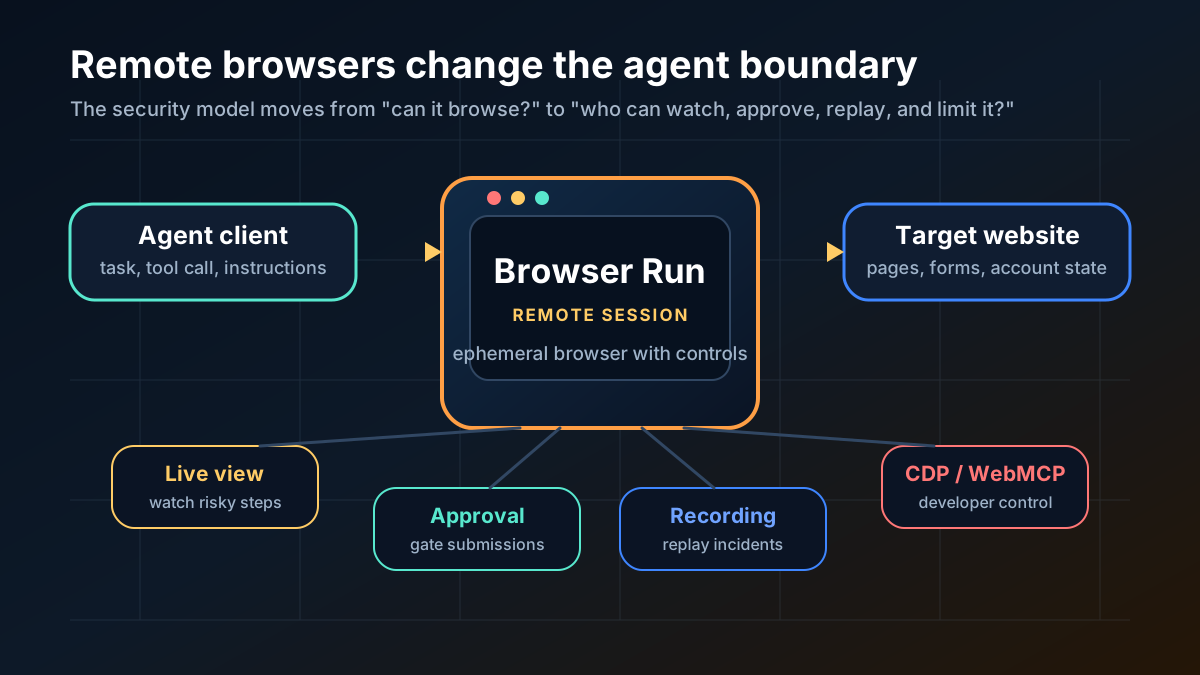
- Live View, so you can watch a browser session in real time
- Human in the Loop, so a session can pause for user confirmation on sensitive actions
- session recordings, so you can replay what happened after a run
- WebMCP support, so sites can expose structured tools directly to agents
- 4x higher concurrency limits for AI-agent use cases
That matters because the product is no longer framed as “headless Chrome on Cloudflare.” It is being framed as browser infrastructure for agents that need visibility, control, and structured interaction.
Cloudflare’s docs reinforce that shift. The Browser Run reference now groups the product around:
- quick browser actions like screenshots, markdown extraction, scraping, and crawling
- direct CDP access for browser-session control
- Playwright MCP support
- WebMCP for structured tool discovery inside the browser
That is a different story from plain web scraping.
Why the rename matters
The rename from Browser Rendering to Browser Run is not the interesting part by itself. The important point is what Cloudflare is trying to optimize the product for.
“Browser Rendering” sounds like a utility API for screenshots and PDFs.
“Browser Run” sounds like an execution surface.
That distinction matters because the market for AI tools is shifting from “can the model read a webpage?” to “can the agent complete a browser task with enough control, safety, and observability to be useful in production?”
Cloudflare is clearly aiming at the second category.
This is also why the launch fits alongside the broader move toward more constrained agent systems rather than raw autonomy. A remote browser is useful, but it becomes much more useful when it is paired with permission checkpoints and replayable logs. That is the same practical concern behind AI Coding Agents Need Guardrails, Not More Autonomy.
The practical features developers should care about
Not every launch bullet matters equally. A few of these are much more important than the rest.
1. Live View makes browser agents debuggable
Cloudflare added Live View so developers can watch an active browser session rather than infer what happened from logs and screenshots after the fact.
That is a bigger product improvement than it sounds.
A lot of browser-based agent systems fail in messy ways:
- the model clicks the wrong element
- the page layout shifts
- auth expires mid-session
- a CAPTCHA or approval gate appears
- the agent loops on a page it misunderstood
Without a live window into the session, debugging those failures is slow and mostly speculative. With Live View, Browser Run starts to look less like a black box and more like a remote runtime you can actually operate.
2. Human in the Loop is the right default for real browser tasks
Cloudflare’s Human in the Loop feature lets a browser run pause for user confirmation before completing sensitive actions.
That is the correct product direction.
If an agent is booking travel, submitting a purchase, changing account settings, or interacting with internal systems, a fully autonomous click path is often the wrong target. Most teams do not need an agent that can complete every action without review. They need one that can do the boring browser work up to the point where a human should decide.
Browser Run is stronger because Cloudflare is making that checkpoint part of the product instead of leaving every team to invent it on their own.
3. CDP and wrangler browser make the workflow more realistic
On April 14, 2026, Cloudflare added wrangler browser commands for creating, listing, closing, and viewing browser sessions from the terminal.
That matters for two reasons.
First, it lowers friction for developers who want to manage sessions without manually dealing with raw API requests and tokens. Cloudflare explicitly says Wrangler handles authentication for these commands.
Second, the same changelog says a created session can be connected to by any CDP-compatible client, including Puppeteer, Playwright, and MCP clients. That means Browser Run is not limited to Cloudflare’s own abstractions. It can plug into tools developers already use.
That is the kind of detail that decides whether a product gets evaluated seriously or stays a demo.
WebMCP is the most forward-looking part of the launch
The most interesting feature in the April 15 set is probably WebMCP.
Cloudflare’s changelog frames WebMCP as a way for websites to expose structured tools that agents can discover and call directly. Instead of relying only on the normal screenshot-analyze-click loop, an agent can use functions such as a site-specific search or booking action with typed parameters.
That is worth taking seriously.
If WebMCP works the way Cloudflare is pitching it, it could remove a lot of the fragility that makes browser automation painful:
- fewer brittle selector-based flows
- fewer hallucinated UI interpretations
- more reliable task completion on compatible sites
- a cleaner handoff between web apps and agent runtimes
That also connects directly to the argument in Why MCP Is Becoming the Default Standard for AI Tools in 2026: the more tools can expose structured actions instead of forcing models to infer everything from pixels and DOM noise, the more reliable the agent layer becomes.
There is one caveat worth stating clearly. Cloudflare’s WebMCP changelog says this requires Chrome beta features and uses an experimental pool for those sessions right now. So this is important, but it is still early.
Where Browser Run fits in a real stack
Cloudflare Browser Run is not a general replacement for every sandbox, container, or browser farm.
The better way to think about it is narrower:
It is useful when your agent needs a remote browser session that can be observed, replayed, gated, and connected to existing automation clients.
That makes it a plausible fit for:
- browser-based research agents
- web automation inside support and ops tooling
- login-dependent scraping and extraction
- AI workflows that need screenshots, DOM inspection, or interactive browsing
- semi-autonomous tasks that need approval before a final click
If you need isolated execution for arbitrary generated code, a browser runtime is only one part of the answer. That is where something like Vercel Sandbox in the Main CLI solves a different problem. Browser Run handles browser interaction. Sandbox products handle broader compute isolation.
Those are adjacent layers, not substitutes.
One important nuance on product maturity
Cloudflare’s documentation currently spans several surfaces at once:
- Browser Run quick-action APIs
- CDP session management
- Playwright and Puppeteer integrations
- Playwright MCP
- WebMCP beta features
That breadth is promising, but it also means the product is still settling into its final shape.
The safest reading is not that Browser Run is a finished, stable “browser agent platform.” The safer reading is that Cloudflare is assembling the key primitives quickly:
- remote browser sessions
- terminal and API controls
- live observation
- human approval
- replayability
- structured website tools
That is enough to make it worth paying attention to now, especially if your team is already building browser-dependent agent workflows.
Should developers care right now?
You should pay attention if you are building:
- AI agents that need to operate inside real websites
- browser automation that needs better observability
- support, ops, or internal tools with human approval steps
- MCP-connected workflows that may move beyond brittle click automation
You should care less if your needs are limited to simple one-off screenshots or if your stack already has a mature remote-browser platform with the same guardrails and replayability.
The stronger reason to watch Browser Run is not that Cloudflare shipped “yet another browser API.” It is that Cloudflare is increasingly packaging browser control as an agent runtime surface, not just a rendering primitive.
Bottom line
Cloudflare Browser Run is worth tracking.
On April 15, 2026, Cloudflare turned Browser Rendering into a more explicit AI-agent product, then backed that repositioning with features that actually matter:
- Live View for debugging
- Human in the Loop for control
- session recordings for replay
- CDP compatibility for existing tooling
- WebMCP for more structured web interactions
The rename is not the story.
The story is that Cloudflare is trying to make browser automation less fragile and more operable for agent teams. If your workflows depend on agents that browse the web, log into products, or complete tasks in real interfaces, that is a meaningful shift.
When to Use
Use Cloudflare Browser Run when an agent needs a remote browser session that can be observed, replayed, and controlled through existing automation clients. It is strongest for workflows that need screenshots, DOM access, CDP-compatible tools, Playwright or Puppeteer integration, session recordings, and human approval before sensitive browser actions.
It is also worth evaluating when browser automation is part of an MCP-connected agent stack. WebMCP and Playwright MCP support point toward a less brittle model than pure screenshot-and-click automation, especially for teams trying to make browser agents more inspectable.
When Not to Use
Do not use Browser Run as a general replacement for application sandboxes, worker queues, or arbitrary code execution environments. It solves browser-session control, not every isolation or compute problem.
It is also not the right default for simple static screenshots, one-off scraping jobs, or workflows where a local Playwright run is cheaper and easier to debug. For sensitive actions such as purchases, account changes, or form submissions, require Human in the Loop checkpoints instead of treating the browser agent as fully autonomous.
SEO FAQ
What is Cloudflare Browser Run?
Cloudflare Browser Run is Cloudflare’s remote browser automation runtime. It evolved from Browser Rendering and is now positioned around AI-agent workflows that need browser sessions, Live View, Human in the Loop controls, recordings, CDP access, and structured web tooling.
What changed when Browser Rendering became Browser Run?
Cloudflare reframed the product for agent workflows and added features such as Live View, Human in the Loop, session recordings, WebMCP support, and higher concurrency limits for AI-agent use cases.
Why does Live View matter for browser agents?
Live View lets developers watch an active browser session instead of relying only on logs or screenshots after the fact. That makes it easier to debug wrong clicks, page changes, authentication issues, and loops.
What is WebMCP in Cloudflare Browser Run?
WebMCP is Cloudflare’s early approach for letting websites expose structured tools that agents can discover and call, reducing reliance on brittle visual or selector-based browser automation.
Is Browser Run fully autonomous?
It should not be treated that way by default. Browser Run is strongest when it combines automation with observability, recordings, and Human in the Loop approval for sensitive actions.
Sources
