TL;DR
On March 4, 2026, OpenAI expanded the Codex app to Windows. That sounds like a platform availability update, but the more important signal is workflow: Codex is being positioned as a sandboxed coding agent you can actually integrate into daily engineering, not just a “write code in chat” demo. (Introducing the Codex app)
And it is not happening in isolation. In early 2026, OpenAI also shipped a round of Codex updates across the stack, including GPT‑5.3‑Codex (with a formal system card) and product changes that push Codex toward “delegate work, review diffs, iterate” as the default loop. (GPT‑5.3‑Codex system card) (Introducing upgrades to Codex)
Here is the practical takeaway for builders: this is less about “which model is smartest today” and more about how agentic coding gets shipped safely.
What is actually new (that matters)
The Windows release matters because it expands who can adopt the same Codex workflow surface across a team without friction. But the real “new” is the product shape:
- Codex is being marketed as an agent that can manage multiple tasks and agents in parallel.
- The experience is built around reviewable outputs rather than blind execution.
- The Codex ecosystem includes Codex CLI, which OpenAI positions as an open-source, terminal-first coding agent interface. (Codex CLI announcement)
If you have been following the last year of coding assistants, this is a quiet shift: the winning tools are moving from “autocomplete and vibes” to structured execution + guardrails.
Why this is the direction the whole stack is heading
Modern coding agents only become consistently useful when they can:
- understand your repo structure and conventions
- run build/test loops (or at least validate changes)
- write code in a controlled environment
- produce artifacts you can review and merge
This is also where standards like MCP (Model Context Protocol) start to matter: agentic tools need reliable ways to connect to the systems where work actually lives (repos, docs, tickets, design, infrastructure). If MCP becomes the default integration layer, coding agents get more capable — and the need for clear boundaries gets sharper. (Why MCP Is Becoming the Default Standard for AI Tools in 2026)
The underrated feature: secure-by-default execution
The Codex app post makes a strong claim that is worth copying even if you never touch Codex: secure by default, configurable by design.
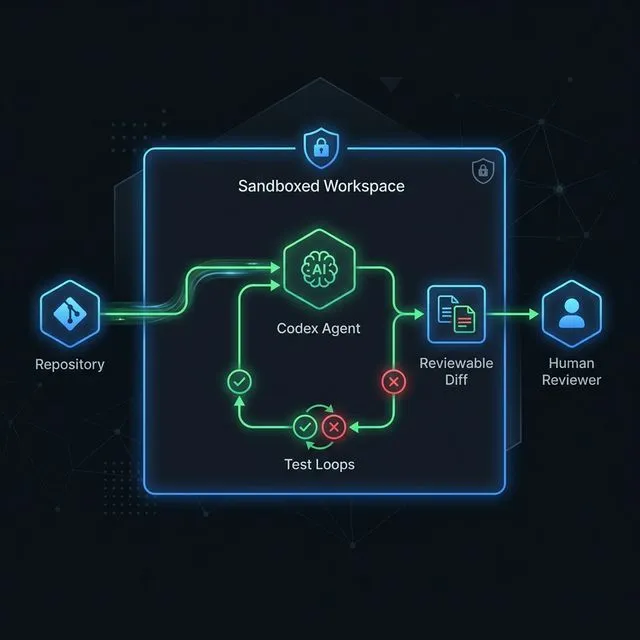
The key idea is that agents should be constrained to the folder/branch they are working in, use limited search by default, and request permission for higher-risk actions like network access or elevated commands. That is the difference between “cool demo” and “tool you can put into a team workflow without crossing your fingers.” (Introducing the Codex app) (Introducing upgrades to Codex)
The workflow you should copy (even if you do not use Codex)
The most valuable idea to steal from the Codex direction is this:
Treat the model as a worker inside a constrained workspace, and treat your merge process as the safety rail.
Concretely:
- Give the agent a clear task (“add feature X”, “fix bug Y”), not open-ended “improve the codebase”.
- Force small diffs and fast validation loops.
- Keep write access scoped and make approvals explicit for high-risk actions.
This aligns with the broader “guardrails” argument we have been making about agentic coding: autonomy is not the point; trustable execution is. (AI Coding Agents Need Guardrails, Not More Autonomy)
Where teams usually go wrong with coding agents
If you adopt Codex (or any similar tool) and it disappoints, it is almost always one of these failures:
- You expected it to replace senior judgment instead of accelerating it.
- You gave it too much freedom without a tight definition of “done”.
- You treated “it ran” as “it works” and skipped validation.
- You let it touch secrets or production systems without strong boundaries.
In other words: the model is rarely the bottleneck. The workflow is.
Practical recommendation
If you have mixed dev environments (Mac + Windows), the Codex app expansion is a good moment to standardize a single “agent workflow” policy:
- what the agent can change
- what requires human approval
- what must be validated before merge
- how you log and review agent work
Then evaluate Codex (app or CLI) against that policy.
The point is not to chase a new tool every week. The point is to build a stack that stays useful after the novelty wears off.
For Windows-heavy teams, the biggest practical win is consistency: one review path, one approval rule, one logging habit, and one expectation for what agent output must look like before it gets merged. That kind of standardization saves more time than any single feature release because it removes ambiguity from the collaboration loop.
It also makes training easier. When the team can point to a single policy for agent behavior, new contributors do not have to guess which prompts are safe, which files are off-limits, or what level of verification is expected before a pull request is accepted. That matters more on Windows because mixed tooling often creates process drift faster than the model itself does.
Adoption checklist for Windows teams
Before rolling Codex into daily engineering work, use a small policy checklist instead of a vague “try it and see” rollout:
- Define allowed work: bug fixes, tests, refactors, documentation, and small feature slices are safer first targets than production migrations or secrets-heavy infrastructure changes.
- Set repository boundaries: decide whether Codex can work across the whole repo or only inside selected packages, branches, and worktrees.
- Require validation evidence: every agent-generated change should show the command it ran, the tests it could not run, and the files it changed.
- Separate suggestion from merge authority: Codex can produce a diff, but a human reviewer should still own final merge decisions.
- Log agent activity: keep enough history to understand prompts, generated changes, validation attempts, and approval decisions.
For teams already comparing coding-agent workflows, the practical comparison is not just Codex versus another assistant. It is whether your process has enough guardrails to make any assistant useful. The same baseline applies to Claude Code vs Codex vs OpenCode and to broader AI coding agent guardrails.
What would make this a failed rollout?
A Codex rollout is probably unhealthy if developers start accepting large changes they cannot explain, if tests become optional because “the agent seemed confident,” or if the team uses Windows availability as a reason to skip sandbox and approval rules. The useful version of Codex is not autonomous mystery coding. It is faster implementation inside a workflow that still makes ownership visible.
One practical test is to require every Codex-produced change to answer three questions before review: what changed, how was it validated, and what risk remains. If the agent output cannot answer those clearly, the task was probably too broad or the workflow was missing a guardrail.
That review habit keeps the Windows release in the right frame. Platform availability is useful, but the real adoption milestone is when every developer, regardless of OS, can follow the same safe agent workflow.
Sources
