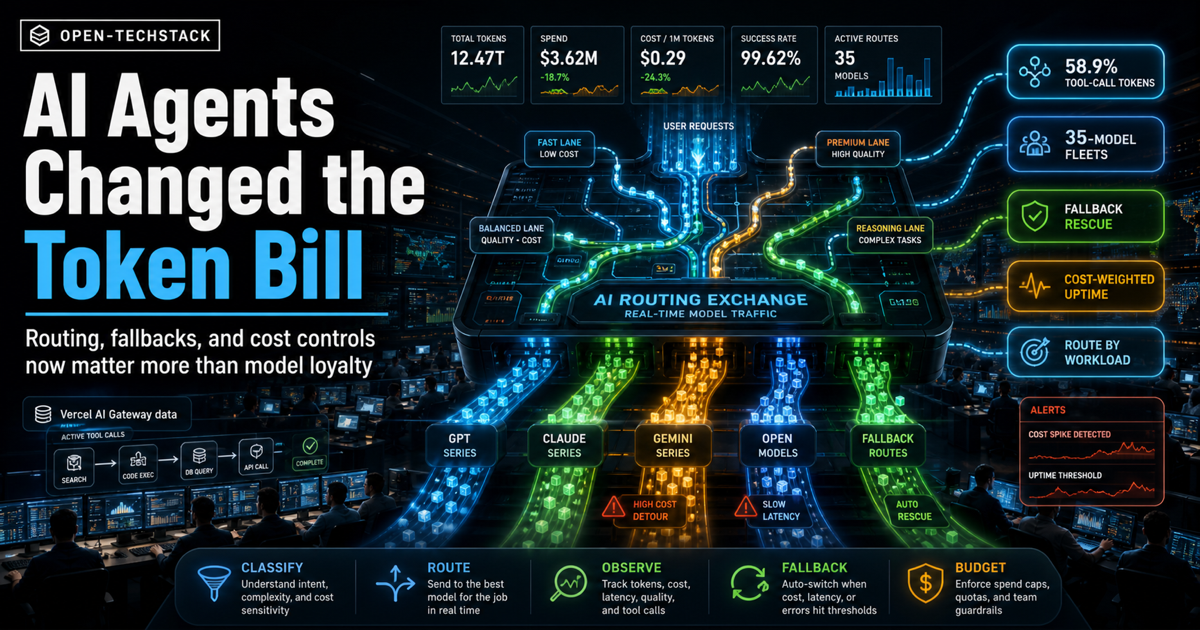
Vercel’s AI Gateway production index is a useful snapshot of where AI application traffic is going: agent workloads are no longer a side experiment. They are becoming the shape of production usage.
The headline number is not just that more apps are using multiple models. It is that tool-call requests account for a much larger share of token volume than request volume. Vercel reports that 22.2% of requests include tool calls, but those requests consume 58.9% of all tokens in the measured traffic.
That should change how teams design AI infrastructure.
The practical question is no longer “which model should we standardize on?” The sharper question is: which routing policy keeps each workload reliable, affordable, and observable when agents start using tools?
This is independent Open-TechStack analysis. It is not official Vercel guidance, financial advice, procurement advice, or a sponsored post.
TL;DR
Agent traffic changes the economics of AI apps because tool use makes requests longer, stateful, and harder to retry blindly.
- Vercel’s production index says 22.2% of AI Gateway requests include tool calls.
- Those tool-call requests consume 58.9% of all tokens, so agent traffic is already the cost center.
- Vercel says teams at more than 10 million tokens per month use an average of 35 distinct models.
- The same report says fallback routing rescued 3.5% of otherwise failed requests.
- That points to a simple pattern: route by workload, not by brand loyalty.
- The minimum production stack is an intent classifier, cost/risk tiers, model lanes, fallback policy, token and latency observability, budget guardrails, and human review for high-risk side effects.
If you are already using Vercel AI Gateway, compare this article with our setup guide: How to Use Vercel AI Gateway (2026). If you are still choosing a gateway, start with LiteLLM vs OpenRouter vs Vercel AI Gateway.
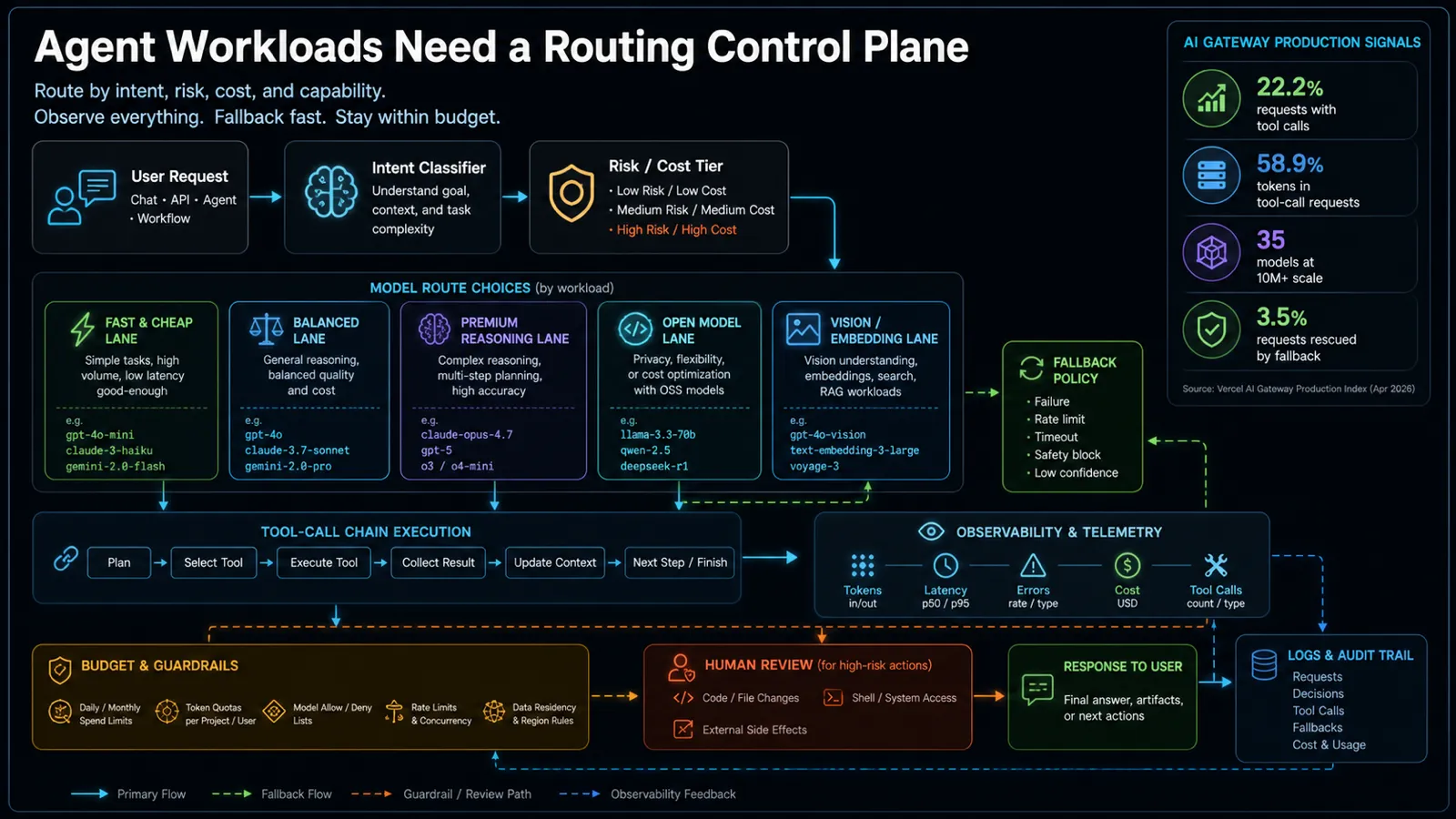
What the production data changes
Most AI app architecture diagrams still make the model look like a single box. The app sends a prompt. The model responds. Maybe there is retrieval. Maybe there is a tool call.
Agent traffic breaks that simple picture.
Once a request can call tools, inspect retrieved context, update state, retry failed steps, write files, query databases, or branch into a follow-up action, the model call becomes only one part of the workload. The expensive part is often the whole trajectory: prompt context, tool schemas, retrieved documents, intermediate reasoning, tool outputs, repair attempts, and final synthesis.
That is why the Vercel numbers matter. A minority of requests can dominate token usage because agent requests are structurally heavier than chat requests.
For teams, this creates four operational requirements:
| Requirement | Why it matters |
|---|---|
| Workload classification | A one-sentence answer, a code review, an invoice extraction, and a multi-step support agent should not use the same model route. |
| Cost-aware routing | The cheapest acceptable model should handle simple work before expensive reasoning models are invoked. |
| Fallback design | Rate limits, provider incidents, timeouts, and safety blocks need planned detours, not improvised retries. |
| Full observability | Teams need token, latency, tool-call, error, and cost visibility by route and workload type. |
The key shift is architectural. Model choice becomes a runtime policy, not a hard-coded dependency.
Why one default model is now a weak default
One default model is simple to start with. It is also easy to outgrow.
If every workload uses the same premium model, simple tasks become too expensive. If every workload uses the same cheap model, complex tasks degrade silently. If every failure retries the same provider, a partial outage becomes a product incident. If every route logs only final answers, the team cannot explain why the bill jumped.
The better pattern is a model-lane strategy:
| Lane | Best for | Avoid using it for |
|---|---|---|
| Fast and cheap | classification, formatting, short answers, routing decisions | high-risk answers, long reasoning, complex tool chains |
| Balanced | default app interactions, support drafts, ordinary summaries | premium workflows where accuracy cost is justified |
| Premium reasoning | multi-step planning, complex code, hard analysis, expensive mistakes | bulk low-value traffic |
| Open model | privacy-sensitive tests, cost experiments, controllable workloads | tasks requiring provider-specific capability or highest reliability |
| Vision or embedding | screenshots, documents, retrieval, similarity search | ordinary text generation |
This does not mean every product needs 35 models. It means mature traffic tends to become multi-model because workloads are not identical.
Vercel’s production index makes that point with the 10-million-token threshold: larger teams use many models. The lesson is not to copy the exact count. The lesson is to design the application so model variety can be governed instead of scattered across code.
The agent routing playbook
Start with a boring rule: no application code should call a provider directly unless the team can explain why that route is special.
Put a small routing layer in front of model calls. It can be a managed gateway, an internal service, or a thin policy module. What matters is that the policy is explicit.
Use this first version:
| Step | Routing decision |
|---|---|
| 1. Classify the request | Is this chat, extraction, coding, retrieval, vision, agentic tool use, or high-risk action? |
| 2. Assign a risk tier | Is the output informational, user-visible, state-changing, financial, legal, security-sensitive, or destructive? |
| 3. Pick a model lane | Choose the cheapest lane that meets quality, latency, privacy, and capability requirements. |
| 4. Set a token budget | Cap context, retrieval chunks, tool outputs, retries, and final answer length. |
| 5. Define fallback order | Pick a second model or provider before production traffic fails. |
| 6. Log the trajectory | Capture route, model, tokens, latency, errors, tool calls, fallback reason, and cost. |
| 7. Escalate risky actions | Require human review before write actions, shell commands, external side effects, or irreversible changes. |
This is where agent teams should connect the dots with observability. Our earlier AI agent observability stack goes deeper on spans, tool-call logs, and cost traces. The routing layer should feed that stack, not sit beside it.
The fallback rule that prevents expensive chaos
Fallbacks are useful only when they preserve intent and safety.
A bad fallback policy says: “If the model fails, try another model.”
A better fallback policy says:
- If the failure is a rate limit, retry a compatible route with the same tool schema.
- If the failure is a timeout, try a faster lane with a smaller context window.
- If the failure is a safety block, do not route around it blindly; escalate or return a constrained refusal.
- If the failure is poor confidence, ask for clarification or send the task to a stronger model.
- If the failure happens after a side effect, stop and reconcile state before retrying.
Vercel’s report says fallback routing rescued 3.5% of otherwise failed requests. That is a meaningful availability signal, but it should not be read as permission to hide every model failure. Some failures are exactly the point where the system should slow down.
For example, a customer-support answer can often fall back to a different provider. A database write agent should not repeat a partially completed action without an idempotency key. A code agent should not keep attempting destructive shell commands after a safety failure.
Budget guardrails for tool-call-heavy traffic
Agent requests need different cost controls than chat.
For ordinary chat, a token cap may be enough. For agents, the budget has to cover the whole path:
- input prompt and system instructions
- retrieved documents
- tool definitions
- tool-call arguments
- tool outputs
- intermediate repair attempts
- fallback attempts
- final answer
That is how a request that looks small in the UI becomes expensive in the logs.
Use three budget layers:
| Budget layer | What to cap |
|---|---|
| Per request | total tokens, max tool calls, max retries, max runtime |
| Per route | daily spend, provider share, latency SLO, error budget |
| Per tenant or project | monthly quota, premium-model allowance, concurrency, approval requirements |
The mistake is waiting for the cloud bill to reveal the architecture problem. If a route can trigger tools, it needs budget telemetry from day one.
What not to do
Do not hard-code model names across the application.
That creates a slow governance problem. Six months later, pricing changes, context windows change, latency changes, providers add better models, and every feature team has a different wrapper. Nobody knows which workflows are safe to move, which prompts depend on old behavior, or which fallback path is actually tested.
Also avoid these patterns:
- routing every task to the most expensive model because it “feels safer”
- using cheap models for high-risk decisions without evaluation data
- retrying failed tool calls without idempotency and state checks
- logging only final responses instead of the full request trajectory
- treating fallback success as a quality metric without reviewing answer quality
- letting agent prompts expand retrieval context without a budget
The goal is not maximum model choice. The goal is controlled model choice.
Copy this routing checklist
Before shipping a new AI agent route, answer these questions:
- What workload class is this route serving?
- Which model lane handles the first attempt?
- What is the maximum token budget per request?
- What tool calls are allowed, and which require approval?
- What happens on rate limit, timeout, safety block, malformed tool output, and low confidence?
- Which fallback models are compatible with the same schema and safety rules?
- What logs prove the route behaved correctly?
- What dashboard shows cost, latency, failure rate, fallback rate, and tool-call count?
- What evaluation confirms that the cheaper route is good enough?
- Who can change the routing policy?
If the team cannot answer those questions, it does not have production agent routing yet. It has model calls with hope attached.
FAQ
What is Vercel AI Gateway used for?
Vercel AI Gateway is used as a managed API layer for routing AI requests across model providers, with operational features such as model access, observability, and fallback-oriented workflows. Teams use this kind of gateway to avoid wiring every provider directly into application code.
Does this mean every AI app needs multiple models?
No. A small app can start with one primary model. The important part is to keep the model behind a route name or policy layer so the team can add fallbacks, cheaper lanes, or specialized models later without rewriting the product.
Why do tool-call requests cost more?
Tool-call requests often include tool schemas, retrieved context, intermediate outputs, retries, and final synthesis. The user may see one answer, but the system may have processed several model and tool steps to produce it.
Are fallbacks always good?
No. Fallbacks are good for availability when the substitute route is compatible and safe. They are risky when they bypass safety blocks, repeat side effects, or degrade answer quality without visibility.
Bottom line
Vercel’s production index is a reminder that AI infrastructure is moving from single-model integration to workload routing.
Agents make that unavoidable. They use tools, consume more tokens, hit provider limits, and create side effects. The teams that handle this well will not be the ones with the longest model list. They will be the ones with explicit routing policy, cost telemetry, fallback discipline, and review gates for risky actions.
If your AI app has agents, build the routing control plane before the token bill becomes the architecture review.
Sources
