TL;DR
The scary part of the LiteLLM PyPI compromise is not that someone pushed malware.
It’s that the malware sat exactly where AI teams keep their most valuable secrets: the Python runtime that boots your app, your notebooks, your CI jobs, and your “glue code” for every model provider.
On March 24, 2026, LiteLLM maintainers said the litellm PyPI package was compromised and that malicious versions 1.82.7 and 1.82.8 were published, designed to steal credentials and exfiltrate them to attacker-controlled infrastructure. They also said the compromised packages were deleted and that they were investigating the publishing-chain compromise. (LiteLLM team updates)
This is an AI infrastructure story, not a Python drama.
LiteLLM is a “plumbing” dependency: it tends to be installed in the same environments that also contain:
- OpenAI / Anthropic / Google / Azure keys in env vars
- cloud credentials for retrieval, logging, and vector DBs
- Kubernetes access (if you run the proxy/server mode)
- CI secrets for deployments and signing
When that layer is compromised, “rotate the one API key” is not the right mental model.
Why this incident is a worst-case pattern
According to the community report that triggered the maintainer thread, litellm==1.82.8 contained a malicious .pth file (litellm_init.pth) that executes code on Python interpreter startup—meaning the payload can run even if your application never imports litellm. (Issue #24512)
That’s not a niche trick. .pth files are part of Python’s startup path processing, and lines starting with import can be executed during initialization. (Python site module docs)
In the LiteLLM team’s timeline, the two malicious versions used different triggers:
1.82.7: payload embedded inlitellm/proxy/proxy_server.py(triggered on importing proxy code)1.82.8: adds the.pthstartup trigger (no import required), plus payload in proxy code
That’s an escalation strategy: move from “execute when the library is used” to “execute whenever Python starts.” (LiteLLM team updates)
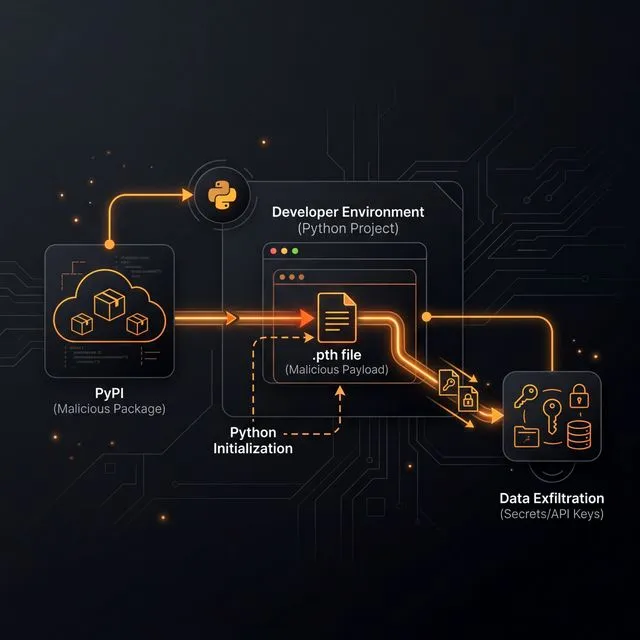
Security researchers who analyzed the wheel describe the payload as credential theft plus persistence—targeting environment variables, SSH keys, cloud creds, Kubernetes secrets, and then installing a backdoor-like polling mechanism. (SafeDep analysis)
The practical reason AI teams are uniquely exposed
Most “normal” apps have a few secrets and a database password.
AI apps often have many more secrets across the stack:
- multiple provider keys (routing/fallback is common)
- tool-specific tokens (observability, evaluation, prompt tooling)
- embedding/vector DB creds
- data warehouse credentials for analytics and feedback loops
- CI runners with deployment privileges (because iteration speed matters)
This creates an uncomfortable asymmetry: attackers don’t need to “break your model.” They just need to sit on your dependency graph long enough to vacuum up everything that makes your infrastructure run.
What to do if you might be affected (2026-03-24 onward)
If you installed LiteLLM around the incident window, treat it like a credential-loss event—not like a “patch-and-move-on” CVE.
Concrete actions worth doing in order:
- Identify exposure: search your build logs, lockfiles, and caches for
litellm==1.82.7orlitellm==1.82.8. - Check for IoCs: look for
litellm_init.pthinside your Pythonsite-packagesand for outbound requests to attacker domains described in the incident threads. (LiteLLM team updates) - Rotate credentials aggressively: assume any env vars and common config files on impacted machines were exfiltrated.
- Audit blast radius: check cloud audit logs (AWS/GCP/Azure), Git tokens, and any model-provider usage spikes that could indicate key reuse.
- Rebuild environments from scratch: don’t trust an environment that may have executed persistence logic.
This is where having a real evaluation and red-team workflow helps: it forces teams to treat “AI glue code” as production software, not experimentation. If you want a practical baseline for operational discipline, start with a structured eval/red-team loop and extend it to dependency hygiene and secrets handling.
For teams already using LiteLLM as a routing layer, the broader comparison with LiteLLM vs OpenRouter vs Vercel AI Gateway is useful only after the incident response is complete. Security first, architecture choice second.
The bigger takeaway: build a supply-chain perimeter, not a “security checklist”
The industry’s default posture is still: “keep your model keys in env vars, install dependencies freely, and trust upstream.”
That posture worked when dependencies mostly meant “a JSON library.”
In 2026, the dependency graph is a control plane for your AI product.
A supply-chain perimeter can be boring and still effective:
- Use lockfiles and hash-verified installs for Python packages where possible.
- Mirror critical dependencies internally (or use an allowlisted proxy) so your builds don’t talk to the entire internet.
- Treat CI secrets as high-value assets: minimize scope, short TTLs, and separate build vs deploy identities.
- Pin and verify external security tooling too—because “security scans” run with privileged access.
- Prefer ephemeral build environments and kill long-lived runners.
None of this eliminates risk.
But it changes the default outcome from “one compromised release empties your entire keychain” to “a compromised release fails to enter production, or at least can’t exfiltrate much.”
That’s the real story here: AI teams are building faster than their supply chain, and attackers are already living in the gap.
If you are running LiteLLM or anything similar in production, the safest move is to treat package updates like code changes: review the diff, pin the dependency, and rehearse the rollback before the upgrade becomes urgent. A compromised package is not just a library issue; it is a route into every environment that trusts the install.
That is why dependency hygiene needs ownership. Someone has to be responsible for allowlists, hash checking, and release-note review, or the “fast path” turns into the easiest way for an attacker to inherit your trust boundary.
Minimum hardening plan for AI package updates
Use this as the baseline before the next dependency bump:
- Pin every production dependency in a lockfile and review version changes as code changes.
- Use hash verification or an internal package mirror for critical runtime dependencies.
- Separate build credentials from runtime credentials so a compromised install step cannot inherit everything.
- Rotate short-lived model-provider keys through a secret manager instead of static environment variables where possible.
- Run package-diff review for AI infrastructure libraries that touch requests, secrets, tools, routing, or execution.
- Keep rollback artifacts so you can redeploy a known-good version without waiting for upstream cleanup.
This also belongs in the same risk family as prompt-injection and tool-abuse testing. A model gateway that is safe at the prompt layer but unsafe at the package layer is still unsafe. For a complementary checklist, see AI Agent Browser Security Checklist.
The key management lesson is simple: AI infrastructure libraries often sit closer to secrets than normal application code. If a package can route requests across providers, read environment variables, run inside CI, or connect to internal tools, then a compromised release has first-class access to your control plane. Treat those dependencies like production infrastructure, not helper utilities.
The safest teams will turn this into a standing release habit: every gateway, eval, agent, and observability dependency gets reviewed as if it might inherit model keys and cloud credentials. That mindset is slower than blind upgrades, but much faster than incident response after a compromised package ships.
SEO FAQ
Which LiteLLM versions were reported as compromised?
LiteLLM maintainers identified malicious PyPI versions 1.82.7 and 1.82.8 in the incident thread. Teams should check lockfiles, build logs, package caches, and environments for those versions.
Why was the LiteLLM compromise dangerous for AI teams?
AI infrastructure libraries often run near model-provider keys, cloud credentials, CI secrets, observability tokens, and routing configuration. A compromised package in that layer can expose more than one application secret.
What should affected teams do first?
Identify whether the malicious versions were installed, preserve evidence, rotate credentials that could have been exposed, audit cloud and model-provider logs, and rebuild affected environments from known-good artifacts.
Does this article provide malware instructions?
No. This article is defensive incident-response and supply-chain guidance. It does not provide payloads, exploit instructions, or operational abuse steps.
Sources
