If you want a private ChatGPT-style workspace for your team, the hard part is not getting a model to answer questions. The hard part is choosing the layer around the model:
- the internal portal where people sign in and use many providers,
- the agent workspace where tool use and MCP matter,
- or the document-centric app where RAG and team knowledge are the whole point. That is the real difference between Open WebUI, LibreChat, and AnythingLLM. This guide is a decision framework, not a feature dump.
TL;DR: pick by operating model
| If your default need is… | Default pick | Why |
|---|---|---|
| ”We need the easiest internal AI portal for mixed models and mixed users.” | Open WebUI | It is the cleanest “self-hosted AI front door” with broad provider support, built-in RAG, strong auth options, and a simple Docker-first start. |
| ”We want the most agent-centric open-source chat stack.” | LibreChat | Its docs put Agents, MCP, RAG, artifacts, and model-provider flexibility at the center of the product. |
| ”We mainly want a private knowledge workspace for docs, agents, and internal assistants.” | AnythingLLM | It is opinionated around workspaces, documents, embedded retrieval, and guided desktop-to-self-host flows. |
The most important distinction: portal-first vs agent-first vs workspace-first
Most teams compare these tools as if they are interchangeable. They are not.
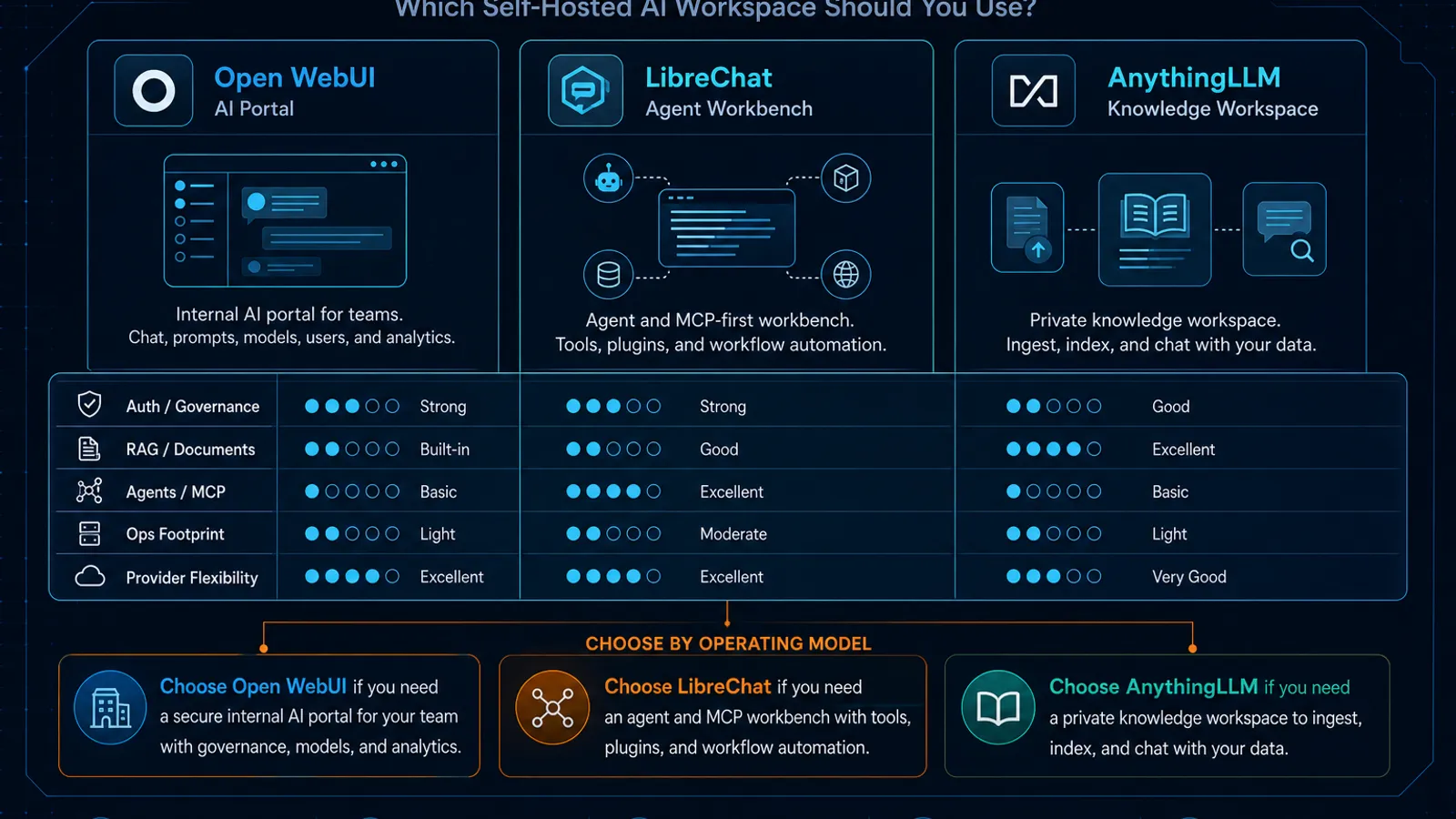
- Open WebUI is best understood as an AI portal. It wants to be the secure internal UI in front of one or more model backends.
- LibreChat is best understood as an agent and provider workbench. It leans into frontier model access, tools, MCP, and programmable workflows.
- AnythingLLM is best understood as a knowledge workspace. It is designed around documents, workspaces, agents, and retrieval-heavy usage. If you choose the wrong operating model, the product feels awkward even when the feature list looks strong.
Quick setup reality: these products do not cost the same to run
| Tool | Fastest on-ramp | What the docs imply about real ops |
|---|---|---|
| Open WebUI | a single Docker run command, typically exposed on port 3000 | easy to start, but multi-worker and multi-node setups require Redis for shared sessions, websocket coordination, and state sync |
| LibreChat | Docker compose quick start | Docker quick start brings up MongoDB, MeiliSearch, and the RAG API, which is convenient but also tells you the stack is more involved |
| AnythingLLM | desktop app for solo use, or Docker quick start for self-hosting | easiest path for individuals is desktop, but team deployment still means choosing the self-hosted Docker route |
| This matters because “best” often just means “the one your team will actually keep healthy.” |
What each tool is really optimizing for
Open WebUI: the cleanest internal AI portal
Open WebUI’s quick-start docs optimize for speed:
- one-container startup,
- a browser UI on
localhost, - optional Ollama-bundled images if you want an all-in-one local path,
- and a wide authentication/security surface once you move beyond a laptop demo. The bigger signal is in the admin docs. Open WebUI has first-party docs for:
- federated auth / SSO,
- LDAP,
- role and access controls,
- RAG and documents,
- and Redis-backed scaling requirements for multi-worker or multi-instance deployments. That combination is why Open WebUI fits well as an internal company portal: it is not just a “chat UI for local models.” It is a UI layer you can actually put in front of a team. Where it becomes unusually powerful is extensibility. Open WebUI documents two main extension paths:
- Functions, which run inside Open WebUI and are the default path for many custom behaviors
- Pipelines, which offload heavier or more specialized logic outside the main instance That is useful, but it is also a governance question. The Functions docs are explicit that code execution here is powerful enough to deserve admin-level caution. Choose Open WebUI if:
- you want a shared internal AI portal more than a pure agent framework
- you need mature auth options early
- you want built-in RAG without committing your whole app architecture to a specific agent system
- you prefer a cleaner starting operational shape than the heavier multi-service alternatives
LibreChat: the strongest fit when agents and MCP drive the roadmap
LibreChat’s current docs front-load the product clearly: Agents, MCP, web search, RAG, artifacts, image generation, and many provider integrations are presented as core product capabilities, not edge add-ons. That positioning matters. LibreChat is the best fit of the three when your team thinks in terms like:
- “We need custom agents.”
- “We want MCP servers available in the chat workspace.”
- “We want to switch between providers without rebuilding the UI.”
- “We need artifacts and richer assistant workflows, not just prompt/response chat.” The operational tradeoff is visible in the quick-start docs:
- the Docker path includes MongoDB, MeiliSearch, and the RAG API
- the manual path expects you to run supporting services yourself That does not make LibreChat bad. It just means LibreChat is not the lightest operational footprint. Its docs also expose a more enterprise-ready auth posture than many hobbyist tools:
- OAuth2 / OpenID Connect
- SAML
- LDAP LibreChat’s MCP docs are also worth calling out because they treat MCP as a real multi-user system concern, not just a local hack. The docs cover per-user authentication and isolation models in addition to YAML or UI configuration. That is a strong sign that the product is being shaped for shared deployments, not just solo experimentation. Choose LibreChat if:
- agents, tools, and MCP are central to your product roadmap
- you want broad model-provider choice in one workspace
- you are willing to run a heavier service graph in exchange for richer capabilities
- you want an open-source chat surface that feels closest to the current “AI app platform” direction If your team is already standardizing MCP across tools, this is adjacent: Why MCP Is Becoming the Default Standard for AI Tools in 2026.
AnythingLLM: the best fit for document-heavy internal knowledge assistants
AnythingLLM is less “generic AI chat platform” than many people assume. Its docs and product structure consistently emphasize:
- workspaces
- documents and retrieval
- AI agents
- agent flows
- MCP compatibility
- desktop plus self-hosted deployment paths That makes AnythingLLM especially attractive when the job is not “give everyone a model playground,” but rather:
- build a private internal assistant on company docs,
- organize usage around knowledge domains,
- and let non-developers live in a more guided environment. AnythingLLM also has one of the clearest bridge paths from solo use to team use:
- Desktop for a fast local on-ramp
- Self-hosted Docker when the tool graduates into a shared service Its docs expose a broad retrieval stack too:
- multiple embedding-model paths,
- multiple vector database options,
- and dedicated docs for security, privacy, and access controls. There is one practical constraint worth noticing: AnythingLLM’s docs explicitly note that multi-user management is available only on the Docker/self-hosted edition, not on Desktop. That is actually helpful because it forces a clean distinction:
- Desktop is your sandbox.
- Docker is your team product. Choose AnythingLLM if:
- your primary use case is private knowledge retrieval, not general AI experimentation
- you want document/workspace structure to be a first-class concept
- you want agents and MCP, but in a product that still feels retrieval-first
- you like the option to start on desktop and later move to a managed self-hosted deployment
RAG and knowledge workflows: this is where the gap gets practical
All three products can support “chat with docs” workflows. The difference is how central that workflow is.
Open WebUI
Open WebUI has meaningful RAG support, but it still feels like a general AI portal that also does knowledge workflows well. That is ideal if your team wants one UI for:
- local models,
- hosted models,
- documents,
- and general assistant usage.
LibreChat
LibreChat supports RAG, but the architecture signals that it is treating retrieval as one subsystem inside a broader assistant platform. Its RAG API docs describe a separate service built with FastAPI, LangChain, PostgreSQL, and pgvector.
That is useful if you want programmable flexibility and are comfortable with moving parts.
AnythingLLM
AnythingLLM is the most naturally opinionated around knowledge work. Workspaces, data ingestion, vector backends, and retrieval-driven chat are the center of gravity, not a side feature. If your main buying question is “which tool helps people talk to our internal docs safely and repeatedly?”, AnythingLLM deserves extra weight. If your broader architecture question is retrieval versus larger context windows, read: RAG vs Long Context in 2026: A Decision Framework That Actually Holds Up.
Team auth and governance: who gets access, and how dangerous are extensions?
This is where many comparisons stay too shallow. You are not just choosing a UI. You are choosing:
- where credentials live,
- who can add tools,
- how identity works,
- and how much arbitrary code you are willing to allow near your AI surface.
Open WebUI
Open WebUI is strongest here if you need a company-facing internal portal quickly. Its docs cover:
- SSO / federated auth
- LDAP
- persistent versus stateless auth configuration That gives it a credible “internal AI gateway” shape.
LibreChat
LibreChat is also strong on auth, with docs covering OAuth2, OpenID Connect, SAML, and LDAP. But LibreChat’s bigger governance question is usually around agents and MCP. The platform is powerful because it is tool-rich. That means operational discipline matters more.
AnythingLLM
AnythingLLM has security/access docs and role-oriented multi-user controls on the self-hosted edition, but it is still best thought of as a managed knowledge workspace rather than a general company-wide AI gateway.
Scaling and architecture: what breaks first
If you are choosing for more than five users, read the architecture hints in the docs as warnings, not trivia.
- Open WebUI: easiest start, but the Redis documentation makes it clear that multi-worker and multi-node deployments need shared state infrastructure.
- LibreChat: the quick start is convenient precisely because the product expects several support services.
- AnythingLLM: simpler product story than LibreChat for document-centric deployments, but you still need to move off Desktop to Docker for real multi-user use. So the honest rule is:
- pick Open WebUI for the lightest path to a secure shared portal
- pick LibreChat for the richest agent-first feature set
- pick AnythingLLM for the cleanest knowledge-workspace mental model
One under-discussed factor: license posture
As of April 8, 2026, the public repo/package pages do not all tell the same licensing story.
- LibreChat and AnythingLLM are presented under MIT License on their public GitHub package/repo surfaces.
- Open WebUI’s GitHub org listing currently shows the main
open-webuirepository under “Other”, and the project maintains its own licensing page. That does not automatically make Open WebUI a bad choice. It does mean that if you are choosing for a company, you should review license terms directly instead of assuming all three tools are interchangeable from a legal standpoint.
Which one should you choose? (practical recommendations)
Choose Open WebUI if:
- you want an internal AI portal for mixed users and mixed backends
- auth and access control matter early
- you want a fast Docker start with room to mature into a more serious deployment
- you do not want your primary product choice to revolve around agents Choose LibreChat if:
- you want the most capable open-source agent/chat workspace of the three
- MCP is a real requirement, not a curiosity
- provider flexibility and richer assistant behaviors matter more than deployment simplicity
- you are comfortable with a heavier operational footprint Choose AnythingLLM if:
- the center of the product is private docs, workspaces, and retrieval
- you want a guided product experience for internal assistants
- you like the desktop-to-self-host path
- you need agents and MCP, but you still want the product organized around knowledge, not just chat
My default picks by scenario
| Scenario | Default pick |
|---|---|
| Small company wants an internal AI portal fast | Open WebUI |
| AI-native team wants agent workflows, MCP, and frontier model flexibility | LibreChat |
| Operations, support, or knowledge teams need a private doc assistant | AnythingLLM |
| Solo user wants the easiest local knowledge assistant path | AnythingLLM Desktop |
| Compliance-sensitive team wants to start simple and gate extensions carefully | Open WebUI |
Final takeaway
This is not a “best self-hosted AI app” contest. It is a workflow choice.
- Open WebUI is the best default when you need a shared internal AI front door.
- LibreChat is the best default when agents, MCP, and model flexibility drive the roadmap.
- AnythingLLM is the best default when documents, workspaces, and private knowledge retrieval are the product. If you pick based on feature count, all three can look close. If you pick based on the job shape, the choice gets much easier.
SEO FAQ
Which is best: Open WebUI, LibreChat, or AnythingLLM?
Open WebUI is the best default for a shared internal AI portal, LibreChat is strongest for agent and MCP-heavy workflows, and AnythingLLM is strongest for document-centered private knowledge work.
Which option is easiest to self-host?
Open WebUI usually has the lightest Docker-first start. AnythingLLM is easiest for solo desktop use, while LibreChat has a heavier service graph because it includes more agent, search, and RAG infrastructure.
Which tool is best for company documents?
AnythingLLM deserves extra weight when private documents, workspaces, and retrieval are the main product. Open WebUI and LibreChat can also support document workflows, but they are broader AI workspace choices.
Related posts
When to Use
Use this comparison when the real decision is not model quality, but the operating model around the model. It is especially useful before standardizing an internal AI workspace, choosing between a portal-first and agent-first deployment, or deciding whether document retrieval deserves its own product surface.
When Not to Use
Do not use this article as a final procurement checklist for a regulated rollout. It compares product shape and operational fit, but a production decision still needs your own license review, identity-provider test, retention policy, data-flow review, and pilot with the actual documents or agents your team will use.
Sources
- Open WebUI Docs — quick start
- Open WebUI Docs — SSO
- Open WebUI Docs — LDAP
- Open WebUI Docs — functions
- Open WebUI Docs — pipelines
- Open WebUI Docs — Redis
- Open WebUI Docs — RAG
- Open WebUI — license
- GitHub — Open WebUI repositories
- LibreChat Docs — documentation home
- LibreChat Docs — MCP
- LibreChat Docs — agents
- LibreChat Docs — RAG API
- LibreChat Docs — authentication
- LibreChat Docs — Meilisearch
- GitHub Packages — LibreChat container
- AnythingLLM Docs — documentation home
- AnythingLLM Docs — quickstart
- AnythingLLM Docs — AI agents
- AnythingLLM Docs — security and access
- AnythingLLM Docs — MCP overview
- GitHub Packages — AnythingLLM container