If you want a local AI agent that can do more than chat, Hermes Agent is one of the more interesting self-hosted options right now.
The hard part is not getting it installed.
The hard part is setting it up in a way that actually supports repeatable automation instead of turning into another half-configured agent sandbox.
Hermes has a few separate layers that matter:
- the local install path
- the model and provider configuration
- the gateway daemon that runs scheduled jobs
- the optional dashboard for managing the install without living in YAML
- the MCP layer that connects Hermes to external tool servers
This guide is the practical version: install Hermes Agent locally, configure the model layer, set up the daemon and dashboard, add one useful MCP server, create your first scheduled workflow, and avoid the mistakes that make local automation feel fragile.
TL;DR
Use this setup:
- Run the official Hermes install script on macOS, Linux, or WSL2.
- Let the installer handle Python, Node,
ripgrep, andffmpeginstead of pre-installing them manually. - Run
hermes modelorhermes setupto configure your LLM provider before you attempt automation. - Start with a local-only workflow first: filesystem access, one MCP server, and a simple cron job that writes output locally.
- Install or run the Hermes gateway before expecting scheduled tasks to execute.
- Add the dashboard only if you want a local browser UI for settings and session monitoring.
- Filter MCP server exposure instead of dumping a large tool surface into the agent.
As of April 21, 2026:
- Hermes docs say the official quick install works on Linux, macOS, and WSL2
- the installation docs say Git is the only prerequisite
- the installer is documented to handle Python 3.11, Node.js v22,
ripgrep, andffmpeg - the cron docs say scheduled jobs are executed by the gateway daemon, not by an idle CLI tab
- the dashboard docs say
hermes dashboardserves a local UI athttp://127.0.0.1:9119by default - the MCP docs say Hermes supports both stdio and HTTP MCP servers and recommends per-server filtering
That combination makes Hermes a strong fit if your real goal is:
- local recurring automation
- a CLI-first agent you can inspect and control
- safe expansion into MCP instead of tool sprawl on day one
If your bigger decision is still “Hermes or OpenClaw?”, start with Hermes Agent vs OpenClaw (2026): Which Self-Hosted AI Agent Should You Use?.
Who this setup is actually for
This guide fits best if you are one of these:
- a developer who wants a local agent for repeated research, coding, or ops tasks
- a power user who wants scheduled AI workflows without starting from a bare orchestration framework
- a self-hosting tinkerer who wants MCP and delegation available, but not necessarily on day one
It is a weaker fit if your real requirement is “I want one assistant gateway available across a bunch of chat apps first.” Hermes can do messaging, but its docs and feature shape are more convincing when the workflow is the center of gravity.
The architecture that usually works best
Start with this mental model:
Your machine
  -> Hermes Agent
      -> local config + tools
      -> gateway daemon for scheduled runs
      -> optional dashboard on localhost
      -> MCP servers for external capabilities
      -> LLM provider for reasoning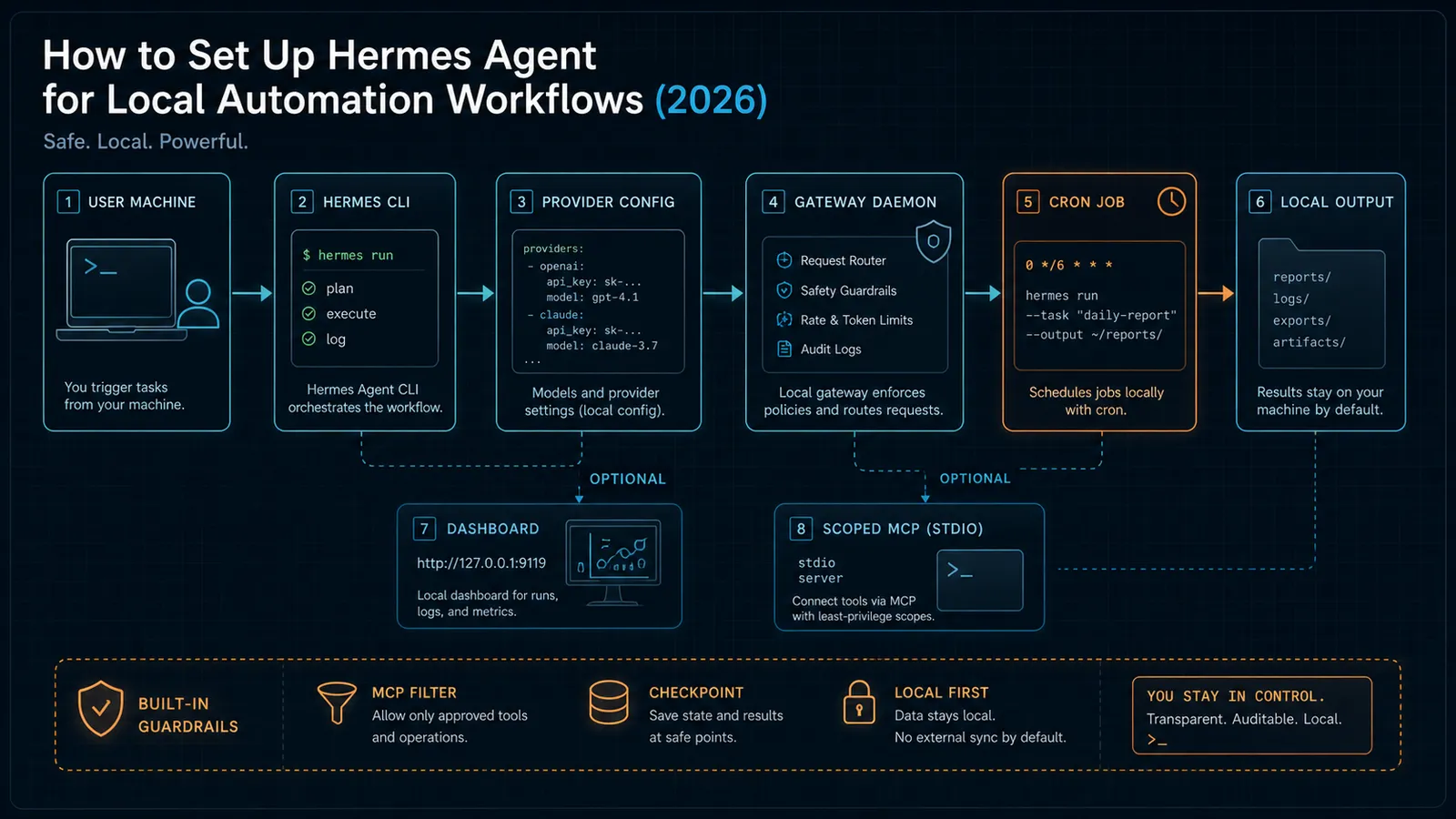
That matters because a lot of broken installs come from treating Hermes like a single long-running chat process.
It is not.
For local automation, there are at least three separate responsibilities:
- the agent runtime
- the scheduler/gateway
- the tool surface
If you keep those separate, setup gets much easier.
Step 1: Use the official installer first
Hermes has one of the cleaner install stories in this category.
The docs say the normal path is:
curl -fsSL https://raw.githubusercontent.com/NousResearch/hermes-agent/main/scripts/install.sh | bashThe important part is not that it is a one-liner.
The important part is what the installer claims to do for you.
According to the installation docs, it handles:
- the repo clone
- the virtual environment
- a global
hermescommand - provider configuration
- missing runtime dependencies including Python 3.11, Node.js v22,
ripgrep, andffmpeg
That means the practical default is:
- do not over-engineer the first install
- do not build a custom environment first unless you have a real reason
- do not assume you need to pre-install every dependency yourself
The docs also state that native Windows is not supported and that Windows users should run Hermes inside WSL2. If your workstation is Windows-first, that is not a minor footnote. It changes how you should think about file paths, shell startup, and local tool access from the beginning.
Step 2: Configure the provider before you touch automation
After installation, the docs point you to the configuration commands:
hermeshermes modelhermes toolshermes gateway setuphermes config sethermes setup
The right order is not “install everything and hope chat works.”
The right order is:
- install Hermes
- configure the model/provider path
- confirm a normal local session works
- only then add scheduled jobs and MCP
This sounds obvious, but it is where a lot of local agent setups go sideways.
If you add cron, MCP, and dashboard dependencies before confirming your base model path works, every failure starts to look like “Hermes is broken” instead of “the provider configuration is incomplete.”
Step 3: Start with a local-only automation baseline
For the first real workflow, keep the scope narrow.
A good baseline looks like this:
- local CLI usage
- one provider
- one simple filesystem-oriented task
- output delivered locally instead of to external messaging channels
Hermes’ cron docs support that pattern directly. The docs say scheduled jobs can deliver results back to:
- the origin chat
- local files
- configured platform targets
For local automation, choose local delivery first.
That gives you a simpler debugging loop:
- no messaging connector setup
- no outbound platform permissions
- no confusion about whether the job failed or just delivered somewhere else
If your actual goal is “run local workflows on a schedule,” local delivery is the cleaner first milestone than Telegram, Slack, or WhatsApp integration.
Step 4: Install the gateway before you expect cron to work
This is the most common operational mistake in Hermes setups.
The cron docs are explicit that scheduled execution is handled by the gateway daemon. On each scheduler tick, the gateway:
- loads jobs
- checks which jobs are due
- starts a fresh agent session for each due job
- injects any attached skills
- runs the prompt
- delivers the final response
- updates metadata and the next scheduled time
That means a cron job is not just “remembered” by your terminal session.
It needs the gateway process.
The docs show these paths:
hermes gateway install
hermes gateway
Use hermes gateway install if you want Hermes running as a user service.
Use hermes gateway in the foreground if you are still testing and want direct visibility into what the daemon is doing.
For a local-first setup, the second option is often better at first because it shortens the feedback loop. Once the job is stable, move to the installed service path.
Step 5: Create one simple cron job, not a full agent empire
Hermes supports natural-language schedules and traditional cron expressions. The docs show examples like:
hermes cron create "every 2h" "Check server status"
hermes cron create "every 1h" "Summarize new feed items" --skill blogwatcher
That is useful, but it is also where people get sloppy.
Your first job should be small enough that you can verify:
- it runs on schedule
- it can access the tools you expect
- the output lands where you expect
- the next run time updates correctly
A good first job is not “run my whole personal operating system.”
A good first job is something like:
- summarize one folder of notes
- scan one directory for changed files
- check one data source and write a short status report locally
Hermes also documents lifecycle controls like:
hermes cron listhermes cron pause <job_id>hermes cron resume <job_id>hermes cron run <job_id>hermes cron remove <job_id>
Use those early. A scheduler you cannot pause cleanly is not a workflow. It is background noise.
Step 6: Add MCP only when it buys you something real
Hermes’ MCP docs are good because they resist the usual “connect everything” hype.
The docs say MCP is useful when:
- a tool already exists in MCP form
- you want Hermes to work against a local or remote system through a clean RPC layer
- you want fine-grained per-server exposure control
The docs also warn against using MCP when:
- a built-in Hermes tool already solves the job
- the server exposes a huge dangerous surface and you are not prepared to filter it
- a narrow native tool would be simpler and safer
That is the right posture.
For local automation, the cleanest first MCP example is usually a filesystem server or another tightly scoped local service.
The docs show a starter config like:
mcp_servers:
  filesystem:
    command: 'npx'
    args: ['-y', '@modelcontextprotocol/server-filesystem', '/home/user/projects']
That is useful for one reason: it forces you to think about scope.
Do not point Hermes at your whole home directory just because you can.
Point it at the smallest useful working tree.
If you are standardizing on MCP more broadly, this background matters: Why MCP Is Becoming the Default Standard for AI Tools in 2026.
Step 7: Use stdio MCP first unless you need remote HTTP
Hermes supports both:
- stdio servers, where Hermes spawns the MCP server locally
- HTTP servers, where Hermes connects to a remote endpoint
For local automation, stdio is usually the better starting point.
Why?
- fewer moving parts
- local process visibility
- lower latency for local tools
- easier troubleshooting when you are still learning the system
HTTP MCP is useful when the server already lives elsewhere or when your organization exposes internal MCP endpoints. But if your first use case is local automation on your own machine, stdio is the more honest default.
Step 8: Treat the dashboard as convenience, not as the core runtime
The dashboard is helpful, but it is not the product’s center of gravity.
The docs describe it as a local browser UI for:
- settings
- API keys
- gateway status
- active and recent sessions
By default, hermes dashboard starts a local server on 127.0.0.1:9119. The docs also say you can bind it to 0.0.0.0, but explicitly note that this should be used with caution on shared networks.
That caution matters.
If you are running Hermes only for yourself on one machine, the safest baseline is:
- keep the dashboard on localhost
- use it for inspection and configuration convenience
- do not confuse “I have a local UI” with “I now have a production-ready control plane”
The dashboard also requires the web extras:
pip install hermes-agent[web]or an existing install that already included hermes-agent[all].
That means the dashboard is optional dependency weight. Add it because you want the UX, not because you think it is required for local automation to function.
Step 9: Know what Hermes is optimized for before you keep expanding
Hermes’ feature overview gives a strong signal about its intended operating model.
The docs emphasize:
- toolsets
- skills
- persistent memory
- context-file loading from files like
AGENTS.md - checkpoints before file changes
- scheduled tasks
- subagent delegation with isolated context
That combination tells you Hermes is strongest when the workflow is structured and repeatable.
If your use case is:
- recurring research
- code-aware automation
- filesystem work
- bounded multi-step tasks
- careful tool exposure through MCP
then the local setup pays off.
If your use case is mostly “I want a chat assistant everywhere,” the operational model is less compelling.
A practical first-week setup that usually holds up
If you want a sane first week with Hermes, use this sequence:
- Install with the official script.
- Configure the provider and confirm normal chat works.
- Run one local-only task manually.
- Start the gateway in the foreground and create one small cron job.
- Add one scoped stdio MCP server.
- Add the dashboard only if you want visual management.
- Only after that consider messaging channels, more MCP servers, or delegated workflows.
That order is boring on purpose.
Boring is good here.
The fastest path to a reliable local automation stack is not maximum capability in one afternoon. It is reaching one narrow workflow you trust, then expanding from there.
Common mistakes to avoid
Treating the install as the whole setup
The installer gets Hermes onto the machine. It does not magically define your provider, daemon model, tool policy, and automation boundaries.
Expecting cron jobs to run without the gateway
The docs are clear on this, but it is still the first thing many people miss.
Adding too much MCP surface too early
If the server exposes more tools than you can reason about, the integration is not safer because it is standardized.
Binding the dashboard broadly without a reason
127.0.0.1 is the right local default for a reason.
Starting with a workflow that is too large to debug
Your first successful automation should be small enough that failure is legible.
SEO FAQ
What is Hermes Agent best used for?
Hermes Agent is best used for local recurring automation, controlled file or research tasks, scheduled jobs, and workflows where the operator wants visible CLI, gateway, dashboard, and MCP boundaries.
Do Hermes cron jobs run without the gateway?
No. The scheduled jobs depend on the Hermes gateway daemon. A reliable setup should verify the gateway before relying on cron automation.
Should Hermes users add MCP servers immediately?
Only when the MCP server solves a real workflow need. Start with one scoped server and filter the exposed tool surface instead of connecting broad capabilities on day one.
Visual checkpoints
Before you expand Hermes beyond the first workflow, check the visible state:
- a normal Hermes session works before cron is involved
- the gateway is running when a scheduled job is expected to execute
- the first cron job has a narrow prompt and a local output destination
- the dashboard is bound to
127.0.0.1unless you have a real network reason - the MCP server exposes only the directory or service the job actually needs
- lifecycle commands such as pause, resume, run, and remove are tested before you rely on the schedule
Sources
- Hermes Agent Docs — installation
- Hermes Agent Docs — feature overview
- Hermes Agent Docs — cron
- Hermes Agent Docs — MCP
- Hermes Agent Docs — use MCP with Hermes
- Hermes Agent Docs — web dashboard
When to Use
Use Hermes Agent when you want local recurring automation with visible runtime pieces: a CLI, provider configuration, a gateway daemon, scheduled jobs, scoped tools, and optional MCP. It is strongest when the workflow is narrow enough to inspect and repeat, such as folder summaries, coding support tasks, research checks, or controlled local reports.
When Not to Use
Do not start here if your real need is a broad chat assistant gateway, a hosted team portal, or an unattended automation system with unclear tool boundaries. Hermes can grow into a powerful local stack, but it works best when the first deployment is deliberately small, local, and easy to debug.
