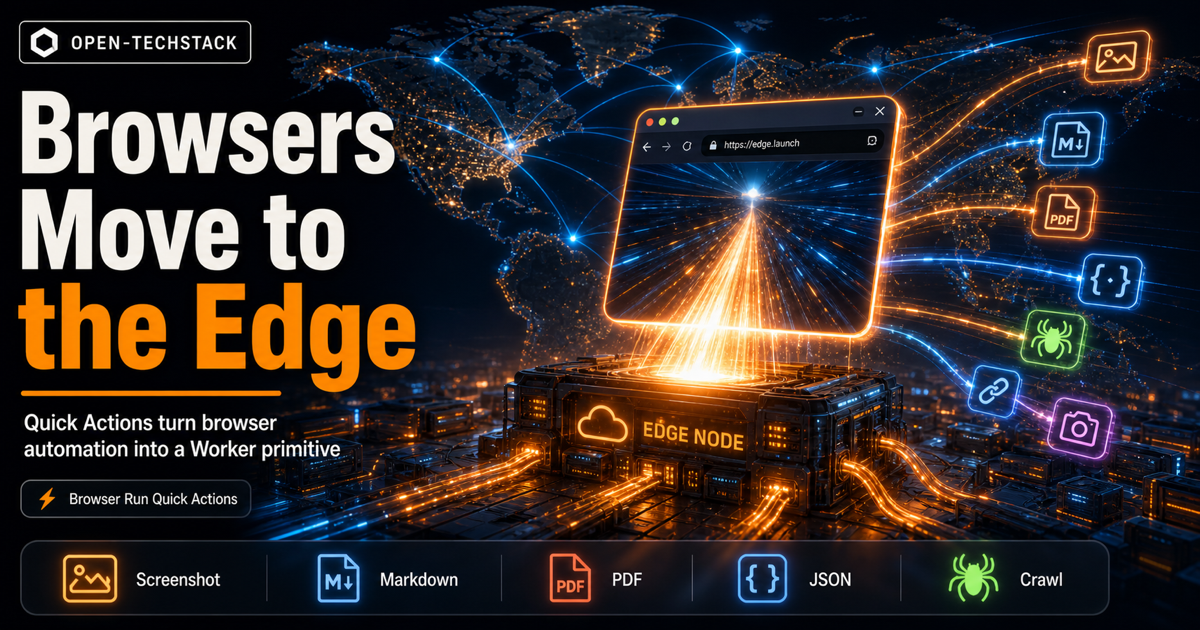
Cloudflare’s Browser Run Quick Actions update is a small API change with a bigger workflow signal: browser automation is moving closer to the edge function.
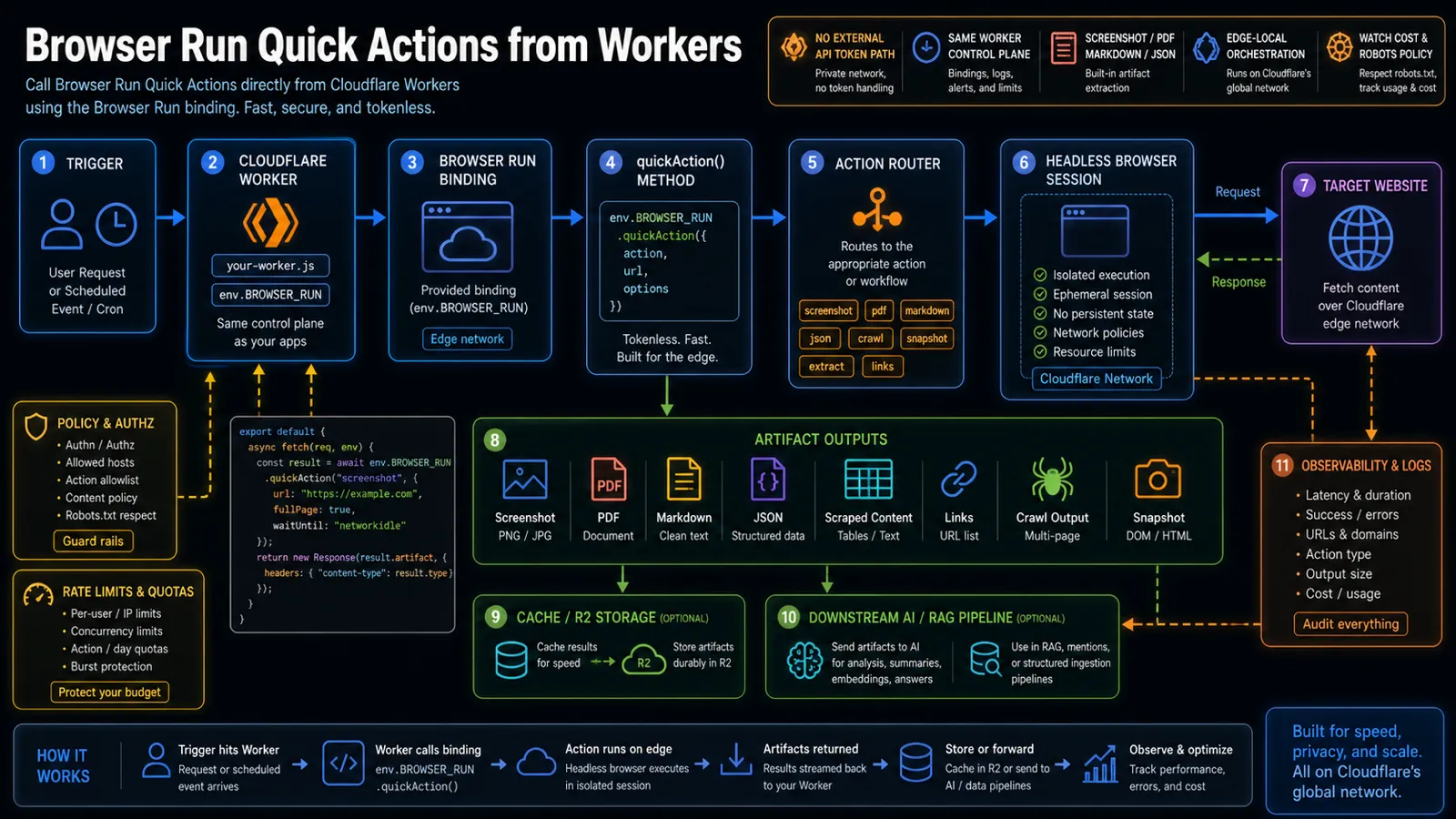
On May 28, 2026, Cloudflare’s changelog said Workers can now call Browser Run Quick Actions directly through the browser binding using quickAction(). The practical win is that a Worker can request a screenshot, PDF, markdown extraction, JSON extraction, scrape, link list, or snapshot without making an external API-token HTTP call to Browser Run.
That matters for AI and automation teams because browser work is no longer a separate sidecar step. It can sit inside the same Worker control plane that receives the request, checks policy, chooses an action, stores artifacts, and sends structured output downstream.
The question is not only “can a Worker take a screenshot?” The sharper question is: when browser automation becomes an edge primitive, what should teams automate, cache, meter, and refuse?
This is independent Open-TechStack analysis. It is not official Cloudflare guidance, legal advice, scraping advice, or a sponsored post.
TL;DR
Cloudflare Browser Run Quick Actions inside Workers is useful because it removes plumbing from browser automation workflows.
- Workers can now call Browser Run Quick Actions through the browser binding with
quickAction(). - Cloudflare says this removes the need for external API tokens or external HTTP requests.
- The Worker communicates with Browser Run directly over Cloudflare’s network, which Cloudflare says leads to simpler code and lower latency.
- Supported quick actions include screenshots, PDFs, HTML content extraction, markdown conversion, AI-assisted structured JSON extraction, CSS-selector scraping, links, crawls, and snapshots.
- This is especially useful for AI agents, RAG ingestion, monitoring, link intelligence, compliance captures, and customer-facing document generation.
- The risk is operational: teams still need URL allowlists, robots policy, rate limits, output-size limits, cache rules, and cost visibility.
If you need a broader browser-session perspective, read Cloudflare Browser Run: Why Browser Automation Is Becoming AI Infrastructure. If you need isolated code execution rather than browser rendering, see Vercel Sandbox Is Now in the Main CLI.
What changed
Before this update, a Worker could still participate in a browser automation workflow, but the integration shape was heavier. Teams had to think about external API calls, token handling, request construction, and the boundary between the Worker and the browser automation service.
The new shape is cleaner:
| Old pattern | New pattern |
|---|---|
| Worker calls an external Browser Run API path | Worker calls env.BROWSER_RUN.quickAction() through a binding |
| API token handling is part of the app flow | Browser Run access is part of the Worker binding configuration |
| Browser automation feels like a separate service call | Browser automation feels like a Worker capability |
| More custom wrapper code | More direct action calls for common browser tasks |
That does not make browser automation magically safe or cheap. It does make the secure default easier to standardize.
Why this matters for AI workflows
AI systems increasingly need browser-derived artifacts:
- rendered screenshots for visual inspection
- markdown text for summarization and RAG ingestion
- PDFs for receipts, reports, and compliance snapshots
- structured JSON from pages that do not expose clean APIs
- link maps for crawl planning
- HTML snapshots for audit, support, or debugging
The old way was to stitch together a queue, browser runner, extractor, artifact store, and model call. That still makes sense for heavy pipelines, but many products need something smaller: a Worker receives a request, runs one browser action, stores or transforms the result, and returns a usable artifact.
That is where Quick Actions are interesting. They turn common browser tasks into explicit actions rather than forcing every team to write a full browser automation script.
The practical architecture
A useful first version looks like this:
| Layer | Job |
|---|---|
| Worker route | Accepts a user request, webhook, cron, or internal job. |
| Policy check | Confirms URL allowlist, action type, tenant quota, and content policy. |
| Browser Run binding | Calls quickAction() without an external API-token HTTP path. |
| Quick Action | Runs screenshot, PDF, markdown, JSON, scrape, links, crawl, or snapshot. |
| Artifact handling | Returns the result directly, stores it in R2, or caches it temporarily. |
| AI pipeline | Sends markdown, JSON, screenshots, or snapshots into downstream analysis. |
| Observability | Logs action type, target domain, latency, output size, errors, and cost signals. |
That architecture is simple enough to be boring, which is exactly the point. Browser automation becomes an operational primitive, not a bespoke mini-platform for every feature.
What teams should automate first
Start with jobs where a browser is genuinely needed.
Good first use cases:
- Screenshot capture: support evidence, QA proof, visual monitoring, and report attachments.
- PDF generation: invoices, receipts, customer exports, compliance captures, and styled summaries.
- Markdown extraction: rendered documentation, changelogs, help centers, and product pages for RAG.
- Structured JSON extraction: pages where the browser-rendered view is easier to parse than raw HTML.
- Link discovery: lightweight crawl planning, broken-link checks, and content inventory.
- Snapshot capture: debugging or audit cases where HTML plus screenshot is more useful than either alone.
Poor first use cases:
- indiscriminate scraping
- bypassing site restrictions
- high-volume crawling without quotas
- workflows that need a stable public API instead of rendered browser extraction
- tasks where a simple fetch is enough
Browser automation is powerful, but it should not become the default answer to every data problem.
Policy controls before production
The main risk is not the quickAction() call. The risk is letting that call become an open browser automation endpoint.
Use these controls before exposing it to users or agents:
| Control | Why it matters |
|---|---|
| URL allowlist or domain policy | Prevents arbitrary browsing and sensitive internal targets. |
| Action allowlist | Separates screenshots, markdown, PDFs, crawls, and JSON extraction by risk and cost. |
| Robots and terms review | Keeps automation aligned with site expectations and legal review. |
| Output-size limits | Prevents huge pages, PDFs, crawls, or JSON outputs from becoming cost and latency problems. |
| Per-tenant quotas | Stops one customer or agent from consuming the browser budget. |
| Cache strategy | Avoids repeated browser work for stable pages. |
| Audit logs | Preserves URL, action type, user, tenant, latency, result size, and error evidence. |
If an AI agent can trigger Browser Run, treat the action as a tool call with cost, privacy, and policy impact.
What not to do
Do not expose “enter any URL and crawl it” as a default feature.
That turns a useful automation primitive into a liability. Browser automation can touch login pages, internal URLs, large sites, hostile content, and pages with legal or contractual restrictions. If the feature is tied to an AI agent, the risk grows because the agent may choose URLs based on untrusted input.
Also avoid:
- storing every artifact forever by default
- sending raw page content to a model without filtering
- using browser extraction where an official API exists
- ignoring output size and crawl depth
- letting users choose action type without quota differences
- logging final answers but not the source URLs and artifact metadata
The safe version is explicit: limited actions, limited targets, limited retention, and visible costs.
Copy this checklist
Before shipping Browser Run Quick Actions from Workers, confirm:
- Which Worker routes can call
quickAction()? - Which tenants, users, or agents are allowed to trigger it?
- Which domains are allowed or blocked?
- Which actions are enabled: screenshot, PDF, content, markdown, JSON, scrape, links, crawl, or snapshot?
- What is the max page size, crawl depth, timeout, and output size?
- Where do artifacts go: response, cache, R2, logs, or AI pipeline?
- How long are artifacts retained?
- What metadata is logged for audit?
- How are errors surfaced to users and operators?
- What quota protects the browser budget?
- What policy prevents accidental scraping abuse?
If those answers are missing, keep the feature internal until the operating rules are clear.
FAQ
What is Cloudflare Browser Run Quick Actions?
Browser Run Quick Actions are predefined browser automation actions for common jobs such as screenshots, PDFs, rendered content extraction, markdown conversion, JSON extraction, scraping selected elements, link extraction, crawling, and snapshots.
What changed for Workers?
Cloudflare says Workers can now call Browser Run Quick Actions directly through the browser binding using quickAction(), without external API-token HTTP requests.
Why is this useful for AI agents?
Agents often need rendered web artifacts, not just raw HTML. Quick Actions can produce screenshots, markdown, structured JSON, links, and snapshots that can feed summaries, RAG pipelines, support workflows, and QA checks.
Is this a scraping free-for-all?
No. Teams still need domain policy, robots and terms review, rate limits, output limits, retention rules, and audit logs. Browser automation should be governed like any other tool an agent or user can trigger.
Bottom line
Cloudflare moving Browser Run Quick Actions directly into Workers makes browser automation feel less like a separate service and more like an edge-native capability.
That is useful, but it raises the bar for product discipline. The winning pattern is not “browser everything.” It is targeted browser actions with policy checks, artifact storage, observability, and cost controls.
When browsers move to the edge, the browser becomes another production tool. Treat it that way.
Sources
