If you are choosing between vLLM and Ollama, the first mistake is treating them as direct substitutes.
They overlap, but they are not centered on the same job.
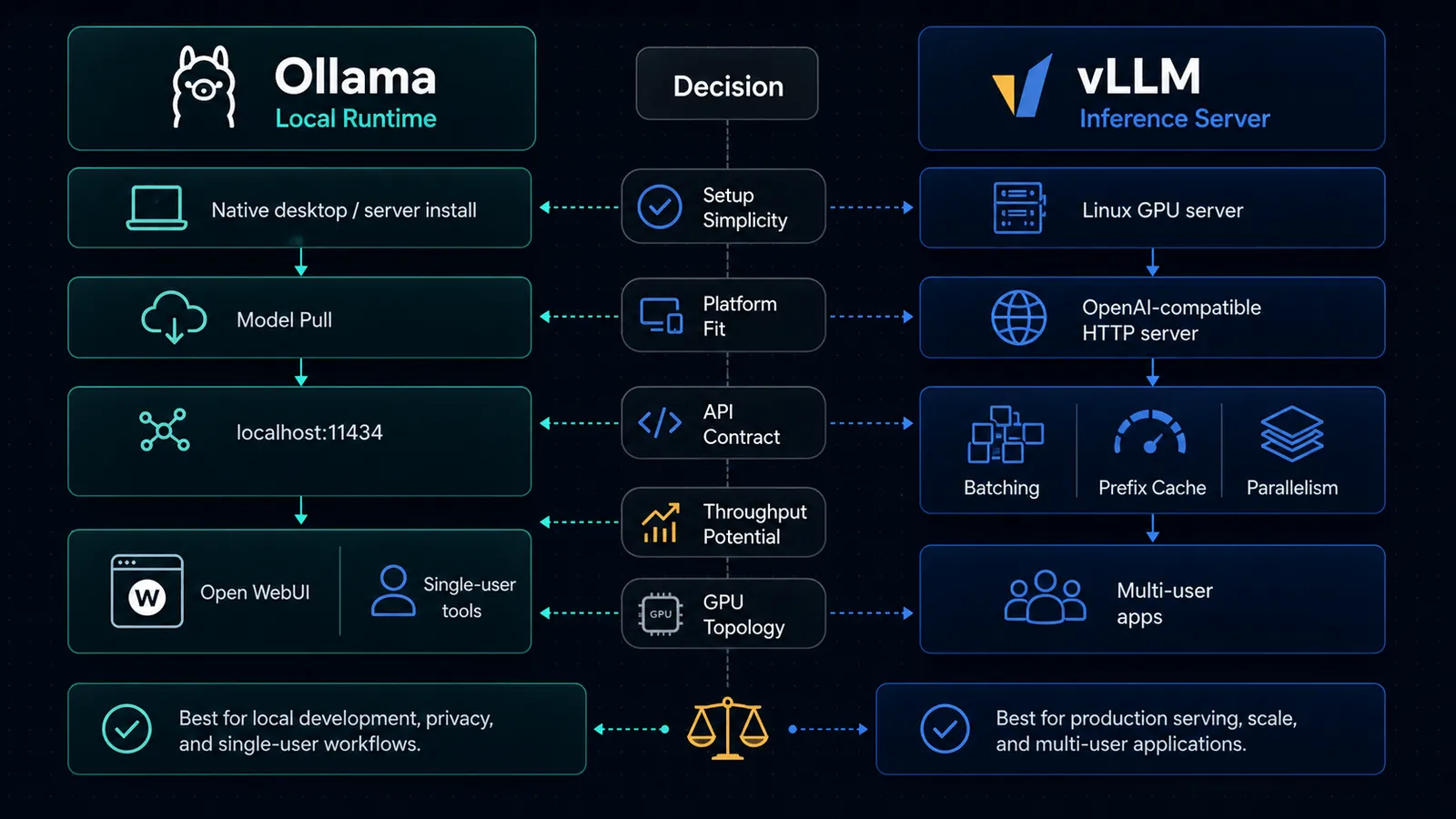
- Ollama is the simpler path for running models on your own machine, exposing a local API, and plugging that into developer tools.
- vLLM is a serving engine built around high-throughput inference, OpenAI-compatible endpoints, and scaling across more serious infrastructure.
That distinction matters more than benchmark screenshots.
As of April 16, 2026, the official docs make the split fairly clear: Ollama is optimized for a broad local developer path across macOS, Windows, and Linux, while vLLM’s GPU installation docs still center Linux and explicitly say Windows is not supported natively.
If your actual use case is still “run models locally on my laptop and connect apps to them,” read Ollama vs LM Studio (2026): Which Should You Use to Run Local LLMs? first. This article is for the next question: when do you outgrow Ollama, and when is vLLM overkill?
TL;DR
| If your real need is… | Pick | Why |
|---|---|---|
| Run local models fast on a Mac, Windows PC, or Linux box with minimal setup | Ollama | The official docs are built around local installation, ollama serve, model pulls, and a default API on localhost:11434. |
| Expose an OpenAI-compatible inference server for apps and teams | vLLM | vLLM’s docs center vllm serve, OpenAI-compatible endpoints, Docker deployment, and scaling primitives. |
| Plug existing tools into a local OpenAI-style endpoint with the least ceremony | Ollama | Ollama explicitly documents OpenAI compatibility and local integrations across coding tools and apps. |
| Scale throughput with data parallelism, tensor parallelism, and smarter cache reuse | vLLM | vLLM documents data parallel deployment, tensor parallel options, and automatic prefix caching. |
| Stay on native Windows without WSL | Ollama | Ollama runs as a native Windows app; vLLM’s GPU install docs say Windows is not supported natively. |
| Serve one local model for personal use and occasional API calls | Ollama | Simpler operational model. |
| Build a multi-user inference tier behind one API endpoint | vLLM | That is much closer to its design center. |
The real difference: local model runtime vs inference serving engine
The clean mental model is this:
- Ollama feels like a local model runtime with a friendly API.
- vLLM feels like an inference server for applications and teams.
Ollama’s API docs start with a local base URL at http://localhost:11434/api, and its platform docs walk through native installs on macOS, Windows, and Linux. That is the posture of a tool that expects to live close to an individual developer or power user.
vLLM’s docs start from the opposite direction. The product surface is vllm serve, an HTTP server that implements OpenAI-compatible APIs and can be deployed via Docker, data parallel deployments, and larger serving topologies.
If you collapse those two positions into “both run open models,” you miss the operational difference that actually decides the tool choice.
Ollama is better when simplicity is the bottleneck
Choose Ollama when the hardest part of your workflow is getting models running reliably on a normal machine.
The official docs make several things straightforward:
- native macOS support, including Apple silicon GPU support and x86 CPU-only support
- native Windows support, including NVIDIA and AMD Radeon GPU support
- Linux installation via a single install script or manual packages
- a default local API on
localhost:11434 - model pulls and local serving without building a larger serving stack first
That is why Ollama keeps showing up inside local tooling ecosystems. If you want to use local models with app-like wrappers and coding tools, the docs already assume that pattern.
It is also why Ollama pairs naturally with tools like:
- How to Use Open WebUI with Ollama and OpenAI (2026)
- How to Use AnythingLLM with OpenAI for Private Docs (2026)
In other words, Ollama is not just “an inference backend.” It is often the local default that makes the rest of the stack usable.
Why that matters
A lot of teams do not need clever serving architecture yet.
They need:
- a model downloaded locally
- a stable local endpoint
- enough compatibility to reuse existing OpenAI-style clients
- lower setup friction than a production inference platform
That is exactly where Ollama is strong.
vLLM is better when serving architecture is the bottleneck
Choose vLLM when local convenience is no longer the main constraint.
vLLM’s docs are explicit about the shape of the system:
- an OpenAI-compatible HTTP server
- Docker images designed for server deployment
- support for Completions, Chat Completions, and Responses
- data parallel deployment for higher throughput
- tensor parallel combinations for larger deployments
- automatic prefix caching to reuse prompt prefixes across requests
That is not a “nice local app” story.
That is a serving engine story.
If you need one API endpoint that multiple applications or users will hit, vLLM starts making more sense fast. The more your requirements sound like throughput, GPU topology, parallelism, request scheduling, or cache reuse, the more likely you are solving the wrong problem with Ollama.
What vLLM is really optimized for
The official docs point toward workloads like:
- centralized inference APIs
- larger Linux GPU servers
- multi-GPU deployments
- structured OpenAI-client compatibility for application code
- production-ish routing and deployment patterns
That makes vLLM much closer to the “self-hosted model serving layer” for a real product or internal platform.
OpenAI-compatible APIs: both support them, but not in the same way
This is the part that confuses people most, because both tools now speak enough OpenAI-shaped API to look similar from far away.
Ollama’s compatibility story
Ollama documents OpenAI compatibility directly and says it supports the OpenAI Responses API, with an important limit: only the non-stateful flavor is supported. Its docs explicitly say there is no previous_response_id or conversation support for stateful Responses flows.
That is good enough for a lot of local use cases:
- swap an OpenAI client base URL to
http://localhost:11434/v1 - point an existing app at a local model
- use tools/function calling where supported
- reuse a familiar API shape without rewriting the whole application
That path is very pragmatic.
But it is still the compatibility layer of a local runtime.
vLLM’s compatibility story
vLLM is more aggressive about the API-server role itself. Its official serving docs say the server implements OpenAI’s Completions API, Chat API, and Responses API, and that you can interact with it using the official OpenAI Python client.
That difference is subtle but important:
- with Ollama, OpenAI compatibility is a bridge into a local runtime
- with vLLM, OpenAI compatibility is part of the serving contract
If your application architecture is already centered on “we need an OpenAI-compatible inference tier,” vLLM is usually the more natural fit.
Platform reality matters more than people admit
This is where a lot of comparison posts get sloppy.
They talk about features and ignore whether the tool actually fits the machine and operating system you have.
Ollama platform posture
As of April 16, 2026, Ollama’s official docs say:
- macOS: Sonoma (v14) or newer, with Apple M series CPU/GPU support and x86 CPU-only support
- Windows: native app, Windows 10 22H2 or newer, with NVIDIA and AMD Radeon GPU support documented
- Linux: direct install path plus optional CUDA and ROCm setup
That is broad and practical.
vLLM platform posture
As of April 16, 2026, vLLM’s installation docs say:
- hardware support spans GPU, CPU, and other accelerators including TPU
- the GPU install requirements are centered on Linux
- Windows is not supported natively, with WSL suggested if you need Windows
So if your actual environment is “a normal Windows machine and I do not want a Linux detour,” the decision is mostly over before the feature comparison starts.
Setup complexity: Ollama is the cleaner default for one-person workflows
If the workflow is:
- install runtime
- pull a model
- expose a local endpoint
- connect a tool or app
Ollama is usually the better default.
That is why it fits well with practical self-hosted tool stacks like Open WebUI, coding assistants, or lightweight local RAG experiments.
If the workflow is:
- stand up an inference server
- choose deployment mode
- configure GPU topology and parallelism
- expose an OpenAI-compatible endpoint for multiple clients
vLLM is the more honest tool.
That does not mean vLLM is “worse to use.” It means it solves a more infrastructure-shaped problem.
Throughput and scaling: this is where vLLM pulls away
This is the strongest non-hand-wavy reason to choose vLLM.
The docs do not just say “it is fast.” They document the mechanics behind that posture:
- automatic prefix caching
- data parallel deployment
- combinations with tensor parallelism
- server-oriented deployment paths in Docker and multi-node setups
That is a different class of concern than “can I run a model on my laptop?”
Ollama can absolutely serve local requests, and for many solo workflows that is enough. But if you are thinking about:
- many concurrent users
- multi-GPU servers
- internal inference endpoints
- maximizing throughput from shared hardware
you are much closer to vLLM’s intended use case.
The best question is not “which is faster?”
The better question is:
Do you want a local model runtime, or do you want an inference serving layer?
If you ask the wrong question, you get the wrong tool:
- teams pick vLLM because it sounds more serious, then burn time on infrastructure they did not need
- teams stick with Ollama too long, then wonder why a growing internal API workload feels bolted together
That is the real tradeoff.
When to choose Ollama
Pick Ollama if most of these are true:
- you are developing on macOS, Windows, or Linux
- you want the fastest path to a usable local model API
- your workload is mainly single-user or small-team local usage
- you want broad compatibility with local tools, desktops, and self-hosted front ends
- you care more about setup speed than serving architecture
If this sounds like you, Ollama is usually the correct default.
When to choose vLLM
Pick vLLM if most of these are true:
- you are serving models from Linux-based infrastructure
- you need an OpenAI-compatible server for applications, not just your own laptop
- you care about throughput, parallelism, and deployment topology
- you expect multiple clients, multiple GPUs, or more production-like serving constraints
- you want a serving layer that is designed around scaling mechanics, not just local convenience
If this sounds like you, Ollama is probably too small a frame for the job.
My blunt recommendation
For most individual builders, indie developers, and small internal prototypes:
- start with Ollama
- move to vLLM only when the workload becomes a serving problem
That is the better default because complexity compounds faster than most teams expect.
If your current pain is model access, local iteration, or getting a stack like Open WebUI running, vLLM is usually too much tool.
If your current pain is concurrency, GPU utilization, scaling an API tier, or serving many requests cleanly through one OpenAI-compatible endpoint, Ollama is usually not enough tool.
That is the actual dividing line.
Decision checklist
Before switching from Ollama to vLLM, ask these questions:
| Question | If yes |
|---|---|
| Do multiple apps or users need one shared model endpoint? | Start evaluating vLLM. |
| Is the machine a normal laptop or Windows desktop? | Stay with Ollama unless there is a strong reason not to. |
| Are you optimizing GPU utilization, batching, or parallelism? | vLLM is the more natural fit. |
| Is the main goal a private local assistant or Open WebUI setup? | Ollama is usually enough. |
| Do you need native Windows without WSL? | Ollama is the safer default. |
| Do you need Linux GPU infrastructure and production-style serving? | vLLM is worth the complexity. |
The migration point is not a benchmark number. It is when the operational problem changes from “run a model” to “serve a model reliably for other software.”
Related reading
- Ollama vs LM Studio (2026): Which Should You Use to Run Local LLMs?
- How to Use Open WebUI with Ollama and OpenAI (2026)
- How to Use LiteLLM with OpenAI, Claude, and Gemini (2026)
SEO FAQ
What is the difference between vLLM and Ollama?
Ollama is a local model runtime designed for simplicity — download a model, run it on your machine, and interact via CLI or API. vLLM is a high-throughput inference serving engine designed for production deployments with features like continuous batching, PagedAttention, and OpenAI-compatible APIs at scale. Use Ollama for local development; use vLLM when you need to serve multiple concurrent users efficiently.
Can vLLM and Ollama both run on Mac?
Ollama runs natively on macOS, Windows, and Linux with minimal setup. vLLM primarily targets Linux with NVIDIA GPUs. Running vLLM on Mac is not a supported production configuration — use Ollama for local Mac-based development and testing.
Which is faster, vLLM or Ollama?
For single-user local inference, Ollama is fast enough and much simpler to set up. For multi-user production serving, vLLM is significantly faster due to continuous batching, efficient memory management (PagedAttention), and optimized GPU utilization. The right question is not “which is faster” but “which fits my serving architecture.”
Can I switch from Ollama to vLLM later?
Yes. Both support OpenAI-compatible APIs, so switching is often a matter of changing the base URL in your client code. Design your application to be provider-agnostic from the start — use the OpenAI SDK with a configurable base URL, and the migration becomes a configuration change.
Sources
- docs.ollama.com — Api
- docs.ollama.com — Openai Compatibility
- docs.ollama.com — Macos
- docs.ollama.com — Windows
- docs.ollama.com — Linux
- docs.vllm.ai — Installation
- docs.vllm.ai — Gpu
- docs.vllm.ai — Openai Compatible Server
- docs.vllm.ai — Automatic Prefix Caching
- docs.vllm.ai — Data Parallel Deployment
- docs.vllm.ai — Docker
