
If you are building a RAG pipeline, the model is rarely the first thing that breaks.
The parser is.
Bad extraction quietly poisons everything downstream: chunking gets worse, retrieval gets noisier, metadata disappears, and the final answer becomes less grounded than it should be. That is exactly why tools like LiteParse matter.
What Is LiteParse?
LiteParse is an open-source local document parser from Run-Llama designed for fast, lightweight parsing with spatial text extraction, bounding boxes, OCR, and screenshot generation. According to the official GitHub repo and LlamaIndex docs, it runs entirely on your machine, supports PDFs plus converted Office files and images, and avoids cloud-only dependencies, API keys, or built-in LLM features.
In plain English: LiteParse is the ingestion layer you use when you want structured document text out of messy files without shipping everything to a hosted parsing service first.
That makes it especially relevant for:
- local-first RAG systems
- coding agents that need document screenshots plus text
- privacy-sensitive ingestion workflows
- batch parsing pipelines that do not need premium cloud extraction
What Problems LiteParse Solves
Most document parsing failures look boring until they hit production.
You point a RAG system at PDFs, invoices, slide decks, scanned docs, or spreadsheets and then discover the raw extraction is full of line-order mistakes, missing text, or flattened layouts that ruin retrieval quality. LiteParse is built to reduce that friction in a few practical ways.
1. It keeps parsing local
Not every team wants to send internal documents to a cloud parser just to test an idea or stand up a retrieval pipeline. LiteParse runs locally and does not require proprietary LLM services or API keys.
That matters for prototyping, regulated environments, air-gapped setups, and teams that simply want lower ingestion cost.
2. It preserves layout context
LiteParse is not just doing plain text extraction. It returns spatial text with bounding boxes, which is useful when page position matters, such as:
- citations back to page regions
- table-aware post-processing
- document viewers with highlighted results
- custom chunking based on layout instead of raw token windows
3. It handles OCR without forcing one stack
The default OCR path uses Tesseract.js, but LiteParse also supports HTTP OCR servers for engines like EasyOCR or PaddleOCR. That means you can start with zero setup, then swap in a stronger OCR backend later without replacing the rest of your ingestion flow.
4. It supports more than PDFs
LiteParse is positioned as a local parser, but it is not limited to PDFs. The official docs say it can convert and parse Office documents and images too, using LibreOffice and ImageMagick where needed. That is a practical advantage if your incoming corpus is a mix of DOCX, XLSX, PPTX, PNG, and JPG files instead of one neat PDF bucket.
5. It can generate screenshots for agent workflows
This is an underrated feature. LiteParse can render page screenshots so an LLM or agent can inspect visual structure that raw text alone misses. That lines up with the broader shift toward tool-connected AI systems we discussed in Why MCP Is Becoming the Default Standard for AI Tools in 2026: useful AI workflows increasingly depend on better context plumbing, not just better prompting.
Where LiteParse Fits in a RAG Stack
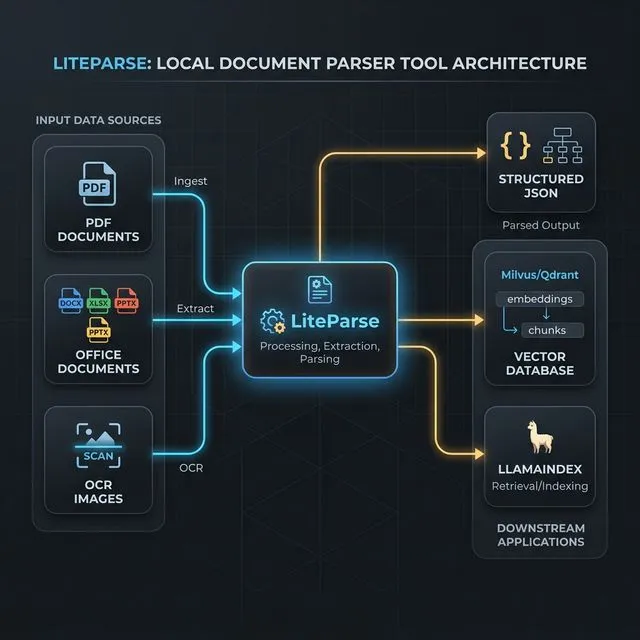
LiteParse is best understood as the document ingestion and preprocessing layer in a RAG pipeline.
The normal flow looks something like this:
- Parse source files into text, pages, screenshots, and layout metadata.
- Clean or normalize the extracted output.
- Chunk the text for retrieval.
- Embed the chunks and store them in a vector database.
- Retrieve relevant chunks at query time.
- Pass grounded context into the model.
LiteParse sits right at the top of that stack. It does not replace your vector store, reranker, or LLM. It improves the quality of what those systems receive.
That is also why parser choice affects hallucination rates more than many teams expect. If the retrieved context is incomplete or malformed, the model has to guess more often. We covered the behavior side of that in Why AI Hallucinates.
Where LiteParse Fits in LlamaIndex
Run-Llama branding makes the fit fairly obvious: LiteParse works naturally as a front-end parser for LlamaIndex pipelines.
A simple way to think about it:
- LiteParse gets text and document structure out of files
- LlamaIndex turns that content into documents, nodes, indexes, and query engines
- your embedding model and vector store handle retrieval at scale
This makes LiteParse a strong fit when you want to stay in the LlamaIndex ecosystem but do not need full hosted parsing from LlamaParse for every workload.
The official LiteParse repo is also explicit about the tradeoff: for complex documents like dense tables, multi-column layouts, charts, handwritten text, or heavily scanned PDFs, LlamaParse will usually produce better results. That gives you a clean upgrade path:
- use LiteParse for fast, local, low-cost ingestion
- move to LlamaParse when document complexity or production accuracy requirements go up
That kind of layered stack is usually healthier than overbuying from day one, which is the same principle behind How to Build a Practical AI Workflow Without Wasting Money.
Practical Use Cases
Here are the use cases where LiteParse makes immediate sense.
Local knowledge base search
You have a folder of internal PDFs, DOCX files, and slide decks and want to stand up a local semantic search workflow without sending documents to a third-party service.
Agent document review
You are building an agent that needs both extracted text and page screenshots to inspect contracts, reports, diagrams, or compliance docs.
Preprocessing before LlamaIndex ingestion
You want a custom ingestion step before creating Document objects and indexing them in LlamaIndex, especially when OCR or page-level metadata matters.
Batch parsing pipelines
You need to parse large directories of files on a machine or server, write outputs to disk, and feed the results into a downstream embedding job.
Privacy-sensitive prototypes
You are testing document QA, retrieval, or enterprise search flows and want local parsing first before committing to a hosted parser.
How To Install LiteParse
The LiteParse repo documents three common ways to get started.
CLI install with npm
npm i -g @llamaindex/liteparse

lit parse document.pdf
lit screenshot document.pdf
CLI install with Homebrew
brew tap run-llama/liteparse
brew install llamaindex-liteparse
Add it as a project dependency
npm install @llamaindex/liteparse

# or
pnpm add @llamaindex/liteparse
If you need Office document conversion, install LibreOffice. If you need image conversion, install ImageMagick. Those two dependencies are what enable LiteParse to accept formats beyond raw PDFs.
Basic LiteParse Usage
Parse a document from the CLI
# Parse a file to plain text
lit parse ./docs/handbook.pdf

# Parse specific pages only
lit parse ./docs/handbook.pdf --target-pages "1-5,9"

# Return structured JSON instead of plain text
lit parse ./docs/handbook.pdf --format json -o ./output/handbook.json

# Disable OCR if you only want embedded text
lit parse ./docs/handbook.pdf --no-ocr
Generate screenshots for agent or multimodal workflows
lit screenshot ./docs/handbook.pdf --target-pages "1-3" -o ./screenshotsUse LiteParse in TypeScript
import { LiteParse } from '@llamaindex/liteparse';

const parser = new LiteParse({ ocrEnabled: true });
const result = await parser.parse('./docs/handbook.pdf');

console.log(result.text);
Parse bytes directly
import { LiteParse } from '@llamaindex/liteparse';
import { readFile } from 'node:fs/promises';

const parser = new LiteParse();
const pdfBytes = await readFile('./docs/handbook.pdf');
const result = await parser.parse(pdfBytes);

console.log(result.text);
LiteParse + LlamaIndex Example
If you are already using LlamaIndex, LiteParse can sit right before document creation and indexing.
import { LiteParse } from '@llamaindex/liteparse';
import { Document, VectorStoreIndex } from 'llamaindex';

const parser = new LiteParse({ ocrEnabled: true });
const parsed = await parser.parse('./docs/vendor-agreement.pdf');

const docs = [
  new Document({
    text: parsed.text,
    metadata: {
      source: 'vendor-agreement.pdf',
      parser: 'liteparse'
    }
  })
];

const index = await VectorStoreIndex.fromDocuments(docs);
const queryEngine = index.asQueryEngine();

const response = await queryEngine.query({
  query: 'What are the renewal and termination terms?'
});

console.log(response.toString());
That example is intentionally simple, but the pattern scales:
- use LiteParse for extraction
- add your own chunking and metadata logic
- pass clean
Documentobjects into LlamaIndex - index and query as usual
If your workflow is agent-heavy, the screenshot feature also makes LiteParse relevant beyond classic RAG. That is the kind of narrow, useful capability we want from tool-connected systems, not vague “AI agent” theater. We made a similar argument in AI Agents Are Everywhere, but Which Ones Are Genuinely Useful?.
When To Use LiteParse vs. LlamaParse
Use LiteParse when:
- you want local-first parsing
- speed, simplicity, and cost matter
- your documents are reasonably clean
- you want OCR plus layout extraction without a cloud dependency
Use LlamaParse when:
- the documents are visually complex
- extraction quality matters more than local-only operation
- you need higher-fidelity parsing for dense tables or messy scans
- the ingestion pipeline is already production-critical
That split is not a weakness. It is a sane product boundary.
Final Take
LiteParse is not trying to be an all-in-one document intelligence platform. That is exactly why it is interesting.
It is a focused, open-source parser that solves a real ingestion problem at the top of the RAG stack: getting usable text, OCR, and layout data out of documents quickly and locally. If you are building with LlamaIndex, it fits naturally as the parsing layer before indexing. If you are building local or privacy-sensitive workflows, the value proposition is even clearer.
The main caveat is the one Run-Llama states openly: once documents get visually complex, you will likely want LlamaParse instead. But for fast local parsing, lightweight document agents, and practical RAG ingestion, LiteParse looks like a very solid addition to the stack.
Official links: LiteParse GitHub | LiteParse Docs | LlamaParse
